Python Print and Browser Request Layers
Web request processing in Chrome
Chrome's Team of Specialists
When you use Google Chrome, you're not running a single, monolithic program. Instead, you're using a collection of specialized programs, called processes, that work together. This is known as a multi-process architecture.
Think of it like a restaurant. You have a manager overseeing everything, chefs cooking the food, and waiters bringing it to the table. Each has a distinct job. If a waiter spills a drink, the kitchen doesn't shut down. Similarly, in Chrome, if one website in a tab crashes, it won't take down your entire browser. This separation of tasks makes the browser more stable and secure.
The two most important processes to understand are the browser process and the renderer process. Let's look at what each one does.
The Browser Process
The browser process is the conductor of the orchestra. It's the main process that controls the browser's user interface, like the address bar, bookmarks, and back and forward buttons. When you open Chrome, this process starts up first.
It's responsible for managing all the other processes. If you open your computer's Task Manager, you'll see several entries for 'chrome.exe'. One of these is the main browser process, while the others are renderer processes for each tab, extensions, and other tasks.
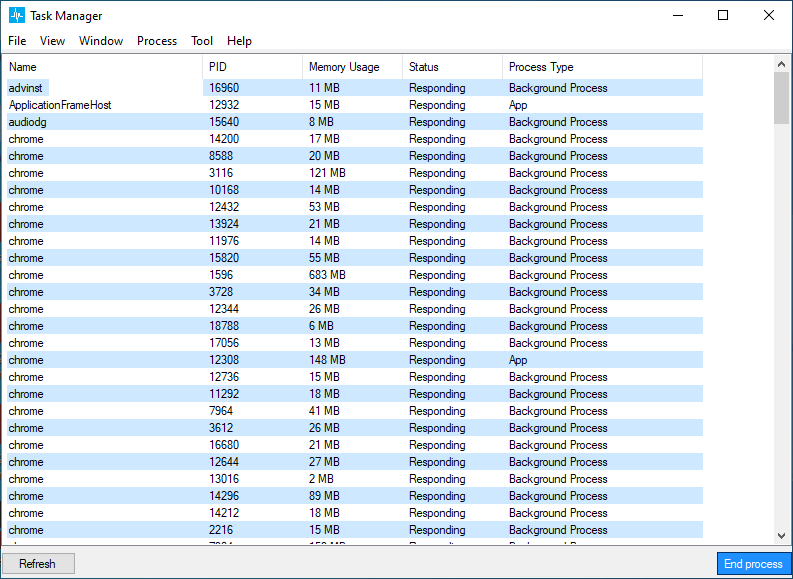
Crucially, the browser process also handles the initial steps of navigating to a website. When you type a URL into the address bar and press Enter, the browser process is what kicks things off.
The Renderer Process
While the browser process is the manager, the renderer process is the specialist that does the heavy lifting for a single web page. Each tab in Chrome typically gets its own renderer process.
This process is responsible for everything that happens inside the tab. It takes the HTML, CSS, and JavaScript for a website and turns it into the interactive page you see and use. It parses the code, constructs a layout, paints the pixels on the screen, and runs any scripts.
This separation is key to Chrome's stability. If a complex website in one tab has a bug and its renderer process crashes, only that one tab will be affected. The rest of your browser, managed by the main browser process, keeps running smoothly. You'll just see a sad face in the crashed tab, and you can reload it without restarting everything.
From URL to Web Page
So, how do these processes work together to get you to a website? Let's walk through the journey.
- You type a URL: You enter
example.cominto the address bar. This is handled by the browser process's UI thread. - Navigation starts: The browser process tells its network thread to start fetching the website's data.
- The Network Layer: This is where the actual communication with the internet happens. The network thread performs a DNS lookup to find the server's IP address, establishes a connection, and sends an HTTP request asking for the page's content.
- Server responds: The server for
example.comreceives the request and sends back the data, typically starting with the HTML file.
HTTP/HTTPS Protocols: Familiarize yourself with request/response cycles, HTTP methods (GET, POST, PUT, DELETE), status codes, headers, and more.
- Data is passed on: The network thread receives the data and passes it to the browser process.
- Finding a renderer: The browser process finds an appropriate renderer process to handle the incoming data. If you're opening a new tab, it will create a new renderer process.
- Rendering the page: The renderer process takes the HTML and other assets (like CSS and images) and renders the visual web page you see in your tab. If the page needs more resources, the renderer process will request them through the browser process's network thread.
This constant communication between the browser process, renderer process, and network layer is what allows you to browse the web.

By splitting up these jobs, Chrome can handle complex web pages efficiently while keeping the browser responsive and stable.
What is the primary advantage of Google Chrome's multi-process architecture?
Which process is responsible for drawing the user interface, such as the address bar, bookmarks, and back/forward buttons?