CMS Setup and Configuration
Introduction to CMS
What is a Content Management System?
Think about building a website. You could start from scratch, writing every line of code yourself. This gives you total control, but it's like building a house by felling your own trees and firing your own bricks. It takes a lot of time and specialized skill.
Or, you could use a pre-built frame and foundation, then customize the rooms, paint, and furniture. This is what a Content Management System, or CMS, lets you do for a website.
A CMS is a tool that helps you build and manage a website without needing to code it from scratch.
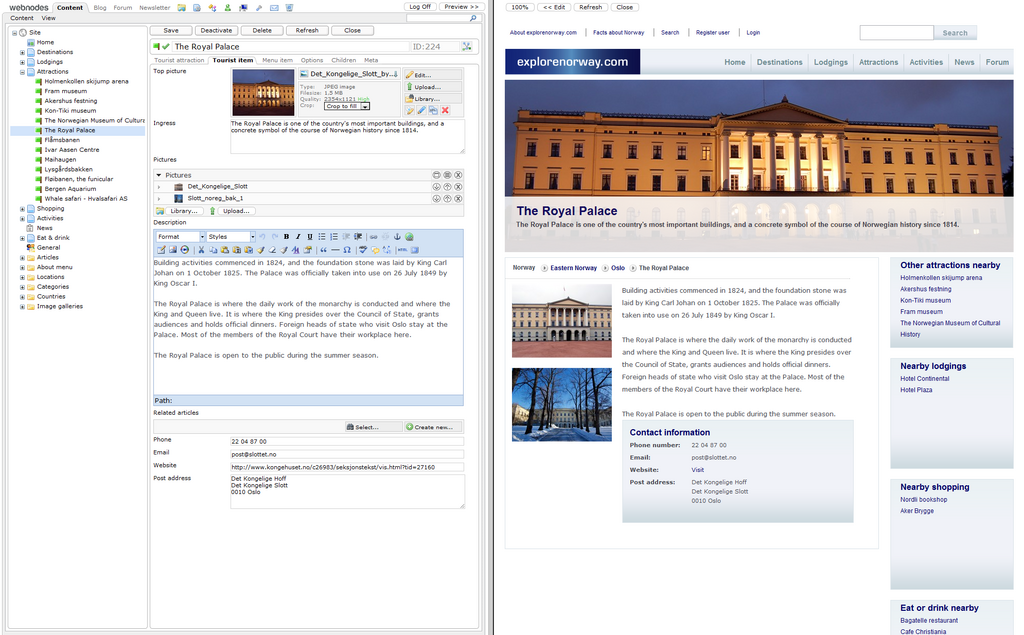
At its core, a CMS separates your website's content (the text, images, and videos) from its design and structure. This is a game-changer. It means you can write a new blog post, update a product photo, or change your contact information through a user-friendly interface, without needing to touch any code. The CMS takes your content and plugs it into the correct template, displaying it perfectly to your visitors.
Most CMS platforms have two main parts working behind the scenes. One is the backend, where you create and manage your content. The other is the frontend, which is the live website that your visitors see.
Key Benefits and Features
The main reason people use a CMS is simplicity. It empowers people without technical backgrounds to control their own website. This is a huge advantage for small businesses, bloggers, and organizations who need to make frequent updates.
If the website will be managed by non-technical users (e.g., marketers or content creators), a CMS offers an easy-to-use interface for updating content without requiring coding knowledge.
This simplicity leads to greater efficiency. Instead of waiting for a developer, a marketing team member can publish a new landing page in minutes. A CMS also makes collaboration easy by allowing you to set up different user roles. An author might only be able to write and save drafts, while an editor can publish them, and an administrator has full control over the site.
Most CMS platforms come packed with useful features right out of the box, but their real power lies in their extensibility. Common features include:
- A visual editor: An interface, often called a WYSIWYG (What You See Is What You Get) editor, that lets you format text and add media without code.
- Templates and themes: These control the visual design of your website. You can switch themes to give your site a completely new look without rebuilding it.
- Plugins and extensions: These are add-ons that provide new functionality, from contact forms and SEO tools to e-commerce shopping carts.
- User management: The ability to assign different permissions and roles to various users.
- Media management: A library for uploading and organizing images, videos, and other files.
Popular CMS Platforms
While there are hundreds of CMS options, a few major players dominate the market. Each has its own strengths and is suited for different types of projects.
WordPress
noun
The most popular CMS in the world, powering over 40% of all websites. It's known for its ease of use and massive ecosystem of themes and plugins.
Next is Joomla. It's a bit more complex than WordPress but offers more flexibility out of the box, especially for managing custom types of content. It's a solid choice for social networking sites or community-based portals.
Drupal
noun
A powerful and highly flexible CMS known for its robust security and performance. It's often the choice for large, enterprise-level websites and government institutions.
| Platform | Best For | Technical Skill Needed |
|---|---|---|
| WordPress | Blogs, small to medium business sites | Beginner |
| Joomla | Community sites, social networks, memberships | Intermediate |
| Drupal | Large enterprise, government, complex sites | Advanced |
How to Choose the Right CMS
Selecting the right CMS depends entirely on your project's needs. There's no single "best" option. Before you decide, ask yourself a few questions:
-
What is my budget? While many CMS platforms are open-source and free, you may need to pay for premium themes, plugins, web hosting, and developer help.
-
How easy does it need to be? Consider who will be managing the website day-to-day. If they are non-technical, a user-friendly platform like WordPress is often the best bet.
-
What features do I need? Do you need an e-commerce store, a booking system, or a forum? Research which CMS has the best extensions to support your required functionality.
-
How much will my site grow? Think about your future needs. You want a CMS that is scalable, meaning it can handle an increase in traffic and content without a major overhaul. A platform like Drupal is built for massive scale, while WordPress can scale well with the right hosting and configuration.
Choosing the right CMS is a balancing act between ease of use, functionality, cost, and scalability. Taking the time to evaluate your needs upfront will save you major headaches down the road.
Now that you understand the what, why, and how of Content Management Systems, let's test your knowledge.
What is the core principle behind how a Content Management System (CMS) works?
A marketing team member needs to quickly publish a new landing page for a campaign. What key benefit of a CMS does this scenario highlight?
Using a CMS is a foundational skill for modern web development and digital content creation, making website management accessible to nearly everyone.