Mastering the Flood Fill Algorithm
Grids and Colors
Images Are Just Grids
At its core, a digital image isn't a single, seamless picture. It's actually a grid of tiny squares, much like a sheet of graph paper. Each square in this grid is called a pixel—short for "picture element." When you look at a photo on your screen, you're really looking at millions of these tiny, colored squares packed so tightly together that your eyes perceive them as a smooth image.
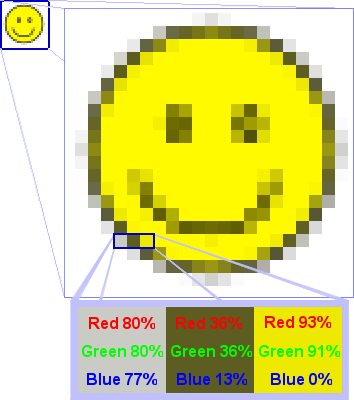
To work with an image, a computer needs a way to refer to every single pixel. It does this using a coordinate system, just like finding a seat in a theater. Each pixel has an address made of two numbers: its column number (x-coordinate) and its row number (y-coordinate). Typically, the top-left pixel is considered coordinate (0, 0). The x-coordinate tells you how far to move to the right, and the y-coordinate tells you how far to move down.
Colors as Numbers
Computers don't understand color names like "red" or "blue." Instead, they store colors as numbers. Each pixel in the grid is assigned a number that represents its specific color. For instance, in a simple black and white image, we could decide that the number 0 represents a white pixel and 1 represents a black pixel.
To store this grid of numbers, programmers use a structure called a (two-dimensional array). You can think of it as a table or a grid built directly into the code. It has rows and columns, just like our image, making it a perfect way to represent the pixel data.
Let's say we want to represent a small 4x5 image that is mostly white, but has a small blue rectangle in it. If we use 0 for white and 1 for blue, the C++ code to store this image data might look like this:
// A 2D array of integers to represent our image
// It has 4 rows and 5 columns
int image[4][5] = {
    {0, 0, 0, 0, 0},  // Row 0
    {0, 1, 1, 1, 0},  // Row 1
    {0, 1, 1, 1, 0},  // Row 2
    {0, 0, 0, 0, 0}   // Row 3
};
In this code, int image[4][5] creates a grid that can hold integers. The numbers inside the curly braces {} are the for each pixel. The value 1 at image[1][1] corresponds to the pixel at row 1, column 1, which we've defined as blue.
From Code to Image
By combining these two ideas—a grid system for location and numbers for colors—a computer can represent any image. The 2D array acts as a blueprint. The computer reads the array, and for each number, it draws a pixel of the corresponding color at the correct (x, y) coordinate. When it does this for every number in the array, the final image appears on the screen.
Now that you understand how images are structured as grids of numbers, we have the foundation we need to start telling the computer how to change their colors. Let's test your understanding.
What is the fundamental building block of a digital image, often described as a tiny square in a grid?
How does a computer typically locate a specific pixel within an image's grid?
With this foundation, you're ready to see how we can manipulate these pixels to create a flood fill algorithm.