Master Control Programs Explained
Introduction to Operating Systems
The Computer's Manager
An operating system, or OS, is the master software that runs a computer. Think of it as the general manager of a busy hotel. The manager doesn't cook the food or clean the rooms, but they coordinate everything. They tell the chefs what to cook, direct the cleaning staff, and handle guest requests. Without the manager, the hotel would be chaos.
Similarly, the OS manages all the computer's hardware (like the CPU, memory, and storage) and software. It's the essential layer that sits between your applications and the physical machine, making sure everything works together smoothly.
Juggling Tasks
When you run a program, like a web browser or a music player, the operating system creates a process. This is essentially an active instance of that program, complete with its own resources and state.
Process
noun
A program that is currently running or executing.
Modern computers do many things at once. You might be browsing the web, listening to music, and downloading a file simultaneously. The OS's process manager makes this multitasking possible. It rapidly switches the CPU's attention between all the running processes. This happens so fast—thousands of times per second—that it creates the illusion that everything is running at the same time, even with a single CPU core.
Managing Memory
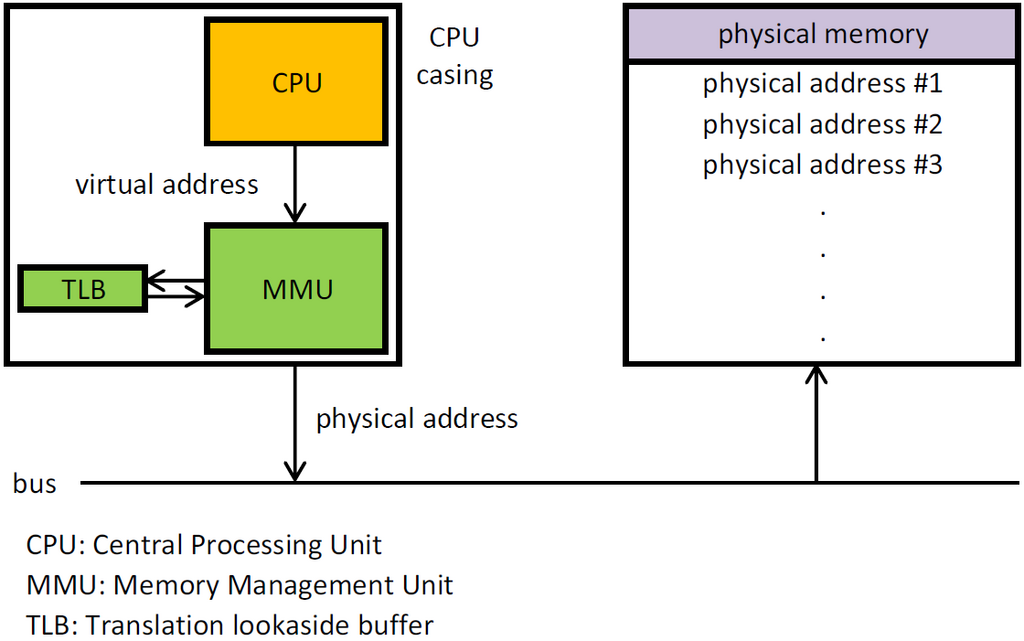
Think of your computer's memory (RAM) as a large, open workspace. When you start a process, the OS needs to find an empty section of this workspace and assign it to that process. This is called memory allocation.
But the OS has another crucial job: protection. It needs to ensure that one process can't access or corrupt the memory assigned to another. It builds virtual walls between each process's workspace. If your web browser crashes, these walls prevent it from taking down your music player or the entire system with it. This isolation is fundamental to a stable computing experience.
Organizing Information
Without a system for organization, finding a specific document on your computer would be like finding a single book in a library with no shelves, just a giant pile of books on the floor. The OS provides this organization through a file system.
The file system is a structure that dictates how data is stored and retrieved from a storage device, like a hard drive or SSD. It's what allows us to have folders, subfolders, and filenames. It keeps track of where every piece of every file is physically located on the drive, so when you click to open a document, the OS knows exactly where to look.
Different operating systems use different file systems. For example, Windows often uses NTFS, macOS uses APFS, and Linux commonly uses ext4.
Interacting with the Machine
Finally, the OS provides a way for us to interact with the computer. This is the user interface (UI). There are two main types:
| Interface Type | Description | Example |
|---|---|---|
| Graphical User Interface (GUI) | Uses windows, icons, menus, and a pointer. It's visual and intuitive. | Windows Desktop, macOS, Android |
| Command-Line Interface (CLI) | Uses text-based commands. It's powerful and efficient for technical tasks. | Windows PowerShell, Linux Terminal |
Whether you're clicking an icon or typing a command, the user interface is your bridge to the OS, allowing you to tell the computer what you want it to do. The OS then translates your actions into instructions the hardware can understand.
Understanding these operating system fundamentals is crucial for developers to build efficient, reliable software.
These core functions—managing processes, memory, files, and user interaction—are the foundation of any modern operating system. A solid grasp of these concepts is the first step to understanding more complex control programs.
Let's check your understanding of these fundamental ideas.