Kubernetes Fundamentals for VMware Users
Deploying Kubernetes in Production
Ready for Production
Moving an application from a development environment to production is a major step. In production, your application needs to be reliable, resilient, and performant. This means setting up your Kubernetes cluster to handle real-world traffic and potential failures gracefully. The key pillars for a production-ready cluster are high availability, disaster recovery, and performance optimization.
Kubernetes provides you with a framework to run distributed systems resiliently.
Building for High Availability
High availability (HA) is about designing a system to avoid single points of failure. If one component fails, the system as a whole keeps running. In Kubernetes, this applies to both the control plane and your applications running on worker nodes.
A standard Kubernetes setup might have a single master node managing the cluster. This is a single point of failure. If that node goes down, your entire cluster becomes unmanageable. For production, you need a high-availability control plane. This typically means running at least three master nodes. Key components like the API server, scheduler, and controller manager run on all master nodes, with a load balancer distributing traffic among the API servers. The etcd database, which stores the cluster's state, must also be clustered across these nodes.
For your applications, high availability means running multiple replicas of your pods and ensuring they are spread across different worker nodes. You can use Kubernetes's affinity and anti-affinity rules to control where your pods are scheduled. For instance, a podAntiAffinity rule can prevent multiple replicas of the same service from being placed on the same node. For even greater resilience, you can configure these rules to spread pods across different availability zones (AZs) in your cloud provider.
# Example of pod anti-affinity
apiVersion: apps/v1
kind: Deployment
metadata:
  name: my-app
spec:
  replicas: 3
  template:
    spec:
      affinity:
        podAntiAffinity:
          requiredDuringSchedulingIgnoredDuringExecution:
          - labelSelector:
              matchExpressions:
              - key: app
                operator: In
                values:
                - my-app
            topologyKey: "kubernetes.io/hostname"
Planning for Disaster Recovery
While high availability handles small, localized failures, disaster recovery (DR) prepares you for catastrophic events, like losing an entire data center or cloud region. A good DR plan ensures you can restore your application and its data in a different location with minimal downtime.
The most critical component for Kubernetes DR is the etcd database. It contains the configuration and state of your entire cluster. You must back it up regularly. You can take a snapshot of etcd using the etcdctl snapshot save command. These snapshots should be stored securely in a remote location, like a cloud storage bucket in a different region.
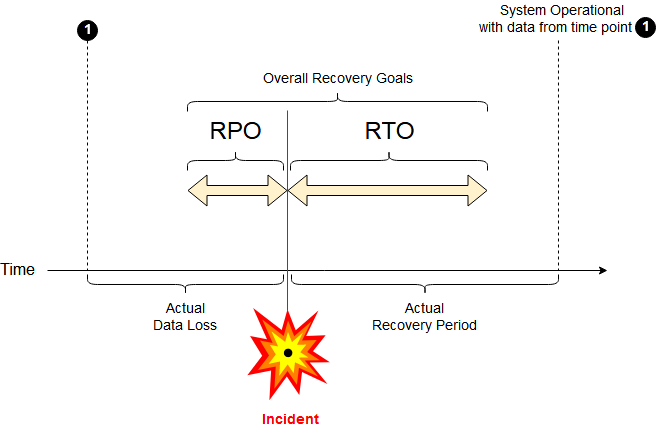
Your DR strategy should also cover application data. Since you've already learned about Persistent Volumes (PVs), you know that your application's state is stored separately from your pods. Your DR plan must include a process for backing up these volumes. Many storage solutions offer tools for creating snapshots of PVs, which can then be replicated to another region. In the event of a disaster, you can restore your etcd snapshot in a new cluster and re-attach your application pods to the restored persistent volumes.
Optimizing for Performance
A production cluster must perform well under load. Performance optimization in Kubernetes involves tuning both the cluster infrastructure and your applications. A key practice is to set resource requests and limits for your containers. Requests tell the scheduler how much CPU and memory a pod needs to run, ensuring it gets scheduled on a node with enough capacity. Limits prevent a container from consuming too many resources and impacting other applications on the same node.
Setting resource requests and limits is one of the most important best practices for running applications in production. It ensures predictable performance and cluster stability.
Another area of optimization is node selection. You can use different types of nodes for different workloads. For example, you might use compute-optimized instances for CPU-intensive applications and memory-optimized instances for in-memory databases. Kubernetes allows you to assign pods to specific nodes using nodeSelector or more advanced node affinity rules.
Finally, continuously monitor your cluster's performance. As you learned previously, tools like Prometheus and Grafana are essential for observing resource utilization, identifying bottlenecks, and setting alerts. Use this data to fine-tune your resource allocations, scaling policies, and node configurations over time.
Time to check your understanding of these production concepts.
What is the primary motivation for running a Kubernetes control plane with multiple master nodes in a production environment?
To ensure that multiple replicas of your application are scheduled on different worker nodes for higher availability, which Kubernetes feature should you implement?
Deploying to production requires careful planning around availability, recovery, and performance. By building a resilient control plane, planning for disaster, and continuously optimizing resource usage, you can run demanding applications on Kubernetes with confidence.