Advanced JavaScript and React Performance Engineering
The JavaScript Runtime
The JavaScript Engine Room
When your JavaScript code runs in a browser, it doesn't just execute in a vacuum. It operates within a specific environment called the JavaScript runtime. This runtime provides everything your code needs to interact with the web page and the browser itself. Think of it as a complete workshop, not just a single tool.
At the heart of this runtime is the JavaScript Engine. The most well-known is Google's V8 engine, which powers Chrome and Node.js. The engine itself has two main parts we need to understand: the Memory Heap and the Call Stack.
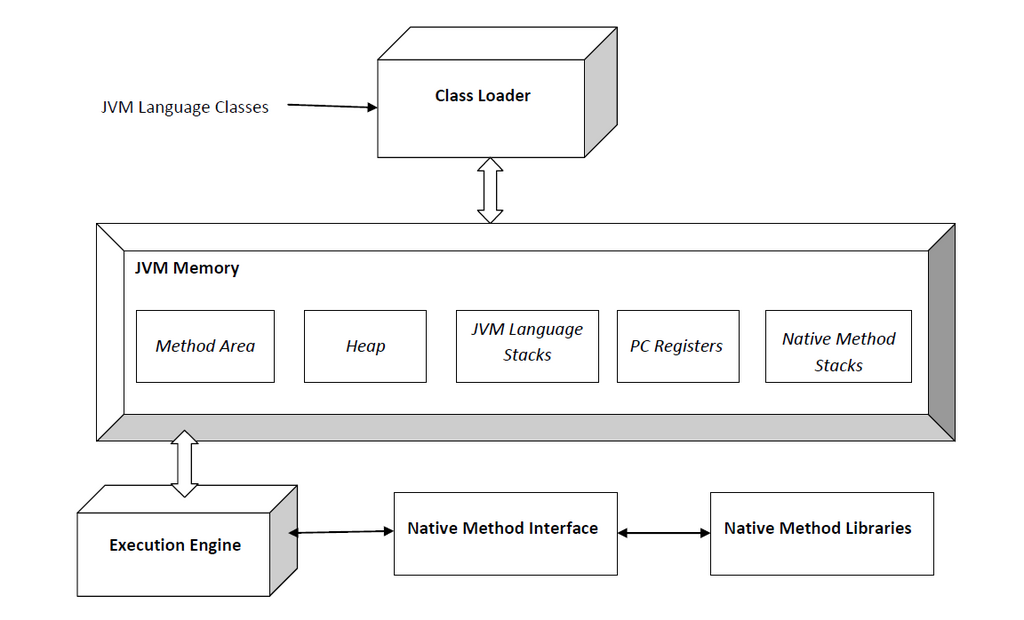
But the engine doesn't work alone. The browser provides additional tools called Web APIs. These are features like setTimeout, DOM manipulation methods, and fetch for making network requests. These APIs allow JavaScript to do things that aren't part of the core language, like talking to a server or changing the page content. To manage all this, the runtime uses an Event Loop and a Callback Queue to handle asynchronous operations without freezing the user interface.
Stack, Heap, and a Single Thread
JavaScript is single-threaded. This means it can only do one thing at a time. The component responsible for keeping track of this one thing is the Call Stack. It's a data structure that records where the program is in its execution. When a function is called, it gets pushed onto the top of the stack. When the function finishes, it's popped off.
This Last-In, First-Out (LIFO) behavior is crucial. The engine always executes whatever is currently at the top of the stack.
Consider this simple series of nested function calls:
function first() {
  console.log('Entering first...');
  second();
  console.log('Exiting first...');
}

function second() {
  console.log('Entering second...');
  third();
  console.log('Exiting second...');
}

function third() {
  console.log('Hello from third!');
}

first();
When first() is called, it's pushed onto the stack. Then it calls second(), which is pushed on top of first(). Then second() calls third(), which is pushed on top of second(). The stack is now three levels deep. Once third() completes, it's popped off. Then second() finishes and is popped off, and finally first() is popped off. The stack is empty again.
While the Call Stack tracks execution, the Memory Heap is where the data lives. It's a large, unstructured region of memory where objects, arrays, and functions are stored. When you declare a variable that holds an object, the variable on the stack holds a reference—a pointer—to the object's location in the heap.
With all these objects being created in the heap, memory could fill up quickly. That's where garbage collection comes in. The V8 engine uses a sophisticated process to automatically detect and clean up objects that are no longer reachable from the root of the application. It periodically traverses the object graph, marks all accessible objects, and then sweeps away the rest, freeing up memory. In large React applications, this means being mindful of holding onto unnecessary object references in state, as this can prevent the garbage collector from doing its job efficiently.
The Event Loop
Since JavaScript has only one call stack, a long-running task would block everything else. If you made a network request and the program waited for the response, the entire UI would freeze. This is where the event loop and asynchronous callbacks save the day.
When you call an asynchronous function like setTimeout, the JavaScript engine doesn't handle it directly. It hands the task over to the Web API environment. The engine then immediately moves on, keeping the call stack clear for other tasks. The Web API holds onto the task (in this case, a timer) and waits for it to complete. Once the timer finishes, its callback function is placed in a queue.
The Event Loop has one simple job: continuously check if the call stack is empty. If it is, the event loop takes the first item from the queue and pushes it onto the call stack for execution. This cycle ensures that long-running operations don't block the main thread, allowing the UI to remain responsive.
Microtasks vs Macrotasks
The callback queue isn't actually a single queue. It's two: one for macrotasks and one for microtasks. This distinction is critical for understanding the precise order of execution in modern JavaScript, especially with Promises and async/await.
| Task Type | Examples |
|---|---|
| Macrotasks | setTimeout, setInterval, DOM events |
| Microtasks | Promise.then(), async/await |
Here’s the rule: after each macrotask is completed, the event loop will immediately process all tasks in the microtask queue before moving on to the next macrotask. This means microtasks have a higher priority and will always execute before the next timer or event handler.
console.log('Start');

setTimeout(() => {
  console.log('Timeout (Macrotask)');
}, 0);

Promise.resolve().then(() => {
  console.log('Promise (Microtask)');
});

console.log('End');
Even with a timeout of 0 milliseconds, the output will be:
Start
End
Promise (Microtask)
Timeout (Macrotask)
This happens because console.log('End') runs synchronously. Then, the event loop sees the stack is empty and processes the microtask queue first, logging the Promise's message. Only after the microtask queue is empty does it pick up the macrotask from the setTimeout.
This scheduling mechanism is exactly why React can perform state updates without blocking the UI. React's updates are often scheduled as microtasks, allowing them to be processed quickly after the current browser task finishes but before the browser has a chance to do other, slower things like repainting the screen.
What are the main components of the JavaScript runtime environment in a browser?
What is the primary responsibility of the Call Stack?