YouTube Content Creator Blueprint
Channel Setup
Your Channel's Foundation
Before you can upload a single video, you need a channel. Your YouTube channel is your home on the platform. It's tied to your Google account, so if you have Gmail or use Google Drive, you're already halfway there.
When you go to create a channel, YouTube will ask if you want to use your personal name or a custom name. Using a custom name creates what's called a Brand Account. A Brand Account is a great choice if you plan to collaborate with others, as it allows multiple people to manage the channel without sharing your personal Google password. It also separates your YouTube presence from your personal Google profile, which is a good idea for most creators.
Think of it this way: a personal account is like your driver's license, tied directly to you. A Brand Account is like starting a company; it has its own identity and can be managed by a team.
First Impressions Count
When someone clicks on your channel, the first things they see are your profile picture and channel banner. These visual elements instantly communicate what your channel is about and set the tone.
A strong profile picture acts as your icon across YouTube. It appears next to your videos and comments. For a personal brand, a clear, high-quality headshot works best. If your channel is for a business or a concept, use a clean logo. It should be simple enough to be recognizable even when it's shrunk down to a tiny circle.
Your channel banner is the large image at the top of your channel page. This is your billboard. Use it to showcase your personality, your content's subject matter, or your upload schedule.
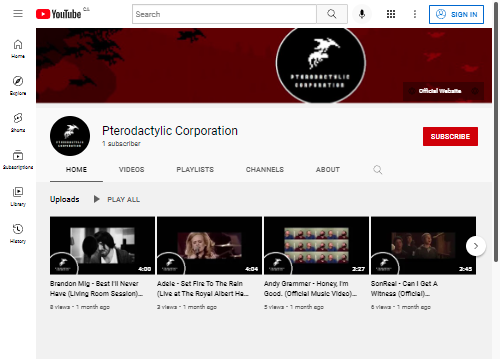
Designing a banner can be tricky because it displays differently across devices. What looks perfect on a TV might get cut off on a smartphone. YouTube has a specific "safe area" in the center of the image that will be visible on all devices. Always place your most important information, like your channel name or logo, within this central zone.
Customizing Your Layout
Your channel’s homepage is like a storefront window. You can customize its layout to guide visitors to your best content. In your channel settings, under 'Customization', you can add different sections to your homepage. You might create a section for 'Popular Uploads' to show off your most-viewed videos, another for a specific playlist, or one for 'Recent Videos'.
You can also set up two different videos to greet visitors:
-
Channel Trailer: This is a short video that automatically plays for people who haven't subscribed yet. It's your elevator pitch, explaining what your channel is about and why someone should subscribe.
-
Featured Video: This video is for your returning subscribers. You can use this spot to highlight your latest upload or a video you're particularly proud of.
A complete and professionally presented channel builds trust with viewers and encourages them to subscribe.
Tell Your Story
The 'About' section is often overlooked, but it's incredibly important. It's your chance to tell viewers and YouTube's algorithm exactly what your channel is. A well-written 'About' page can help your channel appear in search results.
So, what makes a good 'About' section?
- Start with a punchy summary. In one or two sentences, describe what your channel offers. Who is it for? What problems does it solve or what entertainment does it provide?
- Give more detail. Briefly describe the types of videos you make. If you have an upload schedule (e.g., "New videos every Tuesday"), mention it here so viewers know when to come back.
- Add links. This is the place to link to your website, social media profiles, or a mailing list. It helps your audience connect with you off of YouTube.
- Include a business email. If you're open to sponsorships or collaborations, provide a dedicated email address for business inquiries. Don't use your personal email.
With these foundational elements in place, your channel is set up for success. You've created a professional, inviting space for your future audience.
What is the primary advantage of choosing a custom name (Brand Account) over a personal name when creating a YouTube channel?
Why is it crucial to place important information like your logo or channel name within the channel banner's central "safe area"?