YouTube Algorithm Mastery
Understanding YouTube Analytics
Your Video's Report Card
Once your video is live, you're probably curious about how it's doing. Is anyone watching? Do they like it? YouTube Analytics is the tool that answers these questions. It's like a report card for your content, showing you what's working and what needs improvement.
Think of it as a direct line of communication with your audience. They
Regularly analyze your YouTube analytics to understand which videos perform well and why.
Every creator, big or small, uses this tool to understand their performance. It’s built right into YouTube Studio, and it's where you'll find all the data about your channel and individual videos.
Key Metrics to Watch
Analytics can feel overwhelming at first because there are so many numbers. Let's focus on a few key metrics that tell you the most about your video's health.
Watch Time
noun
The total accumulated time viewers have spent watching your videos. YouTube's algorithm values this highly because it shows people are genuinely engaged with your content.
Next up is Average View Duration. This tells you, on average, how long people stick around for a single view. If you have a 10-minute video with an average view duration of 5 minutes, it means the typical viewer watches about half of it. It’s a great snapshot of how engaging your video is from moment to moment.
A high average view duration is a strong signal that your content is compelling and holds people's attention.
For a more detailed look, you have Audience Retention. This is a graph that shows you the percentage of viewers who are still watching at every point in your video. It's incredibly useful for pinpointing exactly where you lose your audience's attention.
See that initial dip? That's common, but a huge drop means your intro isn't hooking viewers. See that bump in the middle? That's a spot people are re-watching, which means you did something right there. Analyzing this curve helps you learn what to do more of, and what to avoid, in your next video.
Where Are Viewers Coming From?
Knowing how people find your videos is just as important as knowing if they watch them. The Traffic Sources report in YouTube Analytics breaks this down for you. It reveals the paths viewers take to get to your content.
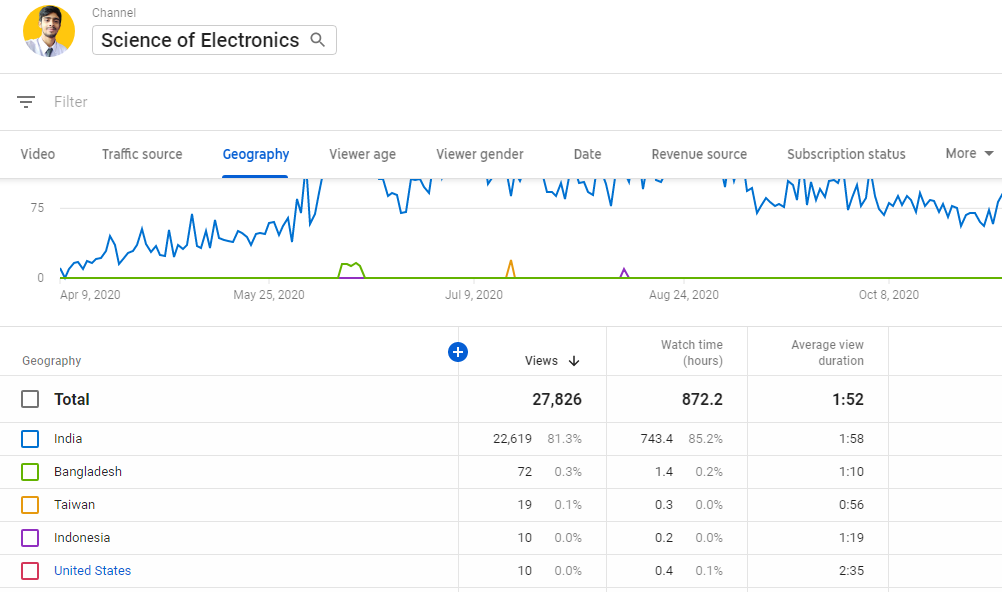
Understanding these sources helps you see which strategies are paying off. If you're getting a lot of views from search, your keyword strategy is working. If you're getting views from Suggested Videos, it means you're making content that people who watch similar videos also enjoy.
| Traffic Source | What It Means |
|---|---|
| YouTube Search | People are typing keywords into the search bar and finding your video. |
| Suggested Videos | Your video appears next to or after other videos. |
| Browse Features | Your video showed up on a viewer's YouTube homepage or subscription feed. |
| External | Viewers clicked a link from a website, social media, or app outside of YouTube. |
Turning Data Into Better Videos
The real power of analytics isn't just looking at the numbers; it's using them to make smarter decisions. Your data tells a story about what your audience wants.
If a video on a specific topic gets unusually high watch time, that's a clear signal from your audience: they want more content like that.
Look at the Audience Retention graph for your top-performing videos. Are there patterns? Maybe you notice that in all your successful videos, you get to the main point within the first 30 seconds. Or perhaps videos where you use on-screen text to highlight key ideas have higher retention. These are clues you can use to build a formula for your future content.
Similarly, pay attention to traffic sources. If a blog post linking to your video sends a lot of engaged viewers, it might be worth writing more blog posts. If a certain search term brings in consistent traffic, consider making more videos around that topic. Analytics provides the feedback loop you need to stop guessing and start creating content that you know will resonate with viewers.
What is the primary purpose of YouTube Analytics?
If a 10-minute video has an Average View Duration of 2 minutes, what does this tell you?
By regularly checking these key metrics, you can refine your strategy and steadily improve your channel's performance.