WordPress Website Creation From Scratch
Introduction to WordPress
What Is WordPress?
At its heart, WordPress is a Content Management System, or CMS. Think of a CMS as a toolkit for building and running a website without having to write code from scratch. It handles all the complex background tasks, like storing your text and images, so you can focus on creating content.
Content Management System (CMS), is a software application used to create and manage websites without dealing with any sort of coding.
Originally launched as a platform for bloggers, WordPress has grown into the world's most popular CMS. It now powers over 40% of all websites on the internet, from simple personal blogs to complex sites for major corporations. Its power lies in its combination of simplicity for beginners and flexibility for experts.
Two Flavors of WordPress
A common point of confusion for newcomers is the difference between WordPress.com and WordPress.org. They are related, but they offer two very different approaches to building a website.
WordPress.com is a for-profit service that uses the WordPress software to host your website for you. It's an all-in-one package. You sign up, choose a plan, and start building. The trade-off for this convenience is less control over your site.
WordPress.org is where you can download the free, open-source WordPress software itself. To use it, you need to buy your own domain name and web hosting. This is called a "self-hosted" site. It requires more setup but gives you complete freedom and ownership.
| Feature | WordPress.com | WordPress.org (Self-Hosted) |
|---|---|---|
| Cost | Free with paid plans for more features | Software is free, but hosting and domain cost money |
| Hosting | Included | You must purchase from a provider |
| Customization | Limited by your plan | Unlimited; use any theme or plugin |
| Maintenance | Handled for you | Your responsibility (updates, security) |
For most people who want full control over their site's design and functionality, the self-hosted version from WordPress.org is the way to go. That's what we'll focus on.
Why Choose WordPress?
WordPress dominates the web for several good reasons. It strikes a balance between ease of use and powerful capabilities, making it a great choice for nearly any project.
WordPress’s true superpower lies in its ecosystem of themes (design) and plugins (functionality).
The main benefits include:
-
Flexibility: With thousands of themes (which control design) and plugins (which add features), you can build almost any kind of website. Whether you need an online store, a portfolio, or a business site, there are tools to make it happen.
-
User-Friendliness: You don't need to be a developer to use WordPress. The intuitive dashboard makes it simple to add pages, write blog posts, and upload media.
-
Ownership: When you use the self-hosted version, you have 100% control over your website and all its content. You're not tied to another company's terms of service, and you can move your site to a new host at any time.
-
Community Support: Because so many people use WordPress, there's a massive global community around it. You can find countless tutorials, forums, and developers ready to help if you get stuck.
A Quick Tour
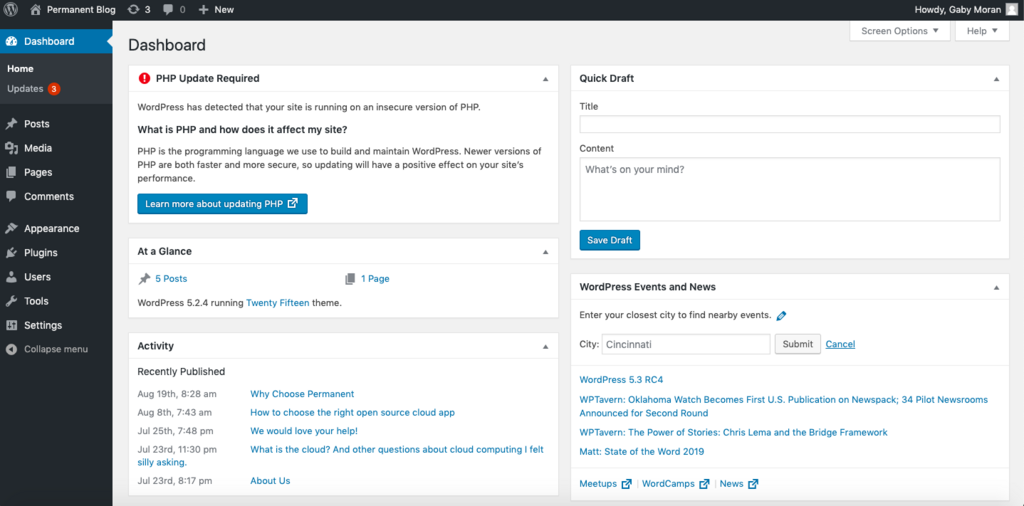
When you log into a WordPress site, you're greeted by the Dashboard. This is your mission control. From the main menu on the left, you can access all the core functionalities.
-
Posts and Pages: This is where you'll create your site's content. Posts are typically timely articles (like blog entries), while Pages are for static content (like an "About" or "Contact" page).
-
Appearance: Here, you can change your website's entire look and feel by activating a new theme. You can also customize your current theme, manage widgets, and create navigation menus.
-
Plugins: This area lets you add and manage plugins. Think of plugins like apps for your website. They can add contact forms, improve security, boost your site's speed, and much more.
-
Settings: The Settings section contains all the global configurations for your site, such as its title, URL structure, and how comments are handled.
Now that you have a grasp of what WordPress is and why it's so popular, you're ready to start building. The next steps involve getting it set up and bringing your vision to life.
What is the primary function of a Content Management System (CMS) like WordPress?
A user wants to change the entire visual design and layout of their website. Which section of the WordPress Dashboard should they use?