WordPress Essentials for Beginners
Introduction to WordPress
What Is a CMS?
Before diving into WordPress, it helps to understand what a Content Management System (CMS) is. At its core, a CMS is a tool that lets you create, manage, and publish digital content without needing to write code from scratch. Think of it as the friendly interface between you and the complex code that makes a website work.
Instead of building a car from individual parts, a CMS gives you a fully assembled vehicle. You just need to get in, choose the paint color, and start driving.
This means you can focus on your content—writing blog posts, adding products, or updating your portfolio—while the CMS handles the technical heavy lifting in the background.
Enter WordPress
WordPress is the world's most popular Content Management System. It started in 2003 as a simple platform for blogging, but it has since evolved into a powerful tool capable of building almost any type of website.
WordPress has grown from a simple blogging platform into the cornerstone of modern web publishing.
From personal blogs and small business sites to massive e-commerce stores and corporate websites, WordPress powers a huge portion of the internet. Its popularity comes from a few key benefits:
- Flexibility: With thousands of themes (for design) and plugins (for functionality), you can customize your site to do almost anything you can imagine.
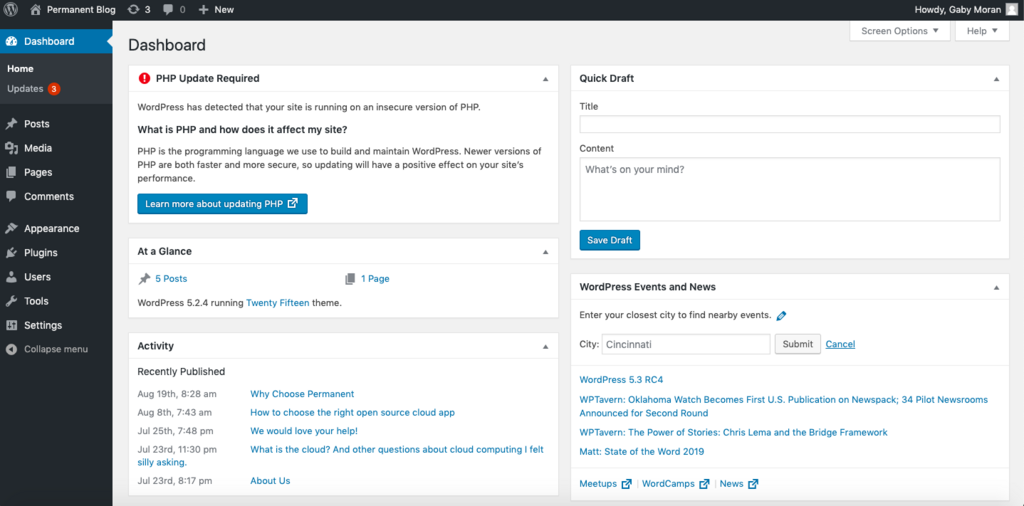
- Ease of Use: Its user-friendly dashboard makes it simple to add new pages, write posts, and upload media.
- Community Support: A massive global community of developers and users means that if you ever have a question, an answer is usually just a quick search away.
Two Flavors of WordPress
One of the first points of confusion for newcomers is the difference between WordPress.com and WordPress.org. They are not the same thing, and choosing the right one depends on your needs and technical comfort level.
| Feature | WordPress.com | WordPress.org |
|---|---|---|
| What it is | A for-profit hosting service that uses the WordPress software. | The free, open-source WordPress software itself that you can download and install on your own web host. |
| Hosting | Included. They handle all the technical setup and maintenance for you. | You are responsible for finding and paying for your own web hosting. |
| Ease of Use | Very easy. You can sign up and have a site running in minutes. | Requires more technical steps, like setting up a host and installing the software. |
| Customization | Limited, especially on free and lower-tiered plans. You can't install all plugins or themes. | Complete control. You can install any theme or plugin and modify the underlying code. |
| Cost | Free with limitations. Paid plans unlock more features and remove ads. | The software is free, but you must pay for a domain name and web hosting. |
WordPress.com is great for beginners who want a simple, hands-off solution. WordPress.org, often called "self-hosted WordPress," is the choice for those who want full control, flexibility, and the ability to grow their site without limitations.
What is the primary purpose of a Content Management System (CMS)?
True or False: WordPress was originally created as a platform for building complex e-commerce stores.
Now you have a solid grasp of what WordPress is, its main benefits, and the key differences between its two versions. This foundation will help you decide which path is right for you as you start building your online presence.