WordPress Essentials
Introduction to WordPress
What Is WordPress?
WordPress is a Content Management System, or CMS. Think of a CMS as a toolkit that lets you build and manage a website without needing to write code from scratch. It handles all the complicated background stuff, so you can focus on creating content like text, images, and videos.
WordPress is a popular content management system (CMS) that allows you to build and manage websites without needing advanced technical skills.
Essentially, a CMS separates the design of your website (the theme) from the content you add (your posts and pages). This makes it easy to update information or even completely change the look of your site without losing any of your work. WordPress is open-source, which means it's free to use and supported by a huge community of developers and users around the world.
A Quick Look Back
WordPress started in 2003 as a simple platform for bloggers. Its creators wanted to make it easy for anyone to publish their thoughts online. But over the years, it grew far beyond its humble beginnings.
Thanks to a massive community of contributors, WordPress evolved into a powerful and flexible tool capable of running almost any kind of website. Today, it powers a significant portion of the entire internet, from small personal blogs to the websites of major corporations.
What Can You Build?
The real strength of WordPress is its versatility. With the right combination of themes and plugins (which are like apps for your website), you can build nearly anything. Here are a few common examples:
| Website Type | Description |
|---|---|
| Blogs | The original use case. It's still one of the best platforms for personal or professional blogging. |
| E-commerce Stores | With plugins like WooCommerce, you can turn your site into a fully functional online store to sell products. |
| Portfolios | A great way for artists, photographers, and writers to showcase their work in a professional layout. |
| Corporate Sites | Businesses of all sizes use WordPress for their official websites to share information and connect with customers. |
The WordPress Dashboard
When you log into a WordPress site, you're greeted by the Dashboard. This is your command center for managing every aspect of your website. While it might look like a lot at first, the layout is designed to be intuitive.
A navigation menu on the left side gives you access to all the key areas:
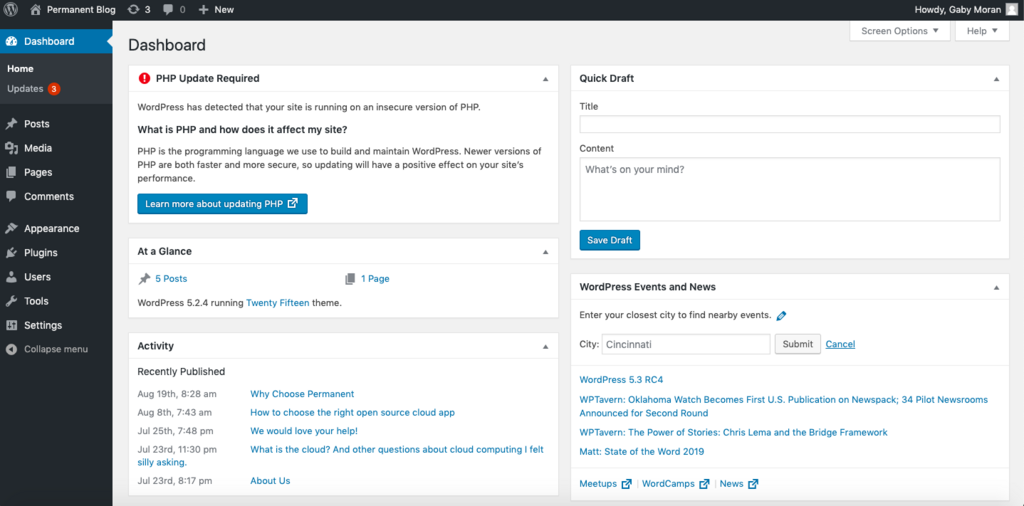
- Posts: Where you write and publish blog articles.
- Pages: For creating static content like an "About Us" or "Contact" page.
- Media: Your library for all uploaded images, videos, and other files.
- Appearance: This is where you can change your site’s theme, customize its design, and manage widgets.
- Plugins: Add new features and functionality to your site here.
This user-friendly interface is what makes WordPress so accessible, allowing people without a technical background to create and maintain a professional online presence.
Now, let's review what you've learned about the fundamentals of WordPress.
What is the primary function of a Content Management System (CMS) like WordPress?
In the WordPress Dashboard, where would you go to change the overall visual design and layout of your website?
Understanding what WordPress is and what it can do is the first step toward building and managing your own website effectively.