WLAN Architecture and Implementation
RF Fundamentals
Waves in the Air
At its core, Wi-Fi is just a sophisticated way of sending data over radio waves. These waves are part of the larger electromagnetic spectrum, a vast range of frequencies that includes everything from AM radio to visible light and X-rays. Most of this spectrum is licensed, meaning you need government permission and often a lot of money to transmit on it. Think of cellular networks and TV broadcasters.
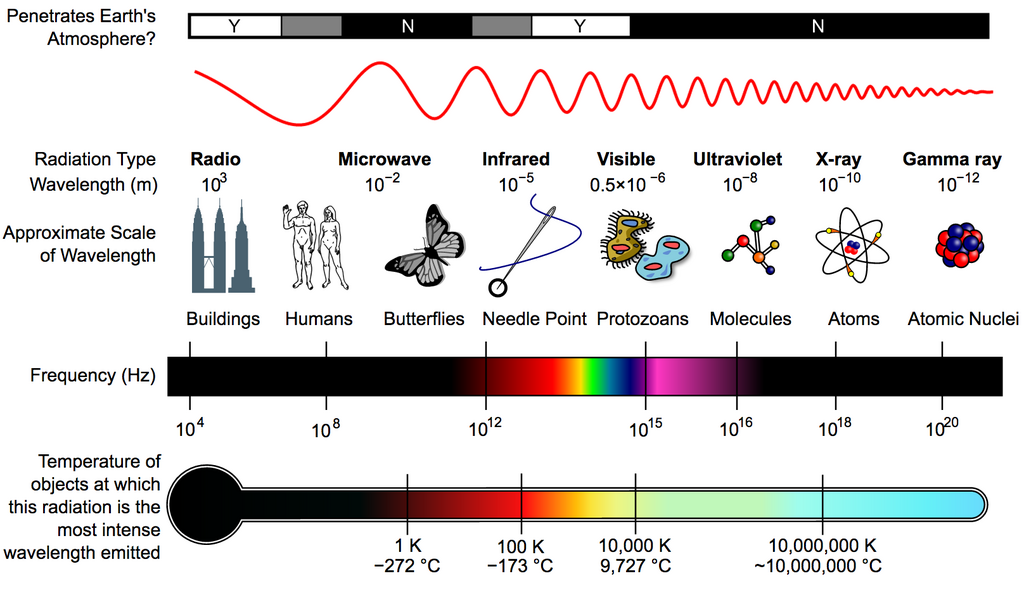
Wi-Fi, however, operates in unlicensed bands. This is like a public park for radio waves, open for anyone to use as long as they follow the rules. The primary bands for Wi-Fi are the Industrial, Scientific, and Medical (ISM) bands and the Unlicensed National Information Infrastructure (U-NII) bands. The 2.4 GHz band is an , which is why it's so crowded; your microwave oven, cordless phone, and Bluetooth devices all compete for the same space. The 5 GHz and 6 GHz bands fall under U-NII rules, which were specifically set aside for high-speed wireless networking.
How Signals Get Around
Radio waves don't just travel in a straight line from your router to your device. They bounce, bend, and scatter as they move through an environment. Understanding these behaviors is key to diagnosing Wi-Fi problems.
Every time a signal reflects or diffracts, it loses some energy. This weakening is called attenuation. Even in open air with no obstacles, signals naturally weaken with distance. This predictable loss is called Free Space Path Loss (FSPL). It's the baseline cost of sending a signal from point A to point B. Any object in the way, like a wall or even a person, adds more attenuation on top of FSPL.
Choosing Your Frequency
Wi-Fi routers often give you a choice between different frequency bands, most commonly 2.4 GHz and 5 GHz, with 6 GHz now appearing in newer devices. This choice isn't just about speed; it's a fundamental trade-off in wave physics.
| Band | Range & Penetration | Speed & Capacity | Interference |
|---|---|---|---|
| 2.4 GHz | Longest range, best at passing through walls. | Slower speeds, fewer channels. | High. Competes with Bluetooth, microwaves, etc. |
| 5 GHz | Shorter range, easily blocked by obstacles. | Faster speeds, many more channels. | Low. Less crowded than 2.4 GHz. |
| 6 GHz | Shortest range, poorest penetration. | Fastest speeds, vast number of channels. | Very Low. Currently used only by new Wi-Fi 6E/7 devices. |
Higher-frequency waves, like those in the 5 GHz and 6 GHz bands, oscillate more rapidly. This allows them to carry more data per second, resulting in faster speeds. However, that higher energy dissipates more quickly over distance and is more easily absorbed by solid objects like walls and floors. Lower-frequency 2.4 GHz waves are less energetic, making them slower, but they are better at traveling long distances and penetrating obstacles.
Signal Quality Isn't Just Strength
It's easy to think that a strong signal is a good signal, but that's only half the story. The true measure of a quality connection is the Signal-to-Noise Ratio (SNR). Imagine trying to have a conversation in a quiet library versus a loud rock concert. Your voice (the signal) might be the same volume, but the quality of communication depends entirely on the background noise.
Here are the key terms:
- Received Signal Strength Indicator (RSSI): This measures how much power your device is receiving from the router. It's measured in decibels relative to one milliwatt (). Closer to 0 is stronger (e.g., -45 dBm is a great signal, -85 dBm is very weak).
- Noise Floor: This is the level of all the background radio interference in your environment. It comes from other Wi-Fi networks, Bluetooth devices, microwaves, and even distant cosmic radiation. A lower noise floor is better (e.g., -95 dBm is quieter than -80 dBm).
- Signal-to-Noise Ratio (SNR): This is the difference between your RSSI and the noise floor, measured in decibels (dB). It tells you how much stronger the desired signal is than the background noise. An SNR of 25 dB or higher is generally considered good for reliable, high-speed Wi-Fi.
A strong RSSI doesn't guarantee a good connection if the noise floor is also high. A weaker signal in a quiet environment can be much more reliable than a strong signal in a noisy one.
Network engineers use these values to create a link budget, which is a calculation that accounts for all the gains (like antenna power) and losses (like FSPL and attenuation from walls) in a wireless link to predict its performance. The goal is to ensure the final received signal has a healthy SNR.
Ready to test your knowledge? Let's see what you've learned about how radio waves work.
Why is the 2.4 GHz Wi-Fi band often crowded with interference?
You are setting up a Wi-Fi network in a large, old house with thick plaster walls. To ensure the signal reaches every room, which frequency band is generally the best choice?
Understanding these physical layer concepts is the first step to mastering wireless networking. It's not just about software and protocols; it's about how the waves themselves behave in the real world.