Windows Exploit Development Fundamentals
Windows Architecture
User Mode and Kernel Mode
Every operating system has to solve a fundamental problem: how to let you run programs like web browsers and games without letting them crash the entire computer. A buggy application shouldn't be able to bring down everything else. Windows solves this by splitting its world into two distinct areas: User Mode and Kernel Mode.
Think of User Mode as the public area of a library. Anyone can come in, read books, and use the computers. But they can't go into the staff-only areas or rearrange the shelves. This is where your applications live. They have limited access and can't directly touch the computer's hardware.
Kernel Mode is the staff-only back room. It's the trusted, privileged core of the operating system. Code running in Kernel Mode has complete access to the system's memory and hardware. It manages everything from scheduling tasks for the processor to reading files from the hard drive.
This separation is a critical security feature. If an application in User Mode crashes, it generally won't affect the kernel or other applications. The OS can just clean up the mess and move on.
So how does a program in User Mode do anything useful, like save a file or display something on the screen? It can't talk to the hardware directly. Instead, it has to make a request to the kernel. This is done through a special gateway called a system call. The collection of functions that applications can use to make these requests is known as the Windows API (Application Programming Interface).
Processes and Threads
When you double-click an icon to launch a program, Windows creates a process. A process is essentially a container for a running application. It includes the program's code, its current activity, and, most importantly, its own private block of memory.
Inside each process are one or more threads. A thread is the actual sequence of instructions that the processor executes. Every process starts with at least one thread, but complex applications often create multiple threads to handle different tasks simultaneously. For example, in a word processor, one thread might be watching for your keyboard input while another is busy checking your spelling in the background.
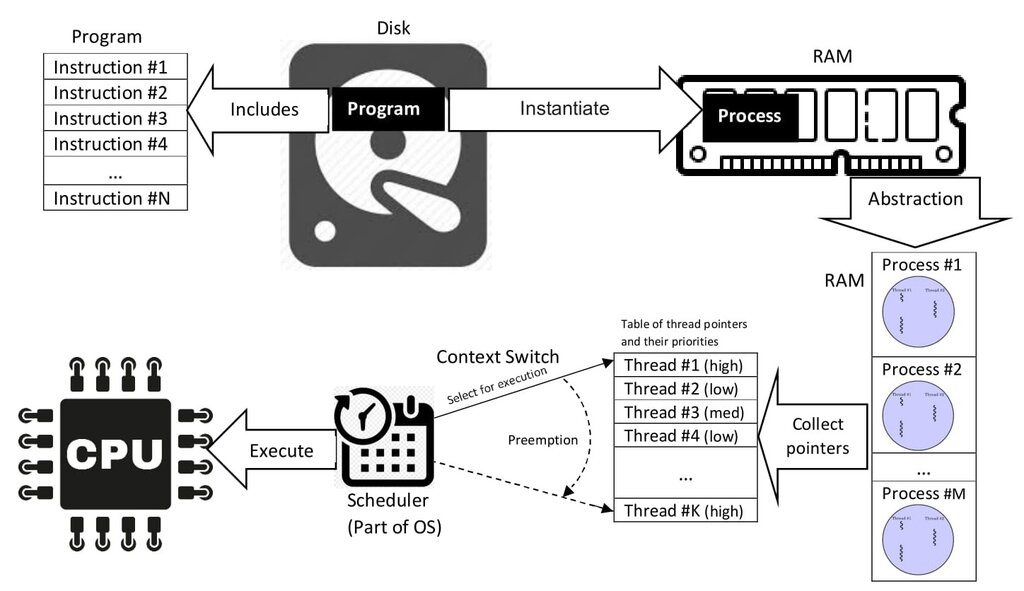
It's the kernel's job, specifically a component called the scheduler, to manage all these threads from all the different processes. It rapidly switches between them, giving each a tiny slice of processor time. This happens so fast that it creates the illusion that many programs are running at the same time.
Virtual Memory Management
Imagine a city where every family lives in a mansion with the exact same address: 123 Main Street. This sounds chaotic, but it's exactly how Windows manages memory. Each process gets its own private, identical address space, known as virtual memory. From the process's point of view, it has a massive, contiguous block of RAM all to itself.
This is just a clever illusion. Behind the scenes, the kernel's Memory Manager is constantly translating these virtual addresses into actual physical addresses in your computer's RAM. This system has two huge advantages.
Isolation: Because each process has its own virtual address space, it's impossible for a buggy web browser to accidentally read or write memory belonging to your password manager. Each process is in its own sandbox.
Efficiency: The total virtual memory for all your running programs can be much larger than the physical RAM you have installed. The Memory Manager handles this by temporarily storing less-used memory chunks (called pages) on the hard drive in a file called the page file.
This translation from virtual to physical addresses is handled by the hardware, but it's managed by the operating system. Understanding this separation is key. Vulnerabilities often arise in the code that handles the interactions between these different parts of the system, such as when data is passed from User Mode to Kernel Mode or when memory is allocated and deallocated.
What is the primary restriction placed on applications running in User Mode?
Which statement accurately describes the concept of virtual memory?