Windows 11 Network Discovery
Network Basics
Your Network Address
Every device connected to a network needs a unique identifier, just like every house on a street needs a unique address. In the world of computer networks, this identifier is called an IP address.
IP Address
noun
An Internet Protocol address is a unique numerical label assigned to each device connected to a computer network that uses the Internet Protocol for communication.
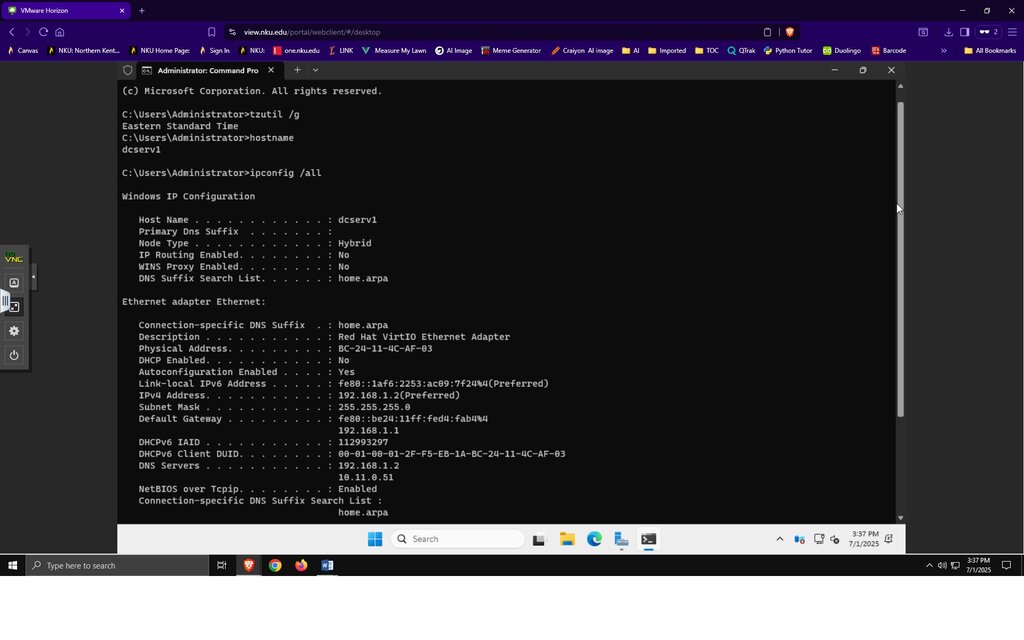
Think of an IP address like a complete mailing address. It has two parts: one part identifies the network (the street name), and the other part identifies the specific device on that network (the house number). A common example of an IP address you might see on your home network is 192.168.1.101.
But how does a computer know which part of the address is the network and which part is the device? That’s the job of the subnet mask.
Subnet Mask
noun
A number that defines a range of IP addresses available within a network. It separates the network portion of an IP address from the host portion.
The subnet mask essentially draws a line in the sand, telling your devices, "This part of the address is our local neighborhood, and that part is the specific house." For the address 192.168.1.101, a common subnet mask is 255.255.255.0. This mask tells the computer that "192.168.1" is the network and "101" is the specific device.
Any device with a "192.168.1" network address is considered local. A device with a different network address, like 8.8.8.8, is on a different network—in this case, the wider internet.
Public vs Private Networks
Not all IP addresses are visible to the entire internet. Networks are generally divided into two types: private and public.
A private network is your local network—at home, at school, or in an office. The IP addresses used here (like the 192.168.1.x range) are for internal use only. They allow your devices to talk to each other and to your router. Multiple different homes can use the exact same private IP addresses without any conflict.
A public network is the internet itself. Your router has a single public IP address assigned by your Internet Service Provider (ISP). This address is unique on the entire internet and represents your whole household online. When you visit a website, your router sends the request from its public IP address. The website's server sends the data back to that same public address, and your router then directs it to the correct private device that asked for it.
Think of it like an office building's mailroom. The building has one public street address. Mail is sent there. The mailroom staff (your router) then looks at the name and office number on the envelope (internal network data) and delivers it to the right person (your specific device).
Private IP addresses are for local communication within your network. Your single public IP address is for communicating with the rest of the world.
Choosing Your Network Profile
When you connect to a new network in Windows, it will ask you if you want your PC to be discoverable by other devices. This choice sets the network profile to either "Private" or "Public."
Private Profile: Choose this for networks you trust, like your home or workplace. It makes your computer "discoverable," meaning it can see and be seen by other devices on the network. This is useful for sharing files, streaming media to a TV, or connecting to a printer.
Public Profile: Choose this for networks you don't fully trust, like the Wi-Fi at a coffee shop, hotel, or airport. This setting makes your computer hidden from other devices on the network, increasing your security by blocking most communication attempts from unknown devices.
| Profile | Best For | Discoverability | Security |
|---|---|---|---|
| Private | Home, Work | On | Lower |
| Public | Coffee Shop, Airport | Off | Higher |
Understanding these core concepts is the first step in managing your own network settings. Knowing what an IP address does and the difference between a public and private network gives you the foundation to configure and troubleshoot connections effectively.
Ready to test your knowledge? Let's see what you've learned about these fundamental concepts.
What is the primary role of a subnet mask in a network?
When connecting to the Wi-Fi at a coffee shop, which Windows network profile should you choose for maximum security?
With these basics down, you're better equipped to understand how your devices talk to each other and the internet.