Wi-Fi Hacking Fundamentals
Wi-Fi Basics
The Language of Wi-Fi
Wi-Fi feels like magic. Information zips through the air, connecting your phone to the internet without any physical cables. But it's not magic, it's technology built on a set of rules, much like a language. For devices from different manufacturers to understand each other, they all need to speak the same wireless language.
This language is defined by a series of standards called IEEE 802.11. The Institute of Electrical and Electronics Engineers (IEEE) is the group that creates these standards. Each new version, or standard, is like an update to the language, usually allowing for faster speeds and better performance.
You've probably seen these standards listed on the box for a router or laptop, with letters like 'b', 'g', 'n', 'ac', or 'ax'. Each one represents a different generation of Wi-Fi technology. Think of it like the evolution of mobile networks, from 3G to 4G and now 5G. Each new Wi-Fi standard is a step up from the last.
| Standard | Nickname | Max Speed (Approx.) |
|---|---|---|
| 802.11g | Wi-Fi 3 | 54 Mbps |
| 802.11n | Wi-Fi 4 | 600 Mbps |
| 802.11ac | Wi-Fi 5 | 1.3 Gbps |
| 802.11ax | Wi-Fi 6 | 9.6 Gbps |
Don't worry about memorizing the speeds. The key takeaway is that newer standards are faster and more efficient.
Choosing Your Lane
Wi-Fi signals travel over radio frequencies, like invisible highways in the air. Most modern Wi-Fi networks use two main highways: the 2.4 GHz band and the 5 GHz band.
Think of the 2.4 GHz band as a two-lane country road. It has a long range and is great at getting through walls and other obstacles. However, it's also crowded. Many other devices, like microwaves, cordless phones, and Bluetooth speakers, use this same road, which can cause traffic jams and slow everything down.
The 5 GHz band is more like a multi-lane, high-speed freeway. It offers much faster speeds because there's more space and less traffic from other devices. The catch is that it has a shorter range and isn't as good at penetrating solid objects. You need to be closer to the router to get the best performance.
Many modern routers are "dual-band," meaning they can broadcast on both frequencies at the same time. This lets you choose the best lane for your needs, putting devices that need speed on the 5 GHz band and those farther away on the 2.4 GHz band.
How Devices Communicate
At its core, wireless communication is a conversation. Your device (like a laptop or phone) wants to talk to the router, and the router talks back. But to avoid everyone talking at once, they follow a protocol.
Imagine a polite dinner conversation. You wait for a pause before you speak. Wi-Fi works similarly. A device "listens" to the airwaves to see if they're clear. If no one else is transmitting, it sends a small chunk of data called a packet. This packet is like a postcard: it has the data you want to send, the address it's going to, and the address it came from.
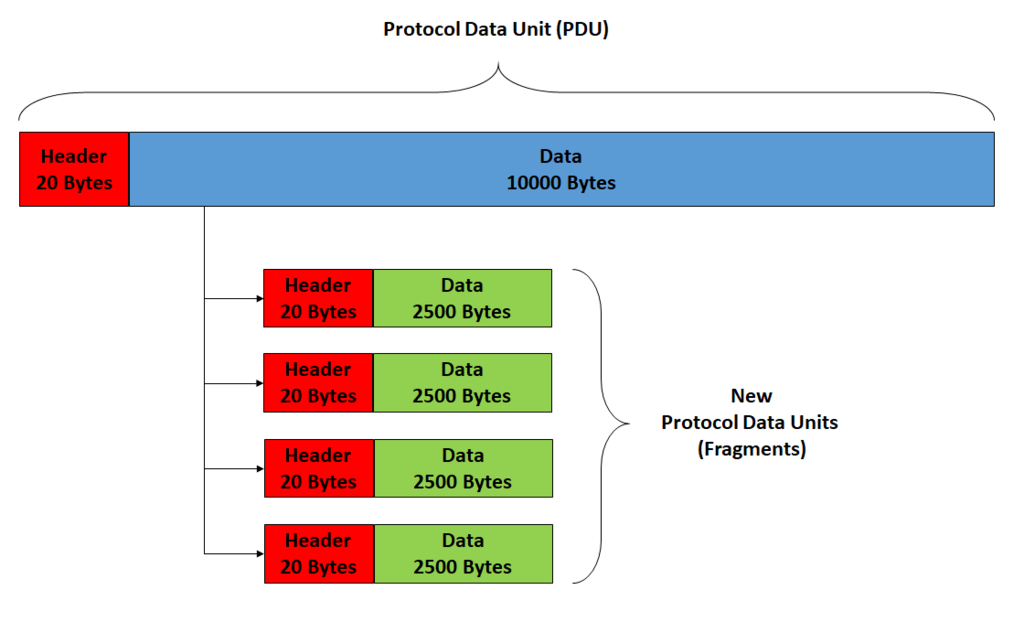
The router, acting as a central coordinator, receives this packet and sends it on its way, either to another device on your local network or out to the wider internet. When the destination receives the packet, it sends back a small confirmation, an "acknowledgment," to let the original device know the message was received successfully. If the sender doesn't get this confirmation, it assumes the packet was lost and sends it again.
This process of listening, sending, and acknowledging happens millions of times a second, creating the seamless internet experience we rely on every day.
What is the primary role of the Institute of Electrical and Electronics Engineers (IEEE) in relation to Wi-Fi?
A gamer wants the fastest possible connection with the least amount of interference for their gaming console, which is in the same room as the router. Which frequency band should they use?
Understanding these fundamentals—the standards that govern Wi-Fi, the frequencies it uses, and the basic way devices communicate—is the first step to seeing how wireless networks really work.