Webpack Module Federation Explained
Introduction to Micro-Frontends
Breaking Down the Monolith
Imagine building a large, complex website. The traditional approach, often called a monolith, is like constructing a house where every room, wall, and fixture is part of a single, interconnected structure. If you want to renovate the kitchen, you risk disrupting the plumbing in the bathroom or the wiring in the living room. Everything is tightly coupled.
Micro-frontends offer a different way. Think of it like building with modular, prefabricated units. Each part of the site—the search bar, the product recommendation carousel, the user profile page—is a separate, self-contained application. A main "shell" application then assembles these independent pieces into what looks like a single, cohesive website to the user.
micro-frontend
noun
An architectural style where a web application is composed of multiple, independently deployable frontend applications.
This idea mirrors the concept of microservices on the backend. Just as microservices break down a large server-side application into small, independent services, micro-frontends do the same for the user interface.
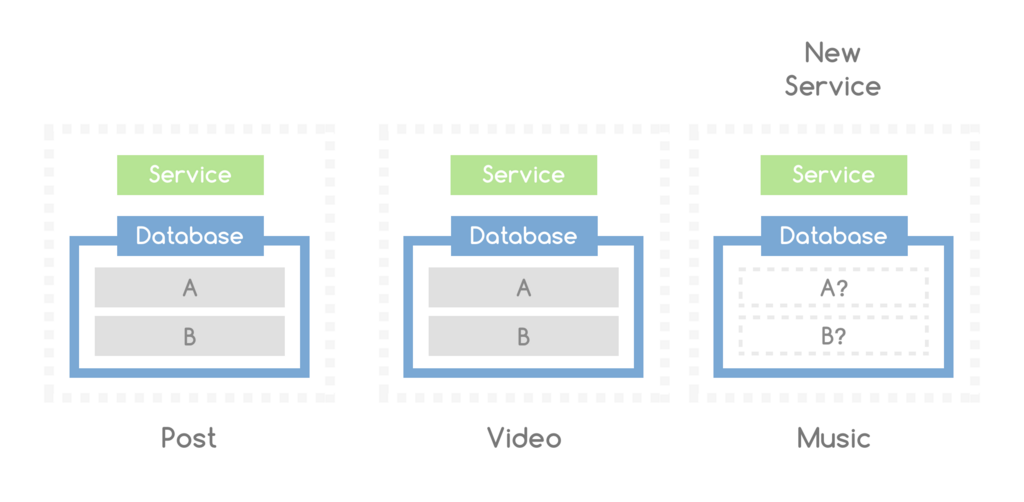
The Advantages of Going Small
Why would you choose to build an application from many small pieces instead of one big one? The benefits are significant, especially for large teams and complex projects.
Team Autonomy: Small, focused teams can own a feature from end to end. They can develop, test, and deploy their part of the application without coordinating with every other team. This drastically speeds up development.
Tech Flexibility: Does one team prefer React while another wants to use Vue or Svelte? With micro-frontends, that's possible. Each team can choose the best technology for their specific task. This also makes it easier to adopt new technologies or rewrite legacy parts of an application piece by piece, avoiding a risky, all-or-nothing rewrite.
Improved Maintainability: A smaller, focused codebase is easier to understand, debug, and change. When a bug appears in the shopping cart, the team knows exactly where to look, and their fix is unlikely to break the user authentication flow.
Because micro-frontends live in bounded contexts, teams can choose the most suitable service to run them.
How It's Done
There are several ways to assemble these independent frontends into a single application. Each has its own trade-offs.
| Method | Description | Pros | Cons |
|---|---|---|---|
| Iframes | Each micro-frontend is loaded inside an <iframe> element. | Strong isolation between parts. Simple to implement. | Can lead to a clunky user experience, poor SEO, and difficulty with communication between frames. |
| JavaScript Integration | A container application dynamically loads the scripts for each micro-frontend at runtime. | A seamless user experience. Flexible and powerful. | Can be complex to set up. Potential for version conflicts between shared libraries. |
| Web Components | Each micro-frontend is encapsulated as a custom HTML element (e.g., <user-profile>). | A modern, standards-based approach. Good encapsulation and interoperability. | Requires browsers to support the Web Components standard. Can have a steeper learning curve. |
The JavaScript integration method has become a popular choice, and modern tools have made it much easier to manage. For instance, Webpack's Module Federation is a powerful feature designed specifically to solve the challenges of this approach, allowing different applications to share code and dependencies dynamically.
Potential Hurdles
While powerful, this architecture isn't a silver bullet. It introduces its own set of challenges that teams need to consider.
First, there's operational complexity. Instead of one repository and one build pipeline, you now have many. This requires mature DevOps practices to manage effectively.
Second, maintaining a consistent user experience can be difficult. How do you ensure buttons look and feel the same across five different micro-frontends built by five different teams? A shared design system or component library is crucial for visual and behavioral consistency.
Finally, performance can be a concern. If each micro-frontend loads its own copy of React, the user might end up downloading the same library multiple times. This increases the page load time. Smart bundling strategies and sharing common dependencies are key to keeping the application fast.
Time to check what you've learned about this architectural style.
What is the primary architectural concept behind micro-frontends?
Which of the following is a significant challenge when implementing a micro-frontend architecture?