WebAssembly Explained
Introduction to WebAssembly
A New Language for the Web
For decades, JavaScript was the only programming language that could run natively inside web browsers. If you wanted to build an interactive website, you used JavaScript. But as web applications grew more complex, handling tasks like 3D gaming, video editing, and complex data visualization, the need for higher performance became clear.
Enter WebAssembly, often shortened to Wasm. It’s a new type of code that can be run in modern web browsers. Unlike JavaScript, which is a high-level language, WebAssembly is a low-level, assembly-like language. It’s not meant to be written by hand. Instead, it’s designed as a compilation target for other languages.
Think of it this way: developers can write code in languages like C, C++, or Rust, and then use a special compiler to translate that code into a highly optimized Wasm file. The browser can then execute this file much faster than it could interpret equivalent JavaScript.
To understand how WebAssembly works, it helps to understand what assembly is and how compilers produce it.
Speed and Power in the Browser
The main advantage of WebAssembly is performance. Because Wasm is a low-level binary format, it's very close to the machine code that a computer's processor executes directly. This means browsers can decode and run it much more quickly than they can parse and optimize JavaScript.
This opens the door for new kinds of web applications. For example, a company could take a powerful desktop video editing application written in C++ and, without a complete rewrite, compile it to WebAssembly to run in the browser. This portability is a huge benefit, saving time and allowing powerful, existing software to reach a web audience.
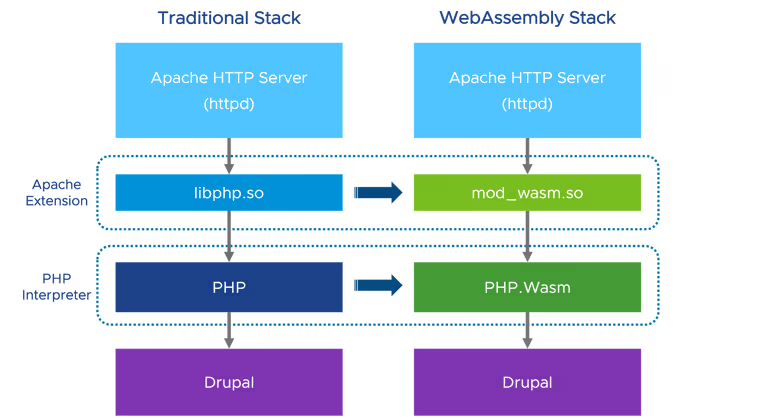
WebAssembly also gives developers more language options. While JavaScript is excellent for many web tasks, other languages have strengths in different areas, like memory management or multi-threading. Wasm lets developers use the right tool for the job.
| Language | Common Use Case with Wasm |
|---|---|
| C/C++ | Porting existing games, applications, and libraries to the web. |
| Rust | Building new high-performance, memory-safe web applications. |
| Go | Used for its simplicity and concurrency features in web services. |
| C# | Running .NET applications on the client-side via projects like Blazor. |
Working Alongside JavaScript
WebAssembly wasn't designed to replace JavaScript. The two are meant to work together, each playing to its strengths. JavaScript is fantastic for interacting with the web page—manipulating the DOM, handling user events, and working with web APIs. WebAssembly excels at pure computational heavy lifting.
The typical workflow looks like this: JavaScript code fetches and loads a .wasm module. Once the module is ready, the JavaScript can call functions that are exported by the WebAssembly code. For example, your JavaScript might handle a button click, and in response, call a Wasm function to perform a complex mathematical calculation. The Wasm function runs, returns the result, and the JavaScript code then displays that result on the page.
// JavaScript code

// Load the WebAssembly module
async function loadWasm() {
  // Fetch the compiled Wasm file
  const response = await fetch('calculator.wasm');
  const buffer = await response.arrayBuffer();

  // Compile and instantiate the module
  const wasmModule = await WebAssembly.instantiate(buffer);

  // Call an exported function from the Wasm module
  const result = wasmModule.instance.exports.add(5, 10);

  // The result is 15
  console.log('Result from Wasm:', result);
}

loadWasm();
This partnership allows developers to build web applications that are both highly interactive and computationally powerful, something that was much more difficult before WebAssembly came along.
What is WebAssembly primarily designed to be?
What is the primary reason WebAssembly offers significant performance gains over JavaScript for certain tasks?