Web Coding Fundamentals
Introduction to HTML
The Skeleton of the Web
Every website you visit is built on a foundation of HTML, which stands for HyperText Markup Language. Think of it as the skeleton of a webpage. It doesn't handle the colors, fonts, or animations—that's the job of other languages. HTML's role is to give the content structure and meaning.
HTML, or HyperText Markup Language, provides the skeleton for your web content.
HTML works by using "tags" to wrap around content. Most tags come in pairs: an opening tag like <p> and a closing tag like </p>. The closing tag has a forward slash. Whatever content you put between these tags is affected by them. For example, <p>This is a paragraph.</p> tells the browser to display that text as a paragraph.
Every HTML file has a basic structure that it follows. It tells the browser that it's an HTML document and separates the invisible metadata from the visible page content.
<!DOCTYPE html>
<html>
  <head>
    <!-- Meta-information goes here, like the page title -->
    <title>My First Page</title>
  </head>
  <body>
    <!-- Visible page content goes here -->
    <h1>Hello, World!</h1>
  </body>
</html>
Let's break that down:
<!DOCTYPE html>: This is the very first thing in your document. It declares that the page is written in HTML5.<html>: This is the root element that wraps everything on the page.<head>: This contains setup information and metadata for the page, like the title that appears in your browser tab. Content here isn't displayed on the page itself.<body>: This contains all the content that you see on the webpage—text, images, links, and everything else.
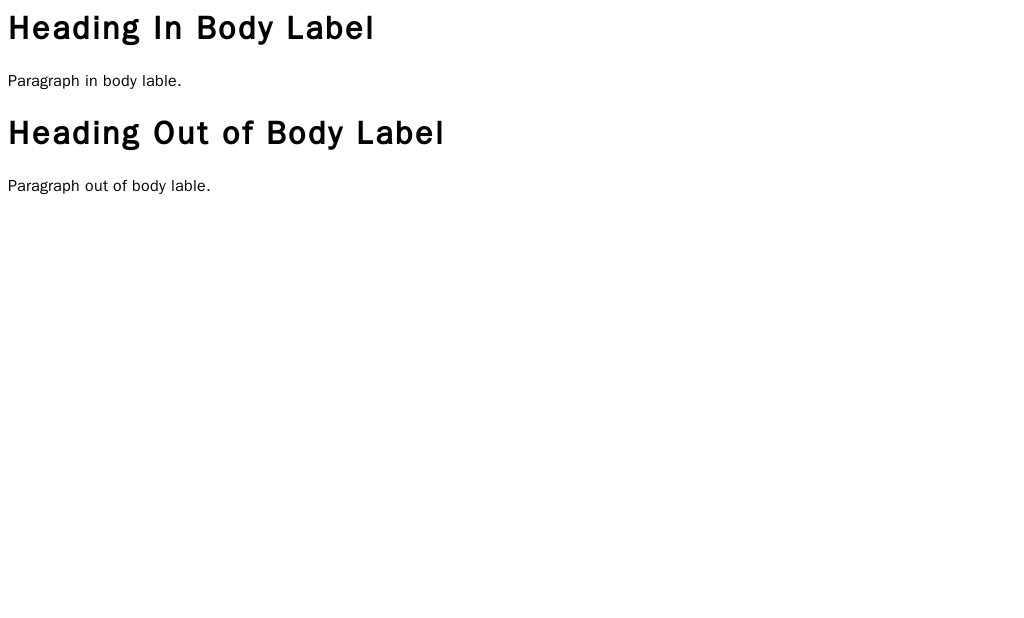
Adding Basic Content
Once you have the basic structure, you can start adding content. HTML gives us simple tags to structure our text in a logical way.
The most common tags you'll use are for headings, paragraphs, and lists. They form the core of most text-based content on the web.
Headings are used to create an outline for your content. There are six levels, from <h1> (the most important) to <h6> (the least important). Search engines use these headings to understand the structure and importance of your content. Paragraphs are created with the <p> tag. The browser automatically adds some space before and after each paragraph.

For lists, you have two main options: unordered (bullet points) and ordered (numbers). An unordered list uses the <ul> tag, while an ordered list uses <ol>. Inside either of these, each list item is wrapped in an <li> tag.
<h1>Main Title</h1>
<p>This is a paragraph introducing the topic.</p>

<h2>A Sub-heading</h2>
<p>Here's another paragraph with more details.</p>

<h3>Key Items</h3>
<ul>
  <li>First bullet point</li>
  <li>Second bullet point</li>
</ul>

<h3>Numbered Steps</h3>
<ol>
  <li>Step one</li>
  <li>Step two</li>
</ol>
Links and Images
What makes the web a "web" are hyperlinks. These allow us to connect pages. We create links with the <a> tag, which stands for anchor. The destination of the link is specified in the href attribute, which stands for "hypertext reference."
<p>You can learn more at <a href="https://www.example.com">Example.com</a>.</p>

To insert an image, we use the <img> tag. This is a self-closing tag, meaning it doesn't need a separate closing tag. It requires two main attributes: src to define the image source (the URL or file path), and alt to provide alternative text for screen readers or if the image fails to load.
Always include
alttext for your images. It's essential for web accessibility, allowing visually impaired users to understand the content and context of an image.
<img src="images/cat.jpg" alt="A fluffy orange cat sleeping on a rug.">
Gathering Information with Forms
Forms are a key part of the interactive web. They allow users to send information to a website, whether it's for a search bar, a login page, or a contact form. The <form> element acts as a container for all the different input fields.
Inside the form, you use various elements to collect data. The most common is <input>. The type attribute of the <input> element can be set to many different values, like text for a single line of text, password to hide the characters, or submit to create a button that sends the form data.
<form action="/submit-data" method="post">

  <label for="username">Username:</label>
  <input type="text" id="username" name="username">

  <label for="password">Password:</label>
  <input type="password" id="password" name="password">

  <input type="submit" value="Log In">

</form>
In the example above, the <label> tag is important. It links a text label to a specific form input, which helps with both usability and accessibility. The for attribute on the label should match the id of the input it describes.
What is the primary role of HTML in web development?
In an HTML document, which tag is used to contain all the visible content of a webpage, such as text, images, and links?
That covers the essential building blocks of HTML. By combining these simple tags, you can create a well-structured document that any browser can understand and display. This structure is the necessary first step before adding any style or interactivity.