Web-Based Beverage Container Detection App
Introduction to Object Detection
What Is Object Detection?
Computer vision is a field of artificial intelligence that trains computers to interpret and understand the visual world. A key task in this field is object detection, which involves identifying and locating objects within an image or video. It's not just about saying, "this picture contains a car," but also, "the car is located in this specific area of the picture."
Think of a self-driving car. It needs to see more than just a collection of pixels. It must identify other vehicles, pedestrians, traffic lights, and road signs. Crucially, it also needs to know exactly where these objects are to navigate safely. This combination of identification (classification) and location (localization) is the essence of object detection.
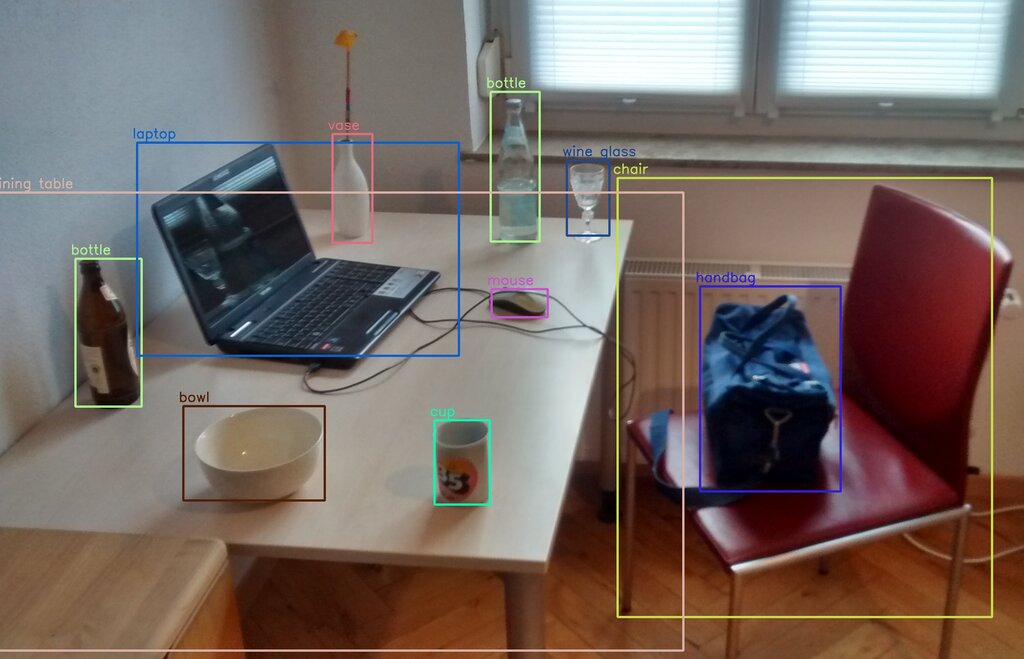
This process produces two key pieces of information for each object found:
- Classification: What is the object? (e.g., bottle, laptop, cup)
- Localization: Where is it in the image? This is typically shown by drawing a rectangular "bounding box" around the object.
Object detection models analyze an image and output a list of all the objects they've found, along with the coordinate points for each object's bounding box. They also provide a confidence score, which is a measure of how certain the model is about its prediction.
You Only Look Once (YOLO)
Many different algorithms can perform object detection. One of the most popular and powerful is called YOLO, which stands for "You Only Look Once." The name hints at its main advantage: speed. Unlike older methods that would examine an image multiple times or in multiple stages, YOLO looks at the entire image just once to make its predictions.
YOLO (You Only Look Once) is an object detection algorithm that can be used to detect, classify, and track objects in near real-time.
How does it manage this? At a high level, YOLO divides the input image into a grid of smaller cells. For each cell in the grid, the model predicts:
- Whether an object's center is in that cell.
- The bounding box for the object (its position and size).
- The probability that the object belongs to a specific class (like 'can' or 'bottle').
By processing the entire image at once, YOLO is exceptionally fast, making it ideal for real-time applications like analyzing live video streams.
The Evolution of YOLO
YOLO isn't a single model but a family of models that has evolved significantly over time. The original YOLOv1 was groundbreaking for its speed. Since then, new versions have been released by different research groups, each building upon the last to improve accuracy, speed, and efficiency.
YOLOv3, for instance, became much better at detecting smaller objects. YOLOv5 introduced architectural changes that made it easier to use and train. More recent versions, like YOLOv8, continue this trend, offering state-of-the-art performance while being highly flexible for various tasks beyond simple object detection.
| Version | Key Feature |
|---|---|
| YOLOv1 | Introduced the single-pass detection concept. |
| YOLOv3 | Improved detection of objects at different scales. |
| YOLOv5 | Focused on usability and faster training. |
| YOLOv8 | State-of-the-art model; supports detection, segmentation, and classification. |
This constant improvement makes the YOLO family a powerful and popular choice for computer vision projects. In the next steps, we'll focus on using YOLOv8 to build our own detection system.