Web Application Architectures Decoded
Web Application Basics
Clients and Servers
Every time you open a browser and visit a website, you're participating in a conversation. This conversation happens between two key players: a client and a server. This relationship is the foundation of the entire web, and it's called the client-server model.
The client is the device you're using, like your laptop or phone, along with the web browser on it. Its main job is to ask for information and then display it to you. When you type an address into your browser and hit Enter, you're sending a request out into the digital world.
The server is a powerful computer that stores website files, data, and the logic of the web application. Its job is to listen for requests from clients. When a request comes in, the server finds the right information, processes it if needed, and sends it back to the client. The client's browser then interprets this information and shows you the webpage.
The Language of the Web
So, clients and servers talk to each other. But what language do they speak? They communicate using a set of rules called the Hypertext Transfer Protocol, or HTTP. Think of HTTP as the grammar of the web, ensuring that both the client and the server understand each other perfectly.
HTTP works in a simple request-response cycle. The client sends an HTTP request, and the server sends back an HTTP response.
An HTTP request has a few key parts, but two of the most important are the method and the URL. The method tells the server what kind of action the client wants to perform. The two most common methods are:
GET: This is used to request data from the server. It's like saying, "Please get me this webpage."POST: This is used to send data to the server. When you fill out a contact form or sign up for an account, your browser sends aPOSTrequest with that information.
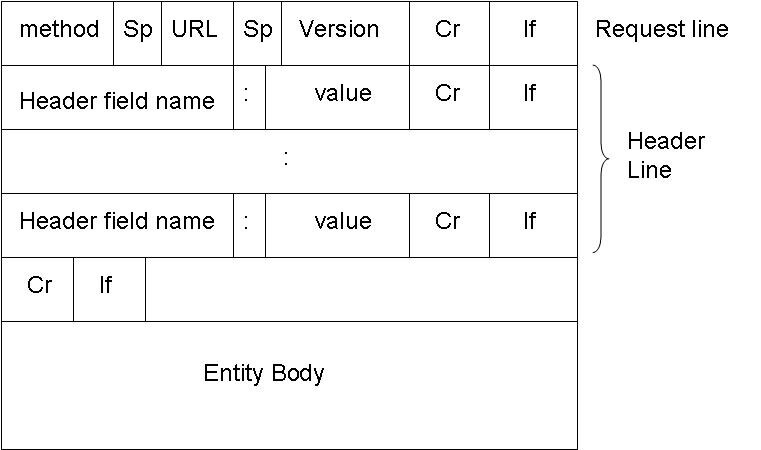
After the server processes the request, it sends back an HTTP response. This response includes a status code and, usually, a body.
The status code is a three-digit number that tells the client how the request went. You've probably seen a 404 error before. That's an HTTP status code.
| Status Code | Meaning |
|---|---|
| 200 OK | Success! The server found what you asked for. |
| 301 Moved Permanently | The resource has a new address. |
| 404 Not Found | The server couldn't find the requested resource. |
| 500 Internal Server Error | Something went wrong on the server's end. |
The body of the response contains the data the client requested, which is often the HTML, CSS, and JavaScript files that make up a webpage.
Finding Your Way
A modern web application can have hundreds of different pages and features. When a request for a specific URL comes in, how does the server know which part of its code should handle it?
This is managed by a process called URL routing. A router acts like a traffic cop for the application. It inspects the URL from the incoming request and matches it to a specific piece of code designed to handle that exact path.
// Example of simple routing rules
// A request for '/home' goes to the home page handler
GET '/home' -> showHomePage()

// A request for '/users/123' goes to the user profile handler
GET '/users/:id' -> showUserProfile()

// A request to submit a contact form goes to another handler
POST '/contact' -> handleContactForm()
For example, a request to /about will be routed to the function that builds the 'About Us' page. A request to /products/shoes will be sent to the code that retrieves and displays all the shoes.
Routing allows developers to create clean, predictable URLs for users and organize their application's logic efficiently. It's the final piece of the puzzle that connects a user's action in the browser to a specific function on the server.
Ready to check your understanding of these core concepts?
What are the primary roles of a client and a server in the client-server model?
When you fill out a sign-up form on a website and click 'Submit', which HTTP method is most likely used to send your information to the server?
Understanding clients, servers, HTTP, and routing is the first step in learning how the web works. These fundamental pieces work together to deliver the rich, interactive experiences we use every day.