VLANs and Inter-VLAN Routing
Introduction to VLANs
Networks Within a Network
Imagine a large open-plan office. When one person shouts, everyone in the office hears them, whether the message is for them or not. This is similar to how a basic Local Area Network (LAN) works. All devices are in a single broadcast domain, meaning a broadcast message from one device is sent to every other device on the network.
In a small network, this isn't a problem. But as the network grows, with hundreds or thousands of devices, all that broadcast traffic becomes noise. It slows down the network for everyone and creates security risks, since every device can technically see traffic from every other device.
How do you get the benefits of having separate networks without buying a lot of extra hardware? The answer is Virtual LANs, or VLANs.
A VLAN allows you to take one physical network switch and split it into multiple logical, independent networks. Devices on one VLAN behave as if they are on their own separate network, completely isolated from devices on other VLANs. You can group devices by department (Sales, Engineering, HR) or by function (servers, printers, user computers), regardless of where they are physically plugged in.
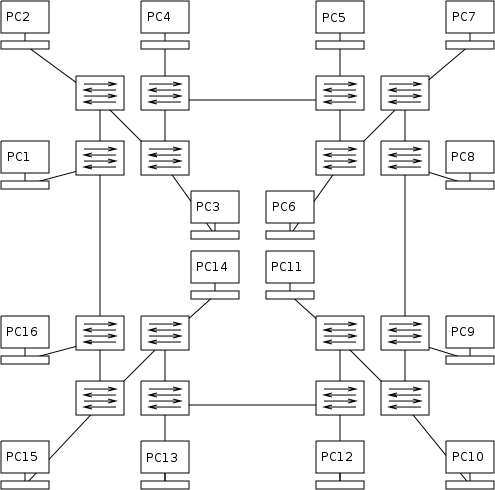
The Benefits of Segmentation
Segmenting a network with VLANs offers several key advantages.
Improved Performance By breaking a large network into smaller broadcast domains, you drastically cut down on unnecessary traffic. A broadcast message sent by a device in the Sales VLAN only goes to other devices in the Sales VLAN, not to the entire company. This reduces network congestion and frees up bandwidth.
Enhanced Security Security is a major reason for using VLANs. You can isolate sensitive data by placing departments like Finance or Human Resources on their own VLANs. Devices in one VLAN cannot directly communicate with devices in another. This partitioning means that if one part of the network is compromised, the breach is contained and won't easily spread to other segments.
Greater Flexibility VLANs are configured through software, not physical wiring. If an employee from the marketing team moves their desk to a different floor, a network administrator can simply reassign their port to the Marketing VLAN with a few clicks. There's no need to run new cables across the building. This makes managing network changes and growth much simpler.
It’s wise to segment your network using VLANs (Virtual Local Area Networks), as this approach significantly enhances both performance and security.
How It Works
The magic behind VLANs is a process called VLAN tagging. When a piece of data (an Ethernet frame) leaves a device and enters a VLAN-aware switch, the switch adds a small, 4-byte tag to it. This tag contains the VLAN ID, a number that identifies which VLAN the frame belongs to. Other switches on the network read this tag to know where to forward the frame.
The standard for this process is called IEEE 802.1Q. Thanks to this standard, switches from different manufacturers can all understand each other's VLAN tags.
To make this work, switch ports are configured in one of two ways:
- Access Ports: An access port belongs to a single VLAN. It's used to connect end devices like PCs, printers, or IP phones. When an access port sends a frame to an end device, it removes the VLAN tag, since the device itself doesn't need to know about VLANs.
- Trunk Ports: A trunk port can carry traffic from multiple VLANs simultaneously. These ports are used to connect switches to other switches or to routers. Frames traveling over a trunk link keep their tags so the next switch knows which VLAN they belong to.
Configuring VLANs on a managed switch is straightforward. First, you create the VLANs themselves. Then, you assign each port on the switch to a specific VLAN.
# This is an example for a Cisco switch
# Enter configuration mode
Switch> enable
Switch# configure terminal

# Create VLAN 10 and name it Sales
Switch(config)# vlan 10
Switch(config-vlan)# name Sales
Switch(config-vlan)# exit

# Create VLAN 20 and name it Engineering
Switch(config)# vlan 20
Switch(config-vlan)# name Engineering
Switch(config-vlan)# exit

# Assign a port (e.g., FastEthernet 0/1) to VLAN 10
Switch(config)# interface FastEthernet0/1
Switch(config-if)# switchport mode access
Switch(config-if)# switchport access vlan 10
Switch(config-if)# exit

# Assign another port (e.g., FastEthernet 0/2) to VLAN 20
Switch(config)# interface FastEthernet0/2
Switch(config-if)# switchport mode access
Switch(config-if)# switchport access vlan 20
Switch(config-if)# exit
In this example, the device plugged into port FastEthernet0/1 is now part of the Sales network, and the device on FastEthernet0/2 is part of the Engineering network. They are now logically separated and cannot communicate directly, even if they're plugged into the same switch.
What is the primary problem that VLANs are designed to solve?
An employee in the Finance department moves their desk to a different floor. How can a network administrator ensure their computer remains on the secure Finance network without running new cables?
VLANs are a fundamental tool for building modern, scalable, and secure networks. By logically segmenting traffic, you gain control over performance and security without the cost of adding more physical hardware.