Visual Programming Fundamentals
Introduction to Visual Programming
Programming with Pictures
Imagine building a piece of furniture. You could follow a detailed, text-only instruction manual, reading every step carefully. Or, you could follow a set of diagrams that show you exactly how each piece connects. For many people, the diagrams are much faster and more intuitive.
Visual programming is like using those diagrams to build software. Instead of writing lines of code in a specific language, you use graphical elements—like blocks, icons, and flowcharts—to create a program. You connect these visual pieces together to define the logic and tell the computer what to do.
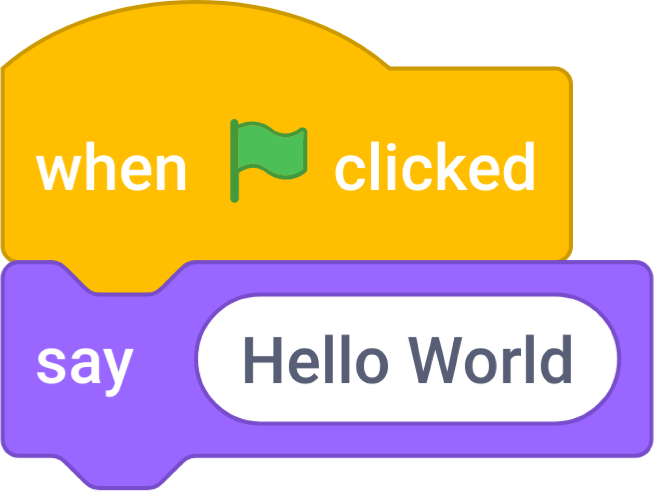
This approach makes programming more accessible. You don't have to memorize complex syntax or worry about a misplaced semicolon crashing your entire program. The focus shifts from getting the text perfect to getting the logic right.
An Idea with History
While it might seem like a modern invention, the concept of visual programming has been around for decades. As early as the 1960s, pioneers like Ivan Sutherland with his "Sketchpad" system explored ways to interact with computers graphically. They dreamed of a future where people could create complex programs simply by drawing and manipulating objects on a screen.
Over the years, this idea evolved. Early educational languages like Logo allowed kids to draw shapes by giving commands to a virtual "turtle." Later, commercial software began incorporating visual interfaces to help professionals build applications faster. The goal has always been the same: to lower the barrier to entry and make programming a more intuitive, human-centered activity.
The core idea is to represent programs in a way that is easier for our visual brains to process.
Why Go Visual?
Text-based coding is incredibly powerful, but it comes with a steep learning curve. Visual programming offers several advantages, especially for beginners or for rapidly building prototypes.
| Feature | Visual Programming | Text-Based Programming |
|---|---|---|
| Learning Curve | Gentle and intuitive | Steep and demanding |
| Syntax | Minimal or none; handled by the interface | Strict rules must be memorized |
| Readability | Logic flow is often immediately clear | Requires reading and understanding code |
| Prototyping | Very fast for building initial versions | Can be slower to get started |
Because the program's structure is laid out visually, it's often easier to spot logical errors. You can trace the connections from one block or node to the next, following the path your data will take. This makes debugging feel more like solving a puzzle than hunting for a needle in a haystack.
Common Approaches
Visual programming isn't a single thing; it's a category that includes a few different styles. You'll most often encounter three main types.
1. Block-Based: This is common in educational tools like Scratch and Blockly. You snap together puzzle-piece-shaped blocks that represent commands, loops, and variables. The shapes prevent you from making syntax errors, as a block will only fit where it makes sense.
2. Flowchart-Based: Here, you create a diagram that maps out the flow of the program. Ovals might represent the start and end points, rectangles are for processes, and diamonds are for decisions. You draw arrows to connect the steps in the logical order.
3. Node-Based: Popular in game development and graphics software, this paradigm uses nodes (boxes) connected by wires. Each node performs a specific function, like getting player input, running a calculation, or changing a color. Data flows through the wires from one node to the next, getting processed at each step.
Each of these approaches has its strengths, but they all share the common goal of turning abstract code into a concrete, visible structure.
Ready to check your understanding?
What is the core idea behind visual programming?
What is a primary advantage of visual programming, especially for beginners?
Visual programming is a powerful and approachable way to learn the fundamentals of logic and computation. By removing the hurdle of complex syntax, it lets you focus on what really matters: solving problems creatively.