Virtual Memory Essentials
Introduction to Virtual Memory
The Illusion of Infinite Memory
A computer's physical memory, or RAM, is like a workbench. It's super fast and lets the processor work on tasks directly. But just like a real workbench, it has a limited amount of space. What happens when a program is bigger than the workbench, or when you want to work on multiple big projects at once?
You could buy a bigger workbench, but that gets expensive. A smarter solution is to use the massive storage space of a nearby warehouse—your computer's hard drive. You keep only the tools and materials you need right now on the workbench, and the rest stays in the warehouse. When you need something new, you swap it out. This is the core idea behind virtual memory.
Virtual memory is a technique managed by the operating system (OS) that creates the illusion of a vast, private memory space for each running program. A program thinks it has a huge, contiguous block of RAM all to itself, even if the actual physical RAM is much smaller and shared by many other programs.
Virtual memory lets a program behave as if it has more memory than is physically available, using the hard disk as an extension of RAM.
Why It's a Game Changer
This trick provides several powerful benefits that are fundamental to modern computing.
First, programs are no longer constrained by the amount of physical RAM. An application can be much larger than the available RAM because only the necessary parts of the program need to be in RAM at any given moment. The rest can wait on the hard disk.
Second, it makes multitasking far more efficient. You can run your web browser, a music player, and a code editor all at once, even if their combined memory requirements exceed your computer's RAM. The OS juggles the different pieces of each program, swapping them in and out of physical memory as you switch between tasks. Each program operates smoothly, unaware that it's sharing the workbench with others.
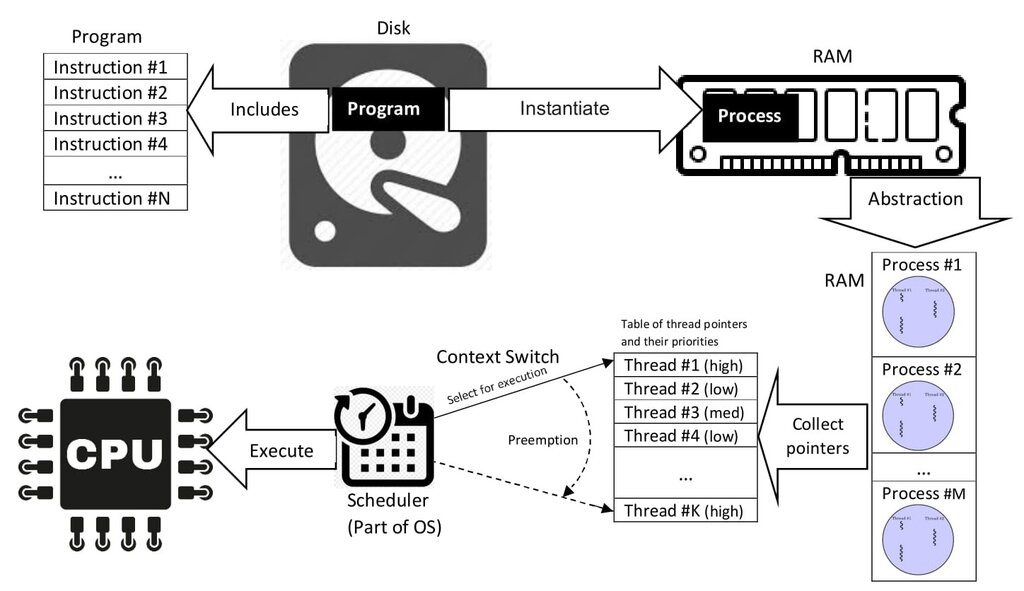
Finally, virtual memory provides crucial system stability through memory protection. The OS gives each program its own separate, isolated virtual address space. Think of it as giving each project its own private, locked workbench. One program cannot accidentally (or maliciously) peek into or alter the memory of another program or the operating system itself. If one program crashes, it doesn't bring down the entire system.
The Basic Principle
So how does the OS pull off this illusion? It breaks down the program's virtual memory space into fixed-size chunks called pages. It also divides the physical RAM into chunks of the same size, called frames.
The OS maintains a map, like a directory, that keeps track of where each page is located. Some pages might be in frames in RAM, while others are stored on the hard disk. When a program needs to access a piece of memory, the OS consults its map.
If the required page is already in a RAM frame, access is granted immediately. If it's not—an event called a page fault—the OS pauses the program, finds the page on the hard disk, loads it into an available frame in RAM (which might involve swapping out a less-used page), and then updates its map. Once the page is in RAM, the program can resume as if nothing happened.
This entire process is invisible to the program. It simply requests a memory address from its own private virtual space, and the operating system and hardware work together to translate that virtual address into a physical location, whether it's in RAM or on the disk.
Virtual storage was a big deal, he explained, because whatever the imitations of real storage on the mainframe, each program didn’t have to worry about it because the operating system gave our programs a pretty big range of seemingly contiguous addresses that were ours to use.
This clever management system allows modern computers to run large, complex applications simultaneously and securely, all while working with a finite amount of physical memory. Let's review these key ideas.
What is the primary benefit of virtual memory for a user running multiple applications?
In the context of virtual memory, a program's virtual address space is broken into fixed-size chunks called __________, which are loaded into physical RAM chunks called _________.
Understanding virtual memory is key to seeing how modern operating systems efficiently manage resources. By creating an abstract layer between programs and physical hardware, the OS provides flexibility, security, and power.