Virtual DOM vs Real DOM Explained
Real DOM Fundamentals
The Browser's Blueprint
When a web browser loads a document, it doesn't just display the HTML code you wrote. It first creates an in-memory model of the page's structure. This model is called the Document Object Model, or DOM. Think of it as a live, interactive blueprint of your webpage, organized into a tree-like structure of nodes. Every single element, attribute, and piece of text in your HTML becomes a node in this tree.
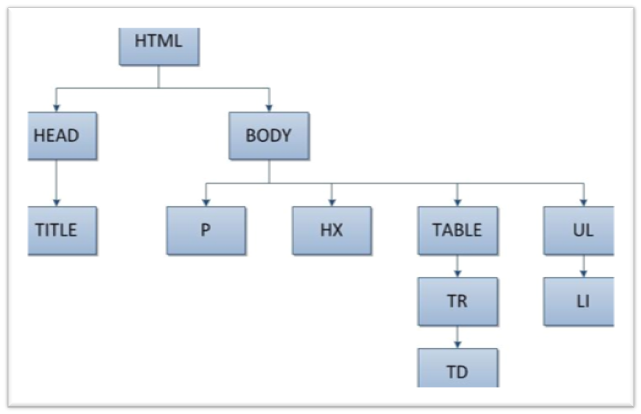
This DOM tree isn't static. It's the living representation of your page that the browser's rendering engine uses to paint the visual interface you see on the screen. Because it's a direct, one-to-one map of the user interface, we often refer to it as the Real DOM. When you use JavaScript to change something on a page—like updating text or adding an element—you are directly manipulating this underlying structure.
The DOM is the browser's internal representation of the document's HTML structure as a hierarchy of objects, which can be manipulated using JavaScript.
The High Cost of Change
Directly changing the Real DOM comes with a performance cost. Every time a node in the DOM tree is updated, added, or removed, the browser has to do some heavy lifting. It needs to figure out how that change affects the layout of other elements on the page.
This process is broken into two main stages. First is the reflow (or layout), where the browser recalculates the positions and dimensions of all affected elements. This can be as small as adjusting one element or as big as re-evaluating the entire page layout.
Following the reflow, the browser performs a repaint (or redraw). This is the actual process of drawing the updated pixels onto the screen. Changing something simple like a color might only trigger a repaint, but altering an element's size or position often triggers both a reflow and a repaint. Think of it like a domino effect: one small change can cascade into a series of recalculations and visual updates.

For simple websites, this process is lightning-fast and unnoticeable. But for complex, data-driven applications where the UI updates frequently—like a social media feed or a live data dashboard—these constant reflows and repaints can become a significant bottleneck. Each update is a relatively expensive operation, and doing hundreds or thousands of them can lead to a sluggish, unresponsive user experience. This inefficiency is the primary reason why alternative approaches, like the Virtual DOM, were created.
Now, let's test your understanding of the Real DOM.
What is the Document Object Model (DOM)?
In the context of browser performance, what is a "reflow"?
Understanding how the Real DOM works and its performance implications is crucial for appreciating why modern frameworks have developed more efficient ways to update the user interface.