Video Editing for Social Media Growth
Introduction to Video Editing
Why Video Matters
Video isn't just another type of content; it's the dominant language of social media. Think about your own scrolling habits. What grabs your attention? Chances are, it's a moving image. Videos are engaging, shareable, and incredibly effective at telling a story, explaining a product, or simply making someone laugh.
For businesses and creators, this is a huge opportunity. A well-crafted video can stop a user mid-scroll, convey a message in seconds, and create a genuine connection with your audience. It's the difference between telling someone about your brand and showing them.
A well-edited video can draw your audience’s focus to the precise moments you want them to experience—be it a witty comedic beat, a heartfelt product endorsement, or a day-in-the-life glimpse that forges a deeper personal connection with your followers.
But raw, unedited footage rarely has that magnetic pull. The magic happens in the edit. Editing is the process of selecting, arranging, and refining video clips to create a polished and compelling final product. It’s storytelling, shaping raw moments into a cohesive narrative that guides the viewer's attention and emotion.
The Editor's Toolkit
Before you can start editing, you need to know the basic vocabulary. Don't worry, there are only a few key terms to grasp at first. These are the fundamental building blocks of every video you'll ever create.
Timeline
noun
The visual workspace in editing software where you arrange your video and audio clips in sequence from beginning to end.
The timeline is your canvas. It’s a chronological map of your video, allowing you to see how all the pieces fit together. You'll drag clips, trim their length, and stack them here.
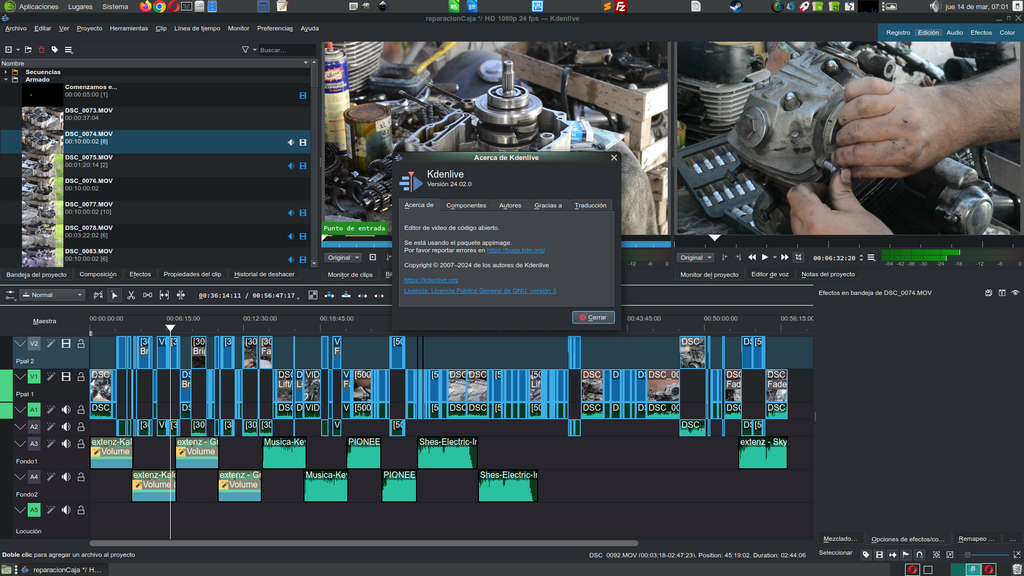
Once clips are on the timeline, you need to move between them.
Cut
noun
An instant switch from one shot to another. It's the most basic and common type of transition.
A simple cut is clean and direct. It's the workhorse of video editing, used to move the story forward without any fancy effects. Sometimes, though, you want to signal a change in time, place, or mood more explicitly. That's where other transitions come in.
Transition
noun
An effect used to move from one clip to the next. Common examples include fades, wipes, and dissolves.
A good rule of thumb for beginners: when in doubt, use a simple cut. Overusing flashy transitions can make your video look amateurish.
The Editing Process in a Nutshell
Every editing project follows a similar path, regardless of the software you use. It can be broken down into a few simple stages.
First, you ingest your media, which means importing all your raw footage, audio files, and graphics into your editing software.
Next, you create an assembly cut. This is your first draft. You lay out the best takes on the timeline in the correct order to form the basic structure of your story. Don't worry about perfect timing yet; the goal is just to get the main pieces in place.
Then comes the refining stage. Here, you trim the beginning and end of each clip with precision, add transitions, layer in music or sound effects, and place any text or graphics. This is where the video really starts to feel polished.
Finally, you export your project. This converts your work from an editable project file into a single video file, like an .MP4, that's ready to be uploaded to social media.
What is the primary purpose of video editing?
In a typical video editing workflow, what is the step that comes immediately after creating an assembly cut?
That's the core of it. By understanding these basic terms and the general workflow, you have the foundation you need to start turning your raw footage into engaging social media content.