Video Editing Essentials
Introduction to Video Editing
The Art of the Cut
Video editing is the process of taking raw video footage and turning it into a finished story. It's more than just trimming the beginning and end of a clip. Editing is where you shape the narrative, set the pace, and create the emotional impact of your video.
Video editing is where footage becomes story, where rhythm meets psychology, and where your creative fingerprint is born.
Every cut, transition, and sound effect is a choice that guides the viewer's experience. A quick succession of shots can create excitement, while a long, slow scene can build tension or allow for reflection. As an editor, your job is to assemble the pieces in a way that feels intentional and serves the story you want to tell.
From Idea to Screen
Video editing is part of a larger workflow called video production. This process is typically broken down into three distinct stages. Understanding where editing fits in helps clarify its role.
Pre-production is the planning phase. This is where you write scripts, create storyboards, scout locations, and gather all the resources you'll need.
Production is the actual filming. This is when the cameras are rolling and you capture all the footage, or raw footage, for your project.
Post-production is where the magic of editing happens. After filming is complete, you'll import your footage into editing software and begin assembling the final video. This stage includes cutting clips, adding music and sound effects, creating titles, and exporting the final product.
Essential Editing Lingo
Like any craft, video editing has its own vocabulary. Getting comfortable with these key terms is the first step toward mastering the software and techniques.
Timeline
noun
The visual interface in editing software where you arrange your video and audio clips in chronological order.
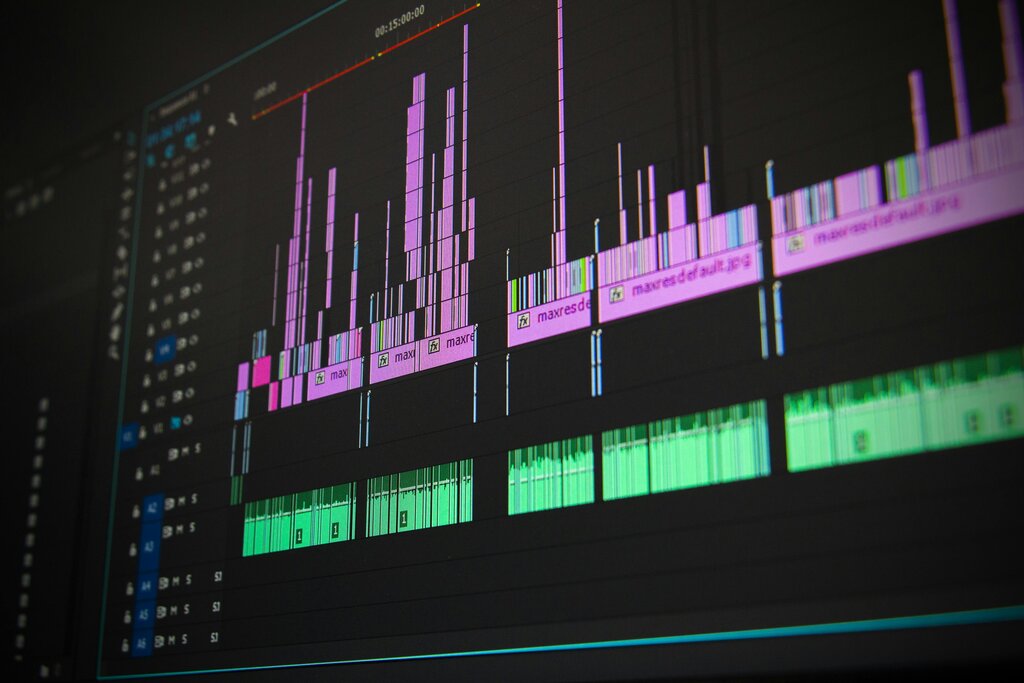
The timeline is your main workspace. It’s where you’ll do most of your work, from making simple cuts to layering complex audio tracks.
Clip
noun
A segment of video or audio footage. When you import a video file, it appears as a clip in your project.
Think of clips as your building blocks. You'll select the best parts of your raw footage, which exist as individual clips, to construct your final video.
Cut
noun
An abrupt transition from one clip to another. It's the most basic type of edit.
A "cut" can also refer to the action of splitting a clip into two separate pieces.
Foundational Techniques
At its core, editing is about deciding what to keep and what to remove. A few basic techniques form the foundation of almost all video editing.
Cutting: This is the act of splitting a clip. You might cut to remove a mistake, create a pause for dramatic effect, or jump to a different camera angle.
Trimming: This involves shortening a clip by removing frames from the beginning or end. It's how you tighten up your edit and ensure every moment on screen is necessary.
Transitions: These are effects used to move from one clip to another. While a simple cut is the most common transition, others like fades or dissolves can be used to signal a change in time or location.
Beyond arranging clips, editing also involves layering other elements. You can add text for titles or subtitles, import music to set the mood, and adjust audio levels to make sure your sound is clear and balanced. These basic actions are the fundamentals you'll use to build any video project.
Time to review the key terms from this section.
Let's check your understanding with a quick quiz.
Which of the following correctly lists the three stages of video production in order?
In video editing software, the main workspace where you arrange clips, add music, and build your story is called the ______.
With these basics, you have a solid foundation for understanding how video editing works. The next step is to put them into practice.