Video Codecs Explained
Introduction to Video Compression
The Magic of Shrinking Video
A single minute of uncompressed high-definition video can take up gigabytes of space. If you recorded a 10-minute video on your phone without compression, it could easily fill up the entire storage. So how can we stream hours of movies or upload videos in seconds?
The answer is video compression. It's the process of making video files smaller by cleverly removing data. Think of it as packing a suitcase. Instead of throwing clothes in randomly, you fold them neatly and use vacuum-sealed bags to fit more in. Compression does something similar for the pixels in a video.
A codec, which stands for coder-decoder, is a software used to compress and decompress video files.
The software that performs this magic is called a codec, short for coder-decoder. The coder part squishes the video down to a manageable size, and the decoder part unpacks it when you're ready to watch.
Finding and Removing Repetition
Video compression works by targeting redundancy, which is just a fancy word for repeated information. There are two main kinds of redundancy in video.
Spatial redundancy exists within a single frame. Imagine a shot of a clear blue sky. A huge portion of the frame is made up of pixels that are the exact same shade of blue. Instead of storing the color value for every single one of those pixels, a codec can just say, "This whole area is blue." That saves a lot of space.
Temporal redundancy exists between consecutive frames. Think about a video of someone talking in front of a wall. From one frame to the next, the wall doesn't change at all. The only things moving are the person's mouth and maybe their eyes. A codec can take advantage of this by only recording the parts of the image that change, like the moving lips, and telling the video player to just keep showing the same background.
Two Flavors of Compression
There are two main strategies for compressing data: lossless and lossy.
Lossless compression is like a perfect vacuum seal. When you decompress the file, you get back every single bit of the original data, exactly as it was. It's great for text files or computer programs where a single missing bit could ruin everything. The trade-off is that the file size reduction is modest.
Lossy compression is more aggressive. It permanently throws away information that it deems unimportant. For video, this often means discarding subtle details or color variations that the human eye is unlikely to notice. This results in dramatically smaller files, but it also means you can never get back the original, perfect-quality video. Most video you watch online uses lossy compression.
| Feature | Lossless Compression | Lossy Compression |
|---|---|---|
| Data Integrity | All original data is preserved. | Some data is permanently discarded. |
| File Size | Moderate reduction. | Significant reduction. |
| Best For | Archiving, medical images, data where perfect accuracy is critical. | Streaming video, online media, situations where file size is a priority. |
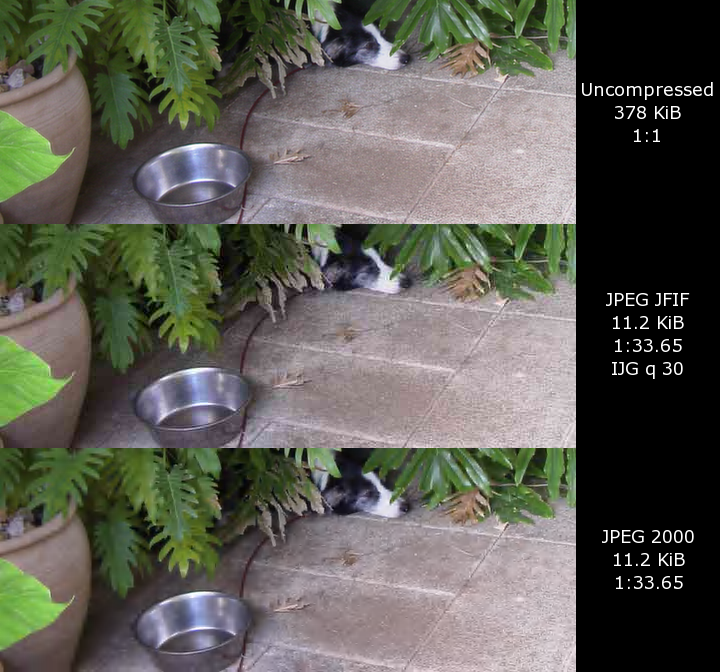
The goal is to find a balance. Codecs use lossy compression to shrink the file enough for easy storage and streaming, but without degrading the quality so much that it becomes a blurry, blocky mess. It's a constant trade-off between file size and visual fidelity.
What is the primary purpose of video compression?
The software responsible for compressing and decompressing a video is called a codec.