UXUI Design Fundamentals
Introduction to UX and UI
The Feeling and The Look
Have you ever used an app that just felt right? Everything was easy to find, the steps made sense, and you accomplished your goal without any frustration. Now, think of an app that made you want to throw your phone across the room. The buttons were confusing, you couldn't find the menu, and the whole experience was a headache.
This difference between a great experience and a terrible one is where User Experience (UX) design comes in. It's all about the overall feeling a person has when they interact with a product.
User Experience (UX)
noun
The overall experience a person has when using a product or service, especially in terms of how easy or pleasing it is to use.
A UX designer is like an architect for a digital product. Before anyone lays a single brick or paints a wall, the architect plans the entire structure. They think about the flow of people through the building, where the doors should go for easy access, and how the layout can best serve the building's purpose. They are focused on the foundation, the structure, and the overall usability of the space.
Similarly, a UX designer maps out the user's entire journey. They conduct research to understand what users need and what their pain points are. They create wireframes and prototypes, which are like blueprints for an app or website, to plan the logic and flow before any visual design is added.

UX design is not about how it looks, but about how it works and feels. It's the invisible structure that makes a product intuitive.
Making it Look Good
While UX focuses on the overall feel and structure, User Interface (UI) design is about what the user actually sees and interacts with. This includes all the visual and interactive elements of a product. If UX is the architecture of a house, UI is the interior design: the color of the walls, the style of the furniture, the light fixtures, and all the little details that make the space visually appealing and functional to live in.
User Interface (UI)
noun
The visual parts of a computer application or operating system through which a user interacts with a device or software.
A UI designer decides on the color schemes, the fonts, the spacing between elements, and the look of the buttons and icons. They are responsible for creating a consistent visual language that guides the user through the experience that the UX designer has mapped out. They translate the structural blueprints (wireframes) into a polished, attractive, and tangible product.
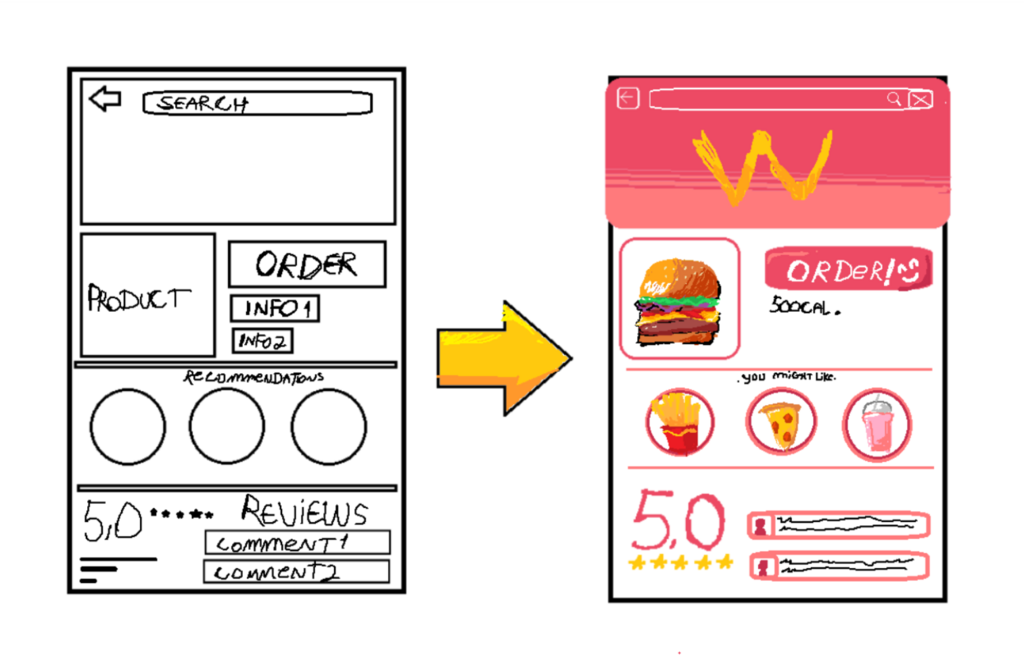
Designers can influence how users interact with the digital product, from the colours of the buttons to the order of information on the page.
Putting It All Together
So, what’s the real difference? It’s a common point of confusion, but the distinction is clear once you see how they relate. A product can look beautiful (good UI) but be difficult to use (bad UX). For example, imagine a beautifully designed teapot with the spout and handle on the same side. It might look like a piece of art, but it's completely impractical.
Conversely, a product can be very usable (good UX) but look dated or unappealing (bad UI). Think of an old website that works perfectly but looks like it was made in the 1990s. It gets the job done, but the experience isn't enjoyable.
| Feature | User Experience (UX) | User Interface (UI) |
|---|---|---|
| Focus | The overall journey and feel | The visual look and interaction |
| Goal | Make the product useful and usable | Make the product beautiful and intuitive |
| Analogy | The blueprint of a house | The interior design and decor |
| Process | Research, prototyping, testing | Visual design, branding, graphic development |
UX and UI are not competing fields; they are two sides of the same coin. They are deeply intertwined and must work together to create a successful product. UX design typically comes first in the process, laying the groundwork for the user journey. Then, UI design builds upon that foundation to create the visual and interactive experience.
Without good UX, a beautiful interface is just a pretty picture that doesn’t work well. Without good UI, a perfectly functional product can feel boring and uninspiring. The best digital products are the ones where you don’t even notice the design because everything just works seamlessly.
Ready to test your knowledge? Let's see what you've learned about the fundamental differences and relationship between UX and UI design.
If UX design is compared to the architectural blueprint of a house, what is UI design analogous to?
Which of the following is a primary responsibility of a UX designer?
Understanding the roles of UX and UI is the first step in appreciating the thought and effort that goes into the apps and websites we use every day. Both are essential for creating products that people love to use.