UX Design Strategy and Practical Application
Synthesis Strategy
From Data to Direction
You've finished the interviews, collected the survey responses, and watched the usability tests. Now you have a mountain of raw data: quotes, observations, and metrics. This is where the real work of a UX researcher begins. It’s not about collecting data; it's about making sense of it. This process is called synthesis.
Synthesis is the bridge from fragmented information to a clear, cohesive narrative. It’s how we transform what users said into a deep understanding of what they actually need. Without this step, you're just guessing. With it, you build a solid foundation for every design decision that follows.
Synthesis integrates information from multiple sources, which shows that you have done the necessary research to engage with a topic more fully.
Organizing the Chaos with Coding
The first step in making sense of qualitative data is coding. In this context, coding isn't about programming. It's the practice of applying short, descriptive labels or tags to individual pieces of data, like a user quote or a specific observation. A quote about struggling to find the checkout button might be coded as "checkout friction" or "navigation confusion."
This process helps you break down large amounts of text into smaller, manageable chunks that can be sorted and compared. There are two primary approaches to coding.
| Approach | Description | Best For |
|---|---|---|
| Inductive Coding | Bottom-up. You start with the data itself, without preconceived notions. As you read, you create codes and themes that emerge directly from what you see. | Exploratory research, when you're not sure what you'll find. |
| Deductive Coding | Top-down. You start with a list of codes based on existing research questions, hypotheses, or a known framework. Then you look for evidence of these codes in your data. | Validating a hypothesis or when research is focused on specific areas. |
Often, you’ll use a mix of both. You might start deductively with codes for known issues but use inductive coding to capture unexpected themes that arise.
Over time, your collection of codes forms a taxonomy, which is a hierarchical system for classifying your data. This taxonomy becomes the shared language your team uses to talk about user needs and experiences. It’s the backbone of your research insights.
Finding Patterns with Affinity Mapping
Once you have your coded data, how do you find the patterns? The most common and effective method is affinity mapping, also known as affinity diagramming. It's a physical or digital exercise that helps you cluster related findings to reveal larger themes.
The process is straightforward. Each coded piece of data—a quote, an observation, a pain point—is written on a separate note. Then, you and your team start grouping the notes that feel related. You don't name the groups at first; you just let the natural relationships in the data guide you.
Once the clusters are formed, you discuss why these notes belong together and give each group a name that captures its essence. These group names are your key themes. What starts as a wall of chaotic notes slowly organizes itself into a clear map of your users' world.
This process is powerful because it helps distinguish between surface-level wants and latent needs. A user might say, "I want a bigger search bar." That's a want, or a 'fashion'. But when you cluster that note with others about difficulty finding information, the real theme emerges: "Users lack confidence in finding what they need." This is the latent need, the deeper 'trend'. Designing for the need, not just the want, leads to more impactful solutions.
Creating a Single Source of Truth
The final output of your synthesis shouldn't be a slide deck that gets presented once and forgotten. To make research a continuous part of the design process, you need to build a research repository.
A research repository is a centralized database for all your research data and insights. Think of it as a library for user knowledge. It contains raw data (like interview transcripts), coded findings, and the synthesized insights or themes you've identified. It’s a living system, not a static report.
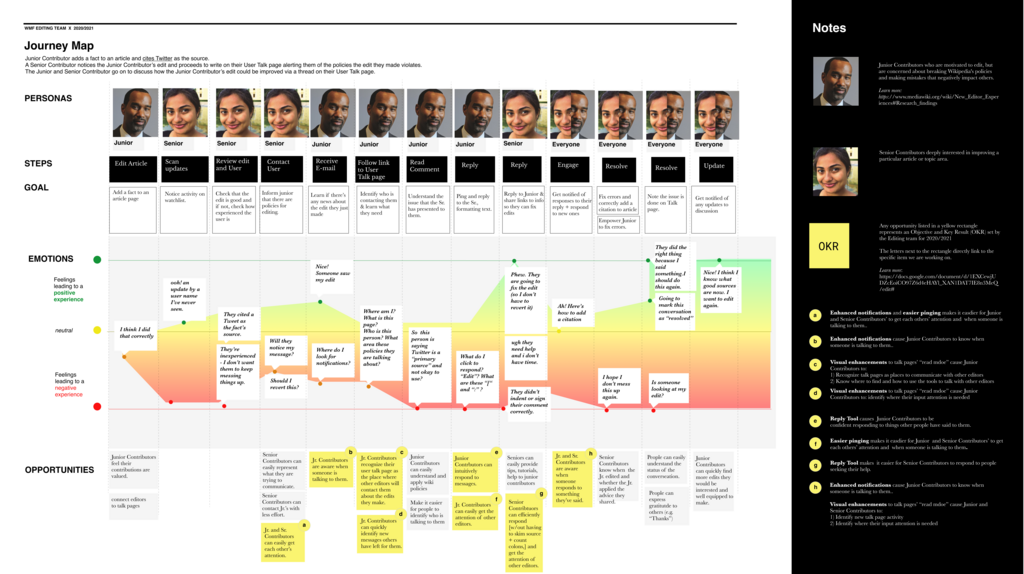
By tagging all your insights using your taxonomy, you make them searchable and discoverable for the entire organization. A product manager can search for all findings related to "onboarding," or an engineer can look up insights about "performance frustration." This has several key benefits:
- It prevents research from being wasted. Insights are findable and reusable, not locked in a report.
- It democratizes knowledge. Anyone in the company can access user insights to make better decisions.
- It reveals trends over time. As you add more research, you can see how user needs evolve.
Building this repository makes your research a durable asset. It becomes the single source of truth for understanding your users, ensuring that their voice is present in every decision your team makes.
In the context of UX research, what is synthesis?
A user states, "I wish this app had a dark mode." During synthesis, your team groups this with other comments about eye strain and using the app at night. What is the underlying 'latent need'?
Synthesizing research is a skill that transforms raw data into a strategic advantage. By coding your findings, using affinity mapping to see the big picture, and storing everything in a repository, you ensure that the user is at the center of your product's evolution.