Unity Compute Shaders Unleashed
Introduction to Compute Shaders
Beyond Graphics
Think of a Graphics Processing Unit (GPU) and you probably picture stunning game visuals. Traditionally, GPUs have one main job: rendering. They run small programs called shaders to figure out the shape of 3D models (vertex shaders) and the color of each pixel on your screen (fragment shaders). But what if you could use that massive processing power for something other than graphics?
That's where compute shaders come in. A compute shader is a program you write that runs on the GPU, but its goal isn't to draw something. Instead, it's designed for general-purpose computation. It lets you tap into the GPU's unique architecture to perform a huge number of calculations all at once.
Compute shaders allow you to use the GPU for high-speed, parallel calculations that have nothing to do with rendering triangles and pixels.
The key advantage is parallel processing. A Central Processing Unit (CPU) is like a master chef who can perform complex, sequential tasks very quickly. A GPU, on the other hand, is like an army of kitchen assistants. Each assistant can only follow simple instructions, but you have thousands of them working simultaneously. If you need to chop 10,000 onions, the army of assistants will finish the job much faster than the single master chef.
CPU vs GPU
CPUs are built for serial processing. They have a few extremely fast and versatile cores that handle the main logic of a program, one instruction after another. This is great for decision-making and tasks that depend on the result of a previous step.
A GPU is different. It contains hundreds or thousands of smaller, simpler cores. They aren't as flexible as CPU cores, but they excel at performing the same operation on large sets of data at the same time. This is what makes them perfect for graphics, where the same lighting and color calculations must be applied to millions of pixels. Compute shaders let us use this same power for non-graphics tasks.
| Feature | CPU (Central Processing Unit) | GPU (Graphics Processing Unit) |
|---|---|---|
| Core Design | Few, powerful, complex cores | Many, simple, specialized cores |
| Best For | Sequential tasks, complex logic | Parallel tasks, repetitive calculations |
| Analogy | A master chef | An army of kitchen assistants |
This makes compute shaders ideal for problems that can be broken down into many small, independent pieces. Think of simulating the behavior of thousands of birds in a flock, calculating physics for a complex particle system, or processing a large texture in real-time. A CPU would have to loop through each bird or particle one by one. A GPU can handle thousands of them in parallel, providing a massive performance boost.
Using Compute Shaders in Unity
To use compute shaders in Unity, your target hardware needs to support them. Thankfully, most modern GPUs and even many mobile devices have this capability. You'll need a graphics card that supports DirectX 11 / OpenGL 4.3 or higher, or Metal for Apple devices. Unity itself has supported compute shaders for many years, so any recent version of the editor will work just fine.
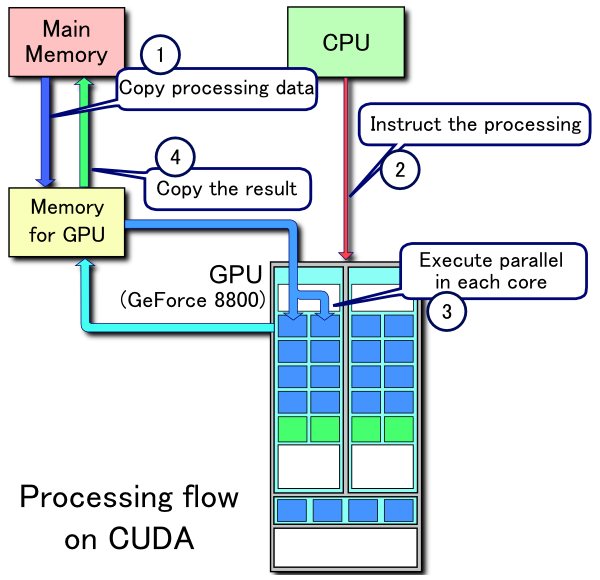
While we won't get into the code here, the basic idea is you write a compute shader asset and then use a C# script to dispatch it. This script prepares the data, sends it to the GPU, tells the GPU to run the compute shader, and then retrieves the results when it's done.
Common use cases for compute shaders in games include procedural generation, complex physics simulations, AI flocking behavior, and real-time image processing.
Let's review the key ideas before moving on.
Now, check your understanding of these concepts.
What is the primary purpose of a compute shader?
Which analogy best describes the difference in processing style between a CPU and a GPU?
By offloading heavy, parallelizable work to the GPU, compute shaders unlock a new level of performance for complex systems in your games and applications.