Understanding the Memory Wall
Introduction to Computer Architecture
What's Inside a Computer?
Computers seem magical. They let us work, play, and connect with people across the globe. But underneath the sleek screens and glowing keyboards, most computers share a common, elegant design that's been around for decades. This fundamental blueprint is called the von Neumann architecture.
The core idea is simple: a computer should store its instructions and the data those instructions use in the same memory. This means the computer can treat its to-do list (the program) just like any other piece of information, opening up a world of flexibility.
The von Neumann Blueprint
This architecture breaks a computer down into three main parts: the Central Processing Unit (CPU), Memory, and Input/Output (I/O) systems. Think of it like a chef in a kitchen.
The CPU is the chef—the brains of the operation. It reads the recipe (the program instructions) and prepares the food (processes the data).
The Memory is the countertop. It’s where the chef keeps ingredients (data) and the cookbook (program) close at hand for quick access. Everything the CPU is working on right now is stored here.
The Input/Output (I/O) system is how the kitchen communicates with the world. Input is like getting a food order (from a keyboard or mouse), and output is like sending the finished dish to the customer (on a screen or to a printer).
The Brains of the Operation
Let's look closer at the CPU. It's an incredibly complex piece of engineering, a tiny city of billions of transistors. You can think of it as having two key departments that work together.
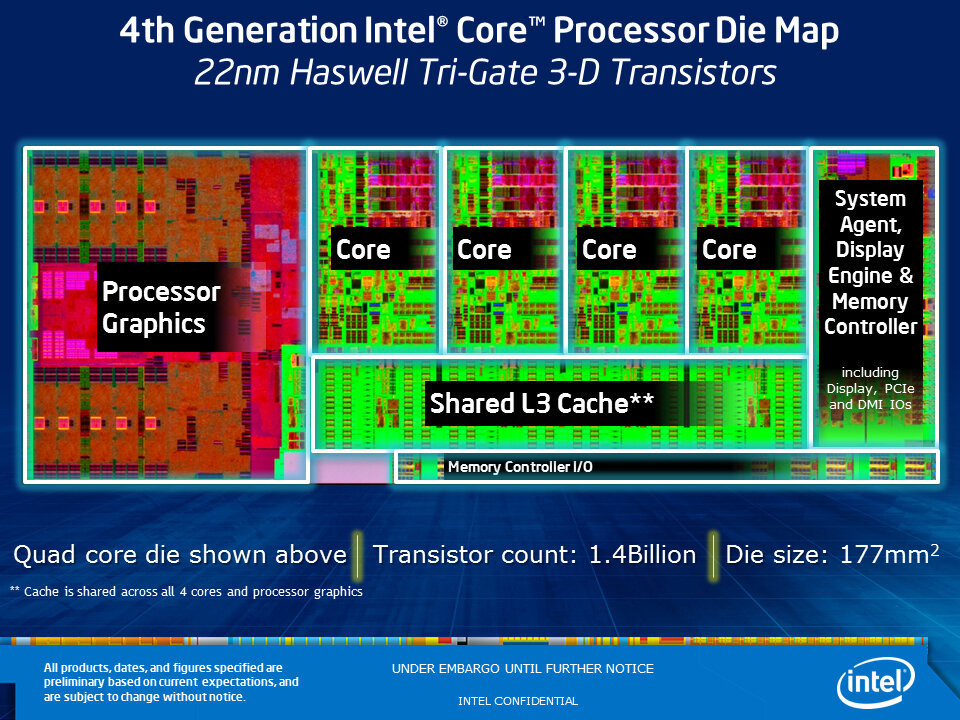
First is the Arithmetic Logic Unit (ALU). This is the CPU's calculator. It performs all the math, like addition and subtraction, and makes logical comparisons, like checking if one number is greater than another. All the complex things a computer does, from rendering a video to calculating a spreadsheet, are built from these simple operations performed at lightning speed.
Second is the Control Unit (CU). If the ALU is the calculator, the CU is the operator. It fetches instructions from memory, decodes them, and directs the other parts of the computer to carry them out. It acts like a traffic cop, managing the flow of data between the CPU, memory, and I/O devices to ensure everything happens in the right order.
The CPU also contains a small amount of extremely fast memory called registers. These are like tiny, personal scratchpads for the ALU, holding the specific numbers it's working on at any given moment.
A Hierarchy of Memory
Just like you have different places to store things in real life—a pocket for your keys, a desk for your papers, and a garage for your car—computers have different types of memory. This is called the memory hierarchy, and it's all about balancing speed, size, and cost.
At the very top are the CPU registers. They are the fastest and smallest, holding only the data the CPU is actively manipulating.
Next comes cache memory. This is a small, fast buffer between the CPU and the main memory. The computer tries to guess what data the CPU will need next and preloads it into the cache. This way, the CPU doesn't have to wait for the slower main memory.
Below that is RAM (Random Access Memory). This is the computer's main workspace. When you open an application, it gets loaded from your hard drive into RAM. It's much larger than cache but also slower. When you turn off the computer, everything in RAM is forgotten.
Finally, at the bottom, is long-term storage, like a Solid State Drive (SSD) or Hard Disk Drive (HDD). This is where your files, applications, and operating system are kept permanently. It's the largest and slowest level of the memory hierarchy.
This tiered system is a clever trick. By keeping the most frequently used data in the fastest memory, the computer can operate much more quickly than if it had to fetch everything from slow storage all the time.
Talking to the World
The computer would be useless if it couldn't interact with us or other devices. This is the job of the Input/Output (I/O) systems. These are the computer's senses and its voice.
| Type | Direction | Examples |
|---|---|---|
| Input | Into the PC | Keyboard, Mouse, Webcam, Mic |
| Output | Out of the PC | Monitor, Printer, Speakers |
| Both | In and Out | USB Drive, Network Card, Touchscreen |
I/O devices connect to the computer through ports and are managed by the operating system. When you press a key on your keyboard, a signal is sent to the computer, processed by the CPU, and the character appears on your screen. This seamless loop—from input device, to CPU and memory, to output device—is what makes interaction possible.
Together, the CPU, memory, and I/O systems, all following the von Neumann blueprint, form the foundation of almost every computing device you use.
In the analogy of a computer as a kitchen, what does the countertop represent?
Which part of the CPU is responsible for performing mathematical calculations and logical comparisons?
These core concepts are the building blocks for understanding how software runs and how computers are designed.