Understanding PCIe High-Speed Cables and Connectors
PCIe Overview
The Computer's Superhighway
Modern computers are packed with powerful parts, from the main processor (CPU) to the graphics card (GPU) and super-fast storage drives. For all these components to work together, they need a way to communicate quickly and efficiently. That's where Peripheral Component Interconnect Express, or PCIe, comes in. Think of it as a private, multi-lane superhighway system built directly onto the motherboard, allowing different parts to exchange massive amounts of data at incredible speeds.
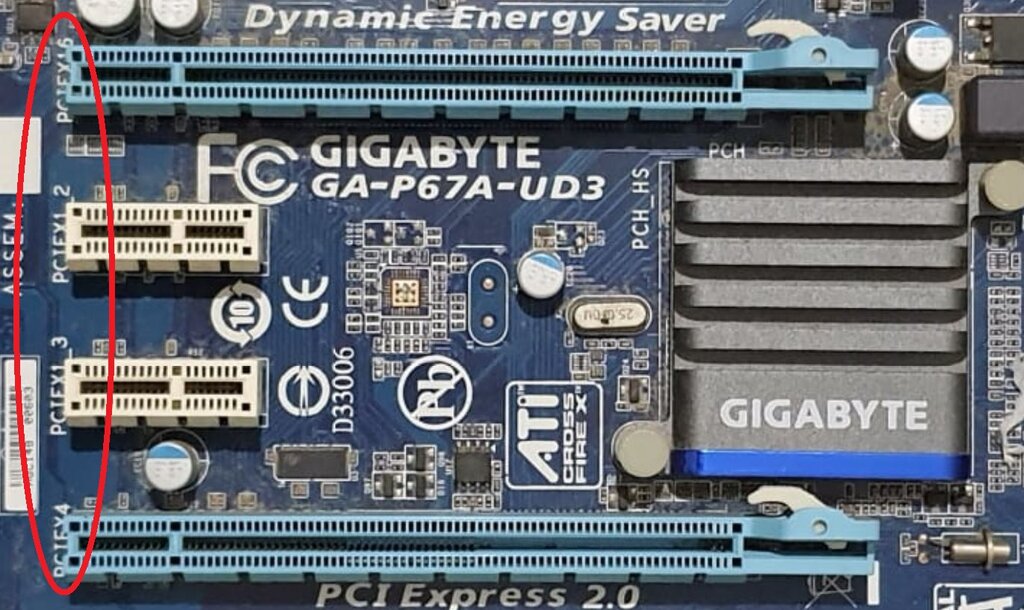
PCIe is the standard interface for connecting high-performance components. When you plug in a graphics card, a network card, or an NVMe solid-state drive, you're using a PCIe slot. This direct connection allows devices to talk to the CPU with minimal delay, which is critical for everything from gaming to complex scientific calculations.
From Shared Roads to Private Lanes
Before PCIe, computers relied on older standards like PCI and AGP. The original PCI (Peripheral Component Interconnect) was revolutionary for its time, but it had a major limitation: it was a shared bus. All connected devices had to share the same data pathway, like cars on a single-lane road. If one device was using the bus, others had to wait their turn, creating a bottleneck that slowed the whole system down.
To solve the specific needs of graphics, the AGP (Accelerated Graphics Port) was created. It gave the graphics card its own dedicated, faster connection, but it was a one-trick pony. It only worked for graphics, and other components were still stuck on the old, slow PCI bus.
PCIe replaced both. It provides a dedicated, high-speed point-to-point connection for every device, eliminating the traffic jams of a shared bus.
This new approach brought several key advantages:
| Feature | Advantage |
|---|---|
| Speed | Massively increased data transfer rates compared to PCI. |
| Point-to-Point Link | Each device gets its own dedicated connection, so they don't compete for bandwidth. |
| Scalability | Bandwidth can be adjusted based on a device's needs using a system of lanes. |
| Hot Swapping | In some systems (mostly servers), devices can be added or removed without powering down. |
Understanding Lanes
The key to PCIe's flexibility is the concept of lanes. A single PCIe lane consists of two pairs of wires: one pair for sending data and one pair for receiving data. This allows for two-way communication at the same time. A device's connection is defined by the number of lanes it uses, written as x1, x2, x4, x8, x16, or x32.
More lanes mean more bandwidth, just like a 16-lane highway can carry more traffic than a 1-lane road. A high-performance graphics card needs the maximum bandwidth, so it uses an x16 slot. A simpler device, like a Wi-Fi card or a sound card, might only need an x1 or x4 connection.
The Three-Layer System
To manage the complex job of moving data, the PCIe standard is broken down into a layered architecture. Each layer has a specific responsibility, working together to ensure data gets from point A to point B reliably.
You can think of it like sending a package. You have a layer for writing the contents, a layer for addressing and tracking it, and a layer for physically transporting it.
-
Transaction Layer: This is the top layer. It takes requests from the device's software and assembles them into data packets. It's like writing a letter and deciding what information needs to go inside the envelope.
-
Data Link Layer: This middle layer acts as a quality control manager. It takes the packets from the Transaction Layer and adds sequence numbers and error-checking codes. This ensures that packets arrive in the correct order and aren't corrupted during transit. If an error is detected, this layer requests a re-transmission.
-
Physical Layer: This is the hardware layer. It includes the actual lanes (wires on the motherboard) and the circuitry that transmits the data packets as electrical signals across the PCIe link. It's the delivery truck and the road it drives on.
What was the primary limitation of the older PCI standard that PCIe was designed to overcome?
In the context of PCIe, what does the term 'lane' refer to?
This layered, lane-based system makes PCIe a powerful and versatile standard that has become the backbone of modern computer hardware communication.