Understanding Digital Files
Introduction to Files
The Digital Container
At its core, a computer file is a named collection of data. Think of it as a digital container. Just as you might put a letter in a manila folder and label it, a computer groups related information into a file and gives it a name. This container holds data that persists even after you turn off the power. Without files, every time you shut down your computer, all your work, photos, and applications would vanish.
Files are the fundamental unit of storage that operating systems use to manage data on devices like hard drives, solid-state drives, and USB sticks. They provide a necessary abstraction. Instead of worrying about the specific physical locations on a disk where data is stored—the tracks, sectors, and magnetic charges—we interact with simple, named entities like resume.docx or vacation_photo.jpg.
Why Files Matter
The primary purpose of files is to ensure data persistence. Programs and the data they work with reside in volatile memory (RAM) while the computer is on. This memory is fast but temporary. Files allow us to save this information to non-volatile storage, making it permanent and accessible for later use.
Files also impose order on chaos. A modern computer can store trillions of bytes of data. Without a way to organize it, finding anything would be impossible. Files break this massive amount of data into manageable, discrete chunks. By naming and grouping them into directories (or folders), we create a logical structure that makes sense to us, separate from the complex physical layout of the storage medium.
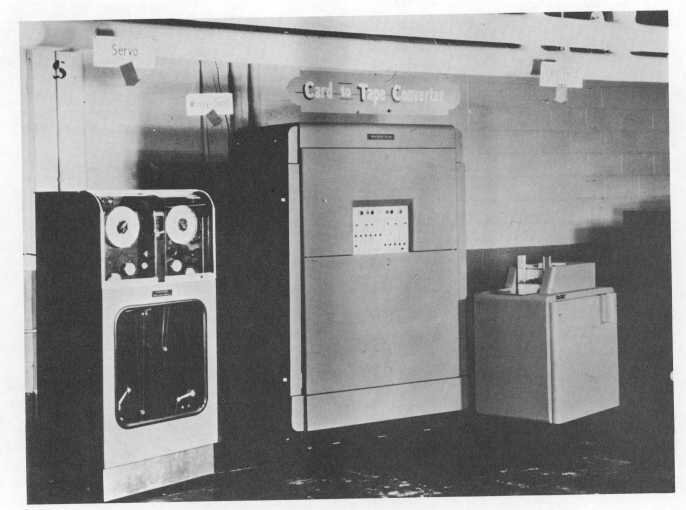
The concept evolved significantly from early computing. Initially, data was stored on punched cards or long reels of magnetic tape. These formats were sequential; to get to a piece of data in the middle of a tape, you had to read through everything that came before it. There wasn't a distinct, named "file" in the way we think of it now, but rather sequences of records.
The introduction of disk storage in the 1950s was a game-changer. Disks allowed for direct access, meaning the computer could jump to any location on the disk almost instantly. This capability paved the way for modern file systems, where data could be organized into discrete, named files that could be created, read, modified, and deleted independently of one another.
Core Characteristics
Every file is more than just the data it holds. It also has a set of properties, or metadata, that the operating system uses to manage it. This information is stored separately from the file's contents but is intrinsically linked to it.
metadata
noun
Data that provides information about other data. In the context of files, it describes attributes like the file's name, size, and creation date, rather than the content of the file itself.
Some of the most common attributes include:
| Attribute | Description |
|---|---|
| Name | The human-readable identifier you see, like report.pdf. |
| Identifier | A unique number the system uses internally to track the file (e.g., an inode number). This is hidden from the user. |
| Location | The path that specifies where the file is stored within the directory hierarchy. |
| Size | The amount of storage space the file's contents occupy, usually measured in bytes. |
| Timestamps | Dates and times marking when the file was created, last modified, and last accessed. |
| Ownership | Information about which user and group owns the file. |
| Permissions | Rules that define who can read, write to, or execute the file. |
These characteristics are crucial for the operating system to perform its functions, from displaying files in a folder to ensuring that only authorized users can access sensitive information. They transform a raw sequence of bits on a disk into a useful, manageable resource.