Understanding ARP Protocol
Introduction to ARP
The Two-Address Problem
Every device on a network has two important addresses, much like a person can have a name and a specific, physical mailing address.
One is the IP address (like 192.168.1.10), which identifies a device on the broader network. It's logical and can change depending on which network you join. The other is the MAC address, a unique hardware identifier burned into the network card from the factory.
MAC address
noun
Media Access Control address. A unique, permanent physical address assigned to a network interface card (NIC) by the manufacturer.
For devices to talk to each other on a local network, like your home Wi-Fi, they need to know each other's MAC addresses. An IP address tells you who to talk to, but the MAC address tells the network hardware where to send the message locally. So, how does a device find the MAC address that corresponds to a specific IP address? It can't just guess.
This is where the Address Resolution Protocol, or ARP, comes in. It acts as a translator, mapping logical IP addresses to physical MAC addresses.
How ARP Works
Imagine you're in a room full of people and you want to give a package to 'Bob,' but you don't know what he looks like. You'd probably shout, "Will the real Bob please stand up?"
ARP does something similar. When your computer (let's call it Host A) wants to send data to another device on the same local network (Host B), it follows a simple process.
- Check the Cache: Host A first checks its ARP cache, which is a small table in memory that stores recent IP-to-MAC address mappings. If it finds an entry for Host B's IP address, it uses that MAC address and communication begins. No broadcast needed.
- Send an ARP Request: If the address isn't in the cache, Host A crafts an ARP request. This is a special message broadcast to every single device on the local network. The message essentially asks, "Who has the IP address
192.168.1.7? Tell me,192.168.1.5." - Receive an ARP Reply: All devices on the network see this message. However, only the device that actually has that IP address (Host B) will respond. All other devices simply discard the request. Host B sends an ARP reply directly back to Host A (not a broadcast). This reply says, "I have
192.168.1.7, and my MAC address isBB:BB:BB:BB:BB:BB." - Update the Cache: Host A receives the reply, updates its ARP cache with the new information, and can now send its data directly to Host B's MAC address.
This process happens automatically and incredibly fast, forming the foundation of communication on local networks like Ethernet and Wi-Fi.
ARP and the OSI Model
In the OSI model of networking, IP addresses exist at Layer 3 (the Network Layer), which handles routing between different networks. MAC addresses exist at Layer 2 (the Data Link Layer), which handles communication within a single network segment.
ARP is the critical protocol that bridges these two layers. It takes a Layer 3 address (IP) and discovers the corresponding Layer 2 address (MAC), allowing data packets to be correctly framed and delivered across the physical medium.
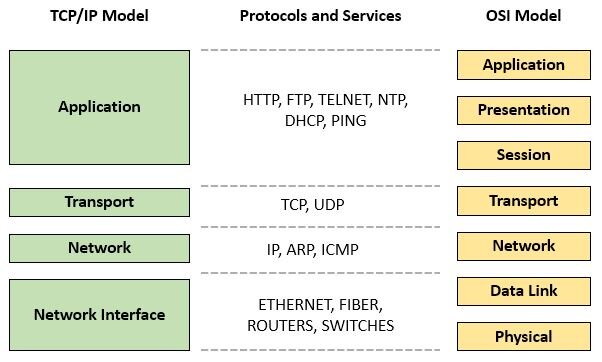
Without ARP, devices on a local network would know the IP addresses of their neighbors but would have no way to physically transmit data to them. It's a simple but essential function for nearly all network traffic.
What is the primary purpose of the Address Resolution Protocol (ARP)?
When a device needs to find a MAC address and sends out an ARP Request, that request is sent as a ______.
Now you see how devices find each other on your local network. It’s a constant, silent conversation of requests and replies that makes everything else possible.