UI Design Fundamentals
Introduction to UI Design
What is a User Interface?
Think about the last time you used an app on your phone. You tapped buttons, swiped through screens, and typed into fields. Everything you saw and interacted with—the colors, the text, the icons—is part of the user interface, or UI. It's the visual bridge between you and the technology.
User Interface
noun
The point of human-computer interaction and communication in a device, webpage, or app. It includes all controls, buttons, blocks of text, images, and other items the user sees and interacts with.
UI design is the craft of building that bridge. The goal isn't just to make something look good, although aesthetics are important. The primary objectives are to make the user's interaction as simple, efficient, and enjoyable as possible. A great UI feels intuitive. You know exactly what to do without needing a manual.
UI vs. UX
You'll almost always hear UI mentioned alongside UX, which stands for User Experience. They're related, but they aren't the same thing. If UI is the saddle, stirrups, and reins of a horse, UX is the feeling of riding the horse.
- UI Design focuses on the visual and interactive elements. It's about the look and feel, the presentation, and the interactivity of a product. A UI designer chooses the color schemes, button shapes, and font styles.
- UX Design is about the user's entire journey with the product. It covers how easy and pleasant it is to use. A UX designer is concerned with the overall logic and flow of the app's features.
Good UI is a crucial part of good UX, but it can't create it alone. A beautiful app that's confusing to navigate is an example of good UI but bad UX.
Why Good UI is Crucial
A product's interface is often the first thing a user notices. A clunky, confusing, or unattractive UI can drive people away before they even discover the product's value. First impressions matter immensely in the digital world.
A well-designed interface builds trust. It signals that the product is professional, reliable, and user-focused. It guides users effortlessly, helping them achieve their goals without frustration. This leads to higher user satisfaction, better retention, and ultimately, a more successful product.
Investing in exceptional UI/UX design isn’t just about aesthetics—it’s about creating a product that delivers real value, drives business growth, and keeps users returning for more.
A Quick History of Interfaces
User interfaces have changed dramatically over the decades. The first widely used interfaces were not visual at all.
Early computers used Command-Line Interfaces (CLIs). Users had to type specific text commands to get the computer to perform tasks. It was powerful but required memorization and was not beginner-friendly.
The next big leap was the Graphical User Interface (GUI), which introduced visual metaphors like desktops, windows, icons, and pointers. This made computers much more accessible to the general public by allowing people to point and click instead of typing commands.
Today, we're increasingly using Natural User Interfaces (NUIs). These include touchscreens, voice commands, and even gestures. The goal is to make our interactions with technology feel as natural and intuitive as interacting with the real world.

An Overview of the Process
Creating a great UI doesn't happen by accident. It follows a structured process that puts the user at the center. While methods can vary, the core stages generally include:
- User Research: Designers start by understanding the target audience. Who are the users? What are their needs, goals, and pain points? This is often part of the broader UX process but is fundamental to good UI.
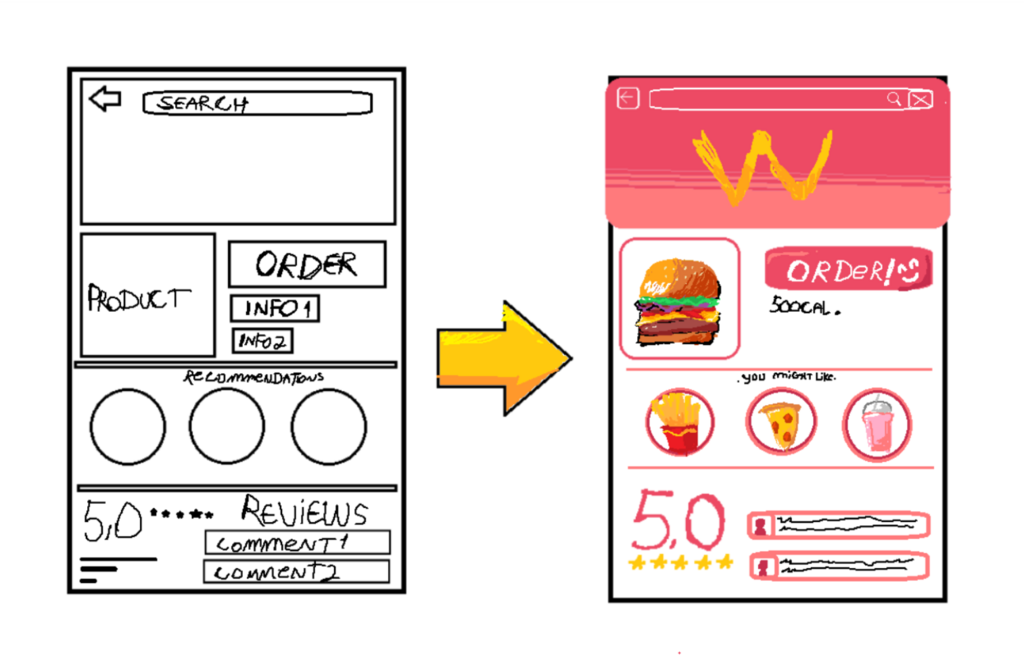
- Wireframing: Next, designers create basic blueprints of the interface. Wireframes are simple, low-fidelity layouts that focus on structure and functionality, not visual details.
- Prototyping: Designers then build interactive mockups, or prototypes. These allow stakeholders and users to click through a simulation of the product to test its flow and usability before any code is written.
- Visual Design: This is where the interface comes to life. Designers apply color schemes, typography, and imagery to create a high-fidelity, polished look and feel that aligns with the brand's identity.
- Testing: The design is tested with real users to identify any usability issues. Feedback is gathered and used to refine the interface in an iterative cycle.
Each step ensures the final design is not only beautiful but also functional, usable, and tailored to the people who will actually be using it.
Ready to test your knowledge on these foundational concepts?
What is the primary objective of User Interface (UI) design?
A product can have a visually stunning interface but still provide a poor User Experience (UX).
This introduction covers the what, why, and how of UI design at a high level. Understanding these core ideas is the first step toward creating interfaces that people love to use.