Two-Dimensional Arrays in Algorithms
Introduction to Two-Dimensional Arrays
Arrays in Two Dimensions
So far, you've worked with arrays as simple lists, a single line of items. But what happens when your data isn't a simple list? Think about a spreadsheet, a chessboard, or a tic-tac-toe board. These are grids, with rows and columns. To store this kind of data, we need a data structure that can handle two dimensions.
This is where two-dimensional arrays come in. A 2D array is essentially an array of arrays. You can think of it as a list where each item is another list. The outer array holds the rows, and each inner array holds the values for that specific row.
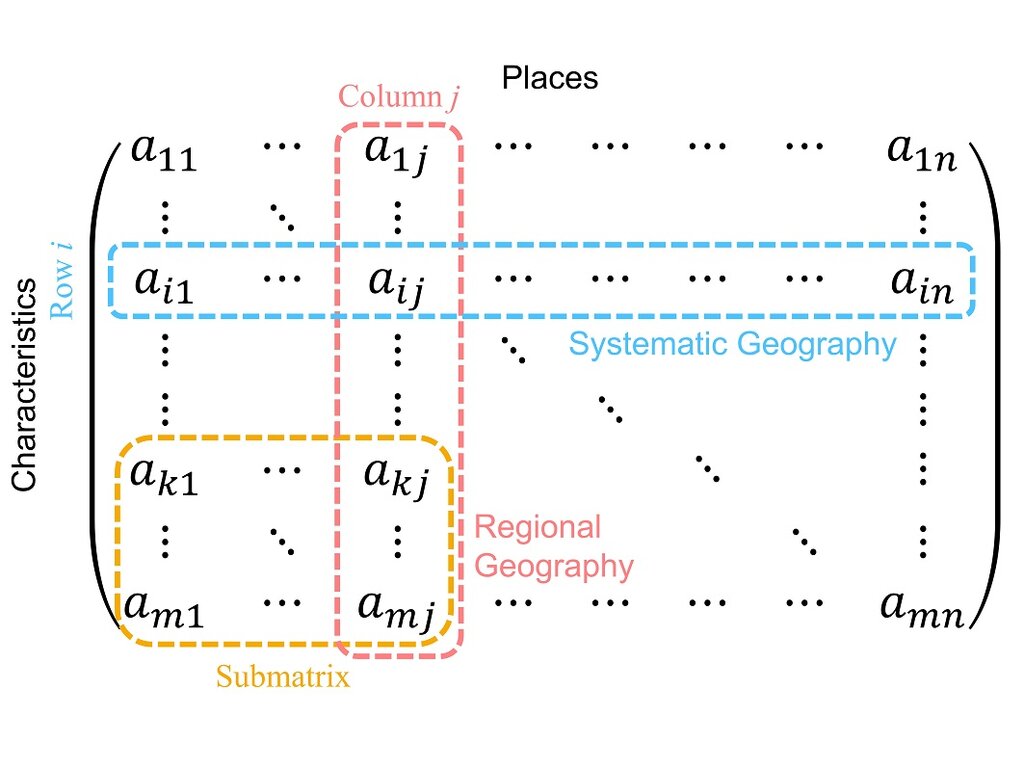
Because they have this grid-like structure, we access elements using two indices instead of one: the first for the row and the second for the column. The index for both rows and columns usually starts at 0, just like in a standard array. So, to get the element in the very first row and first column, you'd look at array[0][0].
This structure is perfect for representing anything that fits a grid. A classic example is a matrix in mathematics.
A 2x3 matrix (2 rows, 3 columns) can be stored in a 2D array. The element at the first row and second column, often written as in math, would be accessed as
matrix[0][1]in code.
Creating 2D Arrays
The syntax for creating a 2D array varies a bit by programming language, but the underlying concept of nesting arrays remains the same. Let's look at a few examples.
In Python, which uses lists to handle arrays, you can create a 2D array by creating a list of lists. The syntax is straightforward and easy to read.
# A 3x3 grid representing a tic-tac-toe board
tic_tac_toe = [
    ['X', 'O', 'X'],
    ['O', 'X', 'O'],
    ['O', ' ', 'X']
]

# Accessing the center square (row 1, column 1)
center_square = tic_tac_toe[1][1]  # This would be 'X'

print(center_square)
Java is more explicit about types and sizes. You need to declare that you're creating an array of arrays of a specific data type, like int[][] for an array of integer arrays.
// Declaring and initializing a 2x3 integer matrix in Java
int[][] matrix = {
    {5, 8, 2},
    {0, 9, 7}
};

// You can also declare an empty grid and fill it later
// This creates a 4x4 grid initialized with zeros
int[][] grid = new int[4][4];

// Accessing an element (row 0, column 2)
int element = matrix[0][2]; // This would be 2
C++ has a similar syntax to Java for initializing a 2D array with values. When declaring an empty one, you must specify the dimensions.
#include <iostream>

int main() {
    // Declaring and initializing a 3x2 matrix in C++
    int matrix[3][2] = {
        {10, 20},
        {30, 40},
        {50, 60}
    };

    // Accessing an element (row 2, column 0)
    int element = matrix[2][0]; // This would be 50

    std::cout << element;
    return 0;
}
Regardless of the language, the core idea is the same. You have one container (the outer array) that holds other containers (the inner arrays), giving you the rows and columns needed to represent structured data.
Now, let's test your understanding of these fundamental concepts.
What is the fundamental structure of a two-dimensional (2D) array?
In a typical programming language where array indexing starts at 0, how would you access the element located in the 3rd row and 4th column of a 2D array named grid?
Getting comfortable with 2D arrays is a key step in managing more complex data.