The YouTube Phenomenon
YouTube Basics
What is YouTube?
YouTube is a massive online video library where you can find content on almost any topic imaginable. From cooking tutorials and music videos to university lectures and news reports, it’s a place for people to watch, share, and create videos. Think of it as a global stage where anyone with a camera can share their voice and a library where you can learn about anything that sparks your interest.
The platform’s goal is to give everyone a voice and show them the world. Whether you're looking for entertainment, education, or a sense of community, you'll likely find it here.
Finding Your Way Around
When you first visit YouTube, the layout can seem busy, but it’s organized around a few key areas. The most important tool is the search bar at the top of the page. This is your gateway to finding specific videos. Just type in what you're looking for, and YouTube will show you the most relevant results.
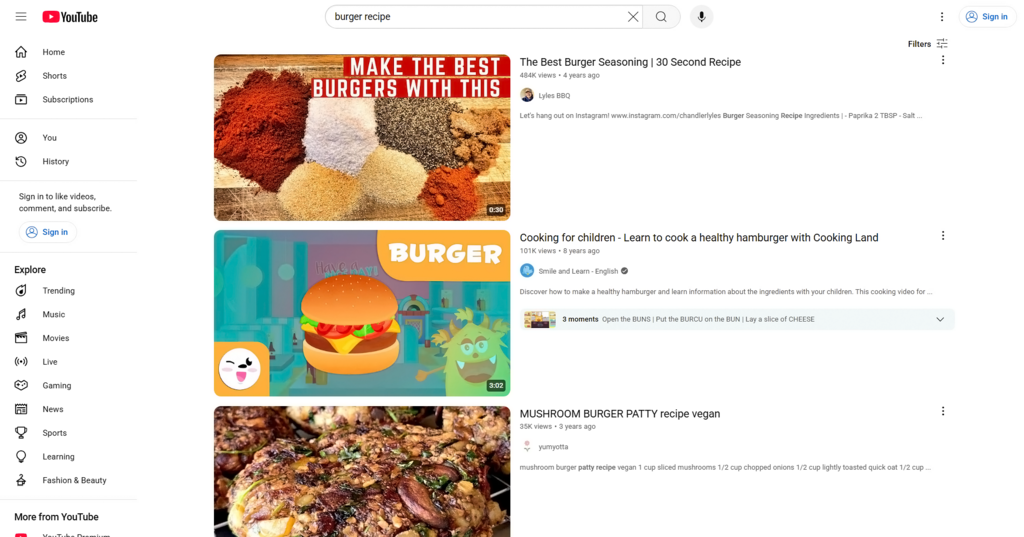
Your homepage is a personalized feed of videos YouTube thinks you'll like based on what you've watched before. On the left side (or bottom on mobile), you'll see links to your Subscriptions, which shows new videos from channels you follow, and your Library, which keeps track of your watch history and playlists.
The more you watch, the better YouTube gets at recommending videos you’ll enjoy.
Your Personal YouTube Experience
Watching YouTube without an account is possible, but creating one unlocks the platform's best features. A YouTube account is the same as your Google account, so if you use Gmail, you're all set. Logging in allows you to save your history, create playlists, and, most importantly, subscribe to channels.
A channel is a creator's home on YouTube. It's where they upload all their videos. When you find a creator you like, you can hit the "Subscribe" button on their channel page or below any of their videos. Subscribing is free, and it's the best way to keep up with new content from your favorite creators. New videos from channels you're subscribed to will appear in your Subscriptions feed.
Interacting with videos also shapes your experience. Giving a video a "Like" tells YouTube you enjoyed it, which helps the algorithm recommend similar content. Leaving a comment allows you to join the conversation with the creator and other viewers. Sharing a video is a simple way to send it to friends or post it on other social media platforms.
Successful YouTube video promotion starts with understanding how the platform works.
All of these actions—watching, liking, subscribing, and commenting—feed into YouTube's recommendation system. The platform pays attention to your activity to build a homepage feed that's tailored just for you. This helps you discover new channels and videos that align with your interests, making each visit a unique experience.
Ready to check your understanding?
What is the primary function of the 'Subscribe' button on YouTube?
If your YouTube homepage is filled with videos about classic cars, what is the most likely reason?
Now that you know how to navigate YouTube, you can start exploring the endless library of content and personalizing your experience.