The OSI Model in Practice
Introduction to OSI Model
A Standard for Talking
Imagine two people who speak different languages and come from different cultures. For them to have a meaningful conversation, they need a set of rules. Maybe they use a translator, or agree on specific hand gestures. Without a shared system, communication breaks down.
Computers face a similar problem. In the early days of networking, a computer made by one company couldn't easily talk to a computer made by another. Each had its own proprietary way of doing things. To solve this, the International Organization for Standardization (ISO) developed a universal framework.
OSI Model
noun
A conceptual framework that standardizes the functions of a network into seven distinct layers. OSI stands for Open Systems Interconnection.
The OSI model isn't a piece of hardware or software. It's a blueprint. It breaks down the enormous, complex task of sending information from one computer to another into seven smaller, more manageable parts. Each part is called a layer, and each layer has a specific job to do.
Think of it as a recipe for network communication, with seven distinct steps.
The Seven Layers
When you send an email or load a webpage, the data on your computer travels down through these seven layers. It gets packaged and prepared for its journey across the network. At the receiving computer, the data travels back up the same seven layers, getting unpacked at each step until it's ready for the user.
This layered approach makes everything much simpler. Each layer only has to worry about its own specific task and how to talk to the layers directly above and below it. It doesn't need to know the details of what the other layers are doing.
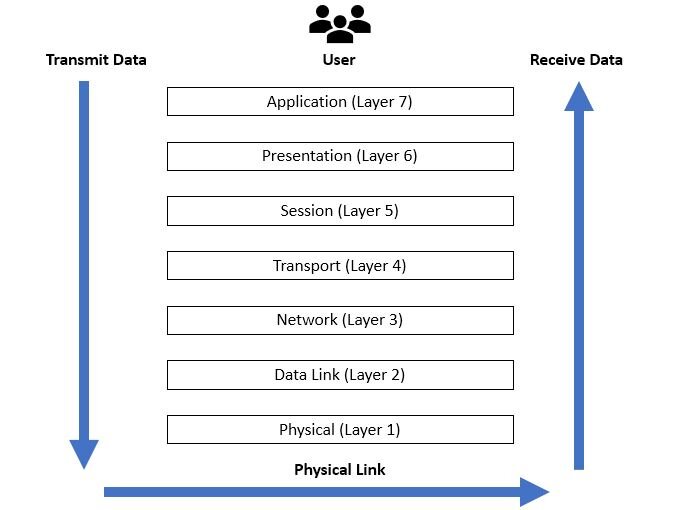
Here's a quick look at the layers, from top to bottom:
- 7. Application Layer: The one you see and interact with, like your web browser or email client.
- 6. Presentation Layer: Acts as a translator, making sure data is in a format the application can use.
- 5. Session Layer: Manages the conversation, opening and closing the communication channel between two devices.
- 4. Transport Layer: Ensures your data gets delivered reliably and in the right order.
- 3. Network Layer: The network's traffic cop. It figures out the best path for data to travel across the network.
- 2. Data Link Layer: Handles communication between devices on the same local network.
- 1. Physical Layer: The actual hardware—cables, Wi-Fi signals, and connectors that transmit raw data as electrical or light signals.
A popular mnemonic to remember the layers is Please Do Not Throw Sausage Pizza Away (Physical, Data Link, Network, Transport, Session, Presentation, Application).
Why It Matters
The OSI model is a powerful tool for anyone working with networks. Its primary benefit is standardization. By breaking down communication into layers, it allows different technologies from different vendors to work together seamlessly. A network card from one company can function perfectly with a router from another, because they both follow the same underlying rules for their respective layers.
This separation of tasks is also invaluable for troubleshooting. If your internet isn't working, a network technician can use the OSI model as a checklist. Is the cable plugged in (Physical Layer)? Is the computer getting a valid address (Network Layer)? By isolating the problem to a specific layer, they can fix it much faster.
The OSI model isn’t just a theoretical framework; it’s a practical tool for understanding, troubleshooting, and securing modern networks.
Understanding this model provides a solid foundation for grasping how the internet and other networks function from the ground up.