The Evolution of Operating Systems
Introduction to Operating Systems
The Computer's Conductor
Think of an orchestra. You have violins, trumpets, drums, and a host of other instruments. Each is a powerful piece of hardware on its own, but without a conductor, all you get is noise. The conductor doesn't play an instrument, but coordinates everything to create beautiful music.
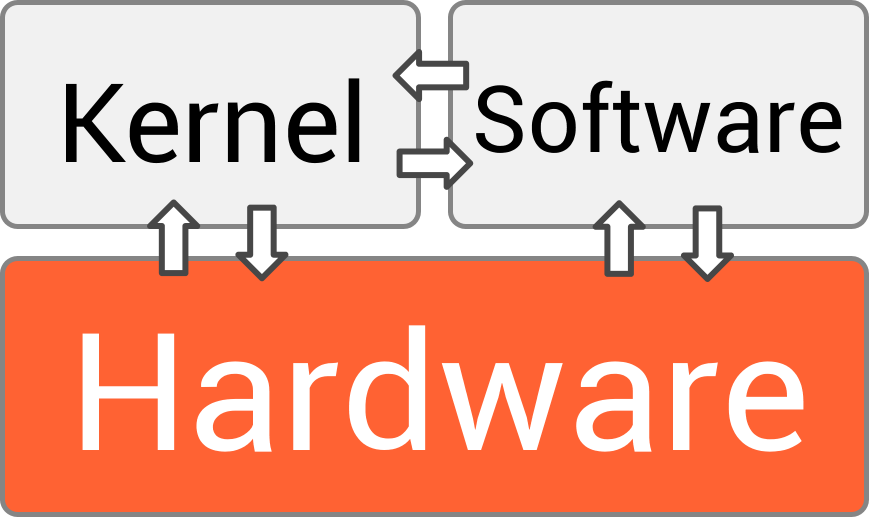
An operating system, or OS, is the conductor for your computer. It’s the essential software that manages all the other software and hardware. Without an OS, a computer is just a collection of silent, uncoordinated parts. It acts as the crucial intermediary, allowing your applications (the 'musicians') to work with the computer's hardware (the 'instruments') without needing to know the complex details of how each part functions.
Inside the Operating System
An operating system isn't one single program. It's a collection of components that work together. The three most important parts are the kernel, the user interface, and system libraries.
kernel
noun
The central component of an operating system that manages the operations of the computer and its hardware. It is the core that provides all the essential services for the system.
The kernel is the heart of the operating system. It has direct control over everything, managing the processor's time, the system's memory, and all the connected devices, from your keyboard to your hard drive. When you launch an application, the kernel is what allocates memory for it and gives it time on the CPU to run. It's the ultimate authority, ensuring every program gets the resources it needs and doesn't interfere with others.

Next is the user interface (UI), which is how you interact with the computer. For decades, the primary method was a Command-Line Interface (CLI), where users typed text commands to get the computer to do things. Today, most of us use a Graphical User Interface (GUI), filled with icons, windows, and menus that we click with a mouse. Both are powered by the OS, providing a way for you to give commands to the kernel.
Finally, there are system libraries. Think of these as toolkits for developers. They are collections of pre-written code that applications can use to perform common tasks, like opening a file, connecting to the internet, or drawing a button on the screen. Instead of writing code from scratch for these functions, a programmer can simply use the tools provided by the OS, saving time and ensuring consistency across different applications.
Styles of Operation
Not all operating systems work the same way. Their design often depends on the job they need to do. Over time, several distinct types have emerged.
Batch Systems: These were among the earliest types of OS. Users would prepare their jobs (programs and data) on punch cards and submit them to the computer operator. The OS would then run these jobs in a batch, one after another, without any direct interaction from the user. It was efficient for processing large amounts of data, like payroll or bank transactions, but not very interactive.
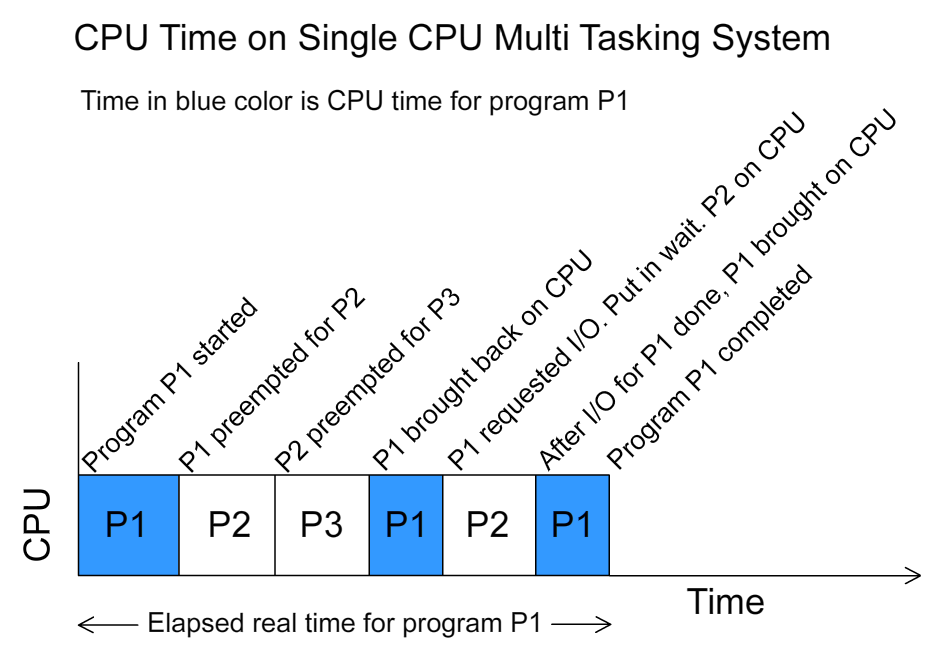
As computers became more powerful, time-sharing systems were developed. This type of OS allows multiple users to interact with the computer simultaneously. It does this by switching between different users' tasks so quickly that each person feels like they have the computer all to themselves. The OS allocates a tiny slice of CPU time to each user in rotation. This is the foundation of modern operating systems like Windows, macOS, and Linux.
Finally, there are real-time operating systems (RTOS). In these systems, the timing of operations is critical. They are designed to process data and events as they happen, with minimal delay. You'll find them in systems where a late response could be disastrous, such as in car engine control systems, medical devices, or industrial robots. For an RTOS, getting the correct result on time is just as important as getting the correct result at all.
Ready to check your understanding?
In the orchestra analogy, what role does the operating system play?
Which component of the OS is considered its 'heart' and has direct control over the system's memory and processor?
Understanding these basic concepts provides a foundation for seeing how computers manage complex tasks and interact with both users and hardware.