Terraform Fundamentals for Infrastructure as Code
Introduction to Infrastructure as Code
Code, Not Clicks
Imagine building a complex server setup by manually clicking through a web console. You select a server size, configure networking, set up a database, and repeat. Now, imagine doing that for ten environments. Or a hundred. It’s slow, tedious, and prone to human error. One wrong click and something breaks.
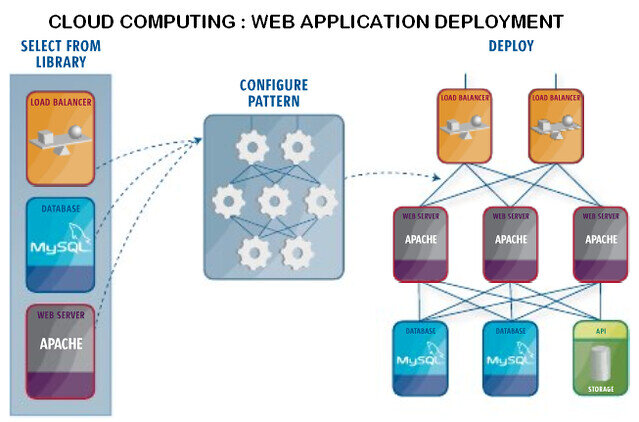
Infrastructure as Code (IaC) offers a better way. Instead of manual configuration, you define your entire infrastructure—servers, databases, networks, and all—in configuration files. It’s like having a blueprint for your data center that a machine can read and build automatically.
Infrastructure as Code (IaC) is the process of managing and provisioning infrastructure—including servers, network devices, and firewalls—through machine-readable configuration files rather than manual hardware configuration.
This approach treats infrastructure management just like software development. Your blueprints are stored in version control systems like Git, where they can be reviewed, shared, and versioned. This shift is fundamental to modern cloud computing, enabling teams to build and scale systems with unprecedented speed and reliability.
The Benefits of IaC
Adopting IaC isn't just about convenience; it brings powerful advantages to any team managing cloud resources.
Automation and Speed Once you write the code for your infrastructure, you can deploy it automatically in minutes. Need a new testing environment? Just run a command. This eliminates the bottlenecks caused by manual provisioning.
Consistency and Reliability Manual setups often lead to configuration drift, where environments that are supposed to be identical slowly diverge. IaC solves this by ensuring every deployment is based on the exact same blueprint. A testing environment built with IaC will be a perfect clone of your production environment, reducing surprises when you go live.
Scalability With your infrastructure defined as code, scaling becomes trivial. You can easily spin up hundreds of servers or tear them down when they're no longer needed, all by changing a few lines of code.
Version Control and Collaboration By storing your infrastructure code in a repository like Git, you gain a full history of every change. Who changed the firewall rules? When? Why? It’s all documented. This also allows for collaboration through pull requests, where team members can review and approve infrastructure changes before they are applied.
Tools of the Trade
Several tools exist to help you implement IaC, each with its own approach. They generally fall into two categories.
| Category | Examples | Description |
|---|---|---|
| Cloud-Specific | AWS CloudFormation, Azure Resource Manager (ARM) | Powerful tools built by cloud providers for their own platforms. They offer deep integration but lock you into a single ecosystem. |
| Cloud-Agnostic | Terraform, Ansible, Pulumi | Third-party tools that can manage resources across multiple cloud providers (AWS, Azure, GCP, etc.) using a single workflow. |
Cloud-specific tools are a great choice if you're fully committed to one provider. However, cloud-agnostic tools offer more flexibility, which is why many organizations gravitate toward them.
Introducing Terraform
Terraform, created by HashiCorp, is one of the most popular open-source IaC tools. Its key advantage is its cloud-agnostic nature. You can use the same tool and workflow to manage your infrastructure whether it lives on AWS, Google Cloud, Azure, or even on-premises.
Terraform uses a declarative approach. This means you describe the desired end state of your infrastructure in a configuration file, and Terraform figures out the steps needed to get there. You tell it what you want, not how to do it.
For example, you'd declare, "I need a web server and a database." You don't have to write the step-by-step instructions for creating them. Terraform handles that for you.
Terraform configurations are written in a human-readable language called HashiCorp Configuration Language (HCL). It's designed to be easy to write and understand. Here’s a simple glimpse of what it looks like:
# Designate the cloud provider
provider "aws" {
  region = "us-west-2"
}

# Define a resource - in this case, an AWS EC2 instance (a server)
resource "aws_instance" "web_server" {
  ami           = "ami-0c55b159cbfafe1f0" # An Amazon Machine Image
  instance_type = "t2.micro"             # The size of the server

  tags = {
    Name = "ExampleWebServer"
  }
}
This simple block of code tells Terraform to create a small server in the AWS us-west-2 region. By running a single command, Terraform will communicate with AWS and build this resource exactly as described.
What is the primary concept behind Infrastructure as Code (IaC)?
When separate environments (like testing and production) are supposed to be identical but slowly become different over time due to manual changes, this problem is known as:
Understanding Infrastructure as Code is the first step toward automating and streamlining how you manage cloud resources. It brings the best practices of software development—versioning, collaboration, and automation—to the world of infrastructure.