Teaching UI UX for Web Development Educators
User-Centered Design
Putting Students First
Have you ever tried to use a new app and felt completely lost? Maybe the buttons were in weird places, or the instructions were confusing. This is a failure of design. The same problem can happen in education. A confusing textbook or a poorly structured online course isn't just frustrating; it's a barrier to learning.
This is where user-centered design (UCD) comes in. It’s an approach that puts the needs and preferences of the user at the heart of the design process. In our case, the “user” is the student.
User-centered design (UCD) is a modern, widely practiced design philosophy rooted in the idea that users must take center-stage in the design of any computer system.
When teaching web development, applying UCD means we stop thinking only about what we want to teach and start focusing on how our students will best learn it. It's about creating a learning experience that is intuitive, engaging, and effective, rather than forcing students to adapt to a poorly designed curriculum.
Know Your Learner
The first step in UCD is to develop empathy for your learners. You can't design a great course without understanding who you're designing it for. Your students are not a monolith; they come with diverse backgrounds, different levels of prior knowledge, and unique goals.
A student who wants to become a professional front-end developer has different needs than a marketing professional who just wants to understand the basics of HTML to update a company blog.
To understand their needs and behaviors, you can use a few simple techniques:
Surveys: Before the course begins, send out a short survey asking about their experience level, what they hope to learn, and any anxieties they have about coding.
Interviews: Talk to a few potential or past students. Ask open-ended questions about their learning experiences. What has worked well for them in the past? What hasn't?
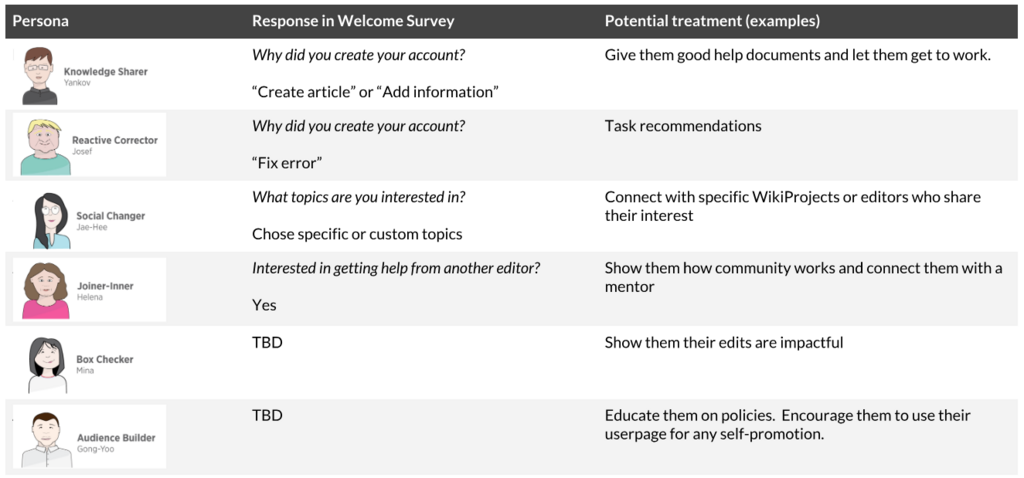
Personas: Create fictional student profiles based on your research. For example, you might create “Anna,” the complete beginner who is intimidated by code, or “Ben,” who has some experience but needs to fill gaps in his knowledge. Designing for these specific personas helps keep real student needs in focus.
Design Your Course for Them
Once you have a clear picture of your students, you can apply UCD principles directly to your course design. This isn't about advanced UI techniques; it’s about clarity and thoughtful structure.
Consider the following:
-
Clear Learning Path: Is the journey from one topic to the next logical? A good course builds concepts brick by brick. For example, teach HTML structure before introducing CSS for styling. Don't jump into complex JavaScript frameworks before they've mastered the fundamentals.
-
Intuitive Navigation: If your course is online, can students easily find what they need? Are assignments, resources, and lessons clearly labeled and organized?
-
Engaging Materials: Instead of just text, use a mix of formats. Short videos, simple diagrams, and hands-on coding exercises cater to different learning styles and keep students engaged. A complex idea like the box model in CSS can be much easier to grasp with a simple visual.
By adopting a user-centered approach, you shift from being just a content expert to being a learning experience designer. This mindset is the foundation for creating web development courses that are not only informative but also empowering for students.
What is the primary focus of user-centered design (UCD) when applied to creating a web development course?
According to the principles of UCD, what is the essential first step before designing a course curriculum?