System Administration Fundamentals
Introduction to System Administration
What is System Administration?
System administration, often called "sysadmin," is the practice of managing and maintaining an organization's IT infrastructure. Think of a sysadmin as the caretaker of a company's digital world. They ensure that all the computer systems, networks, and servers are running smoothly, securely, and efficiently so everyone else can do their jobs without interruption.
Without system administration, a company's technology can quickly become chaotic. Software goes out of date, security risks emerge, and when something breaks, there’s no one to fix it. Sysadmins are the essential force that keeps the digital gears turning, from a small startup's single server to a multinational corporation's vast network of computers.
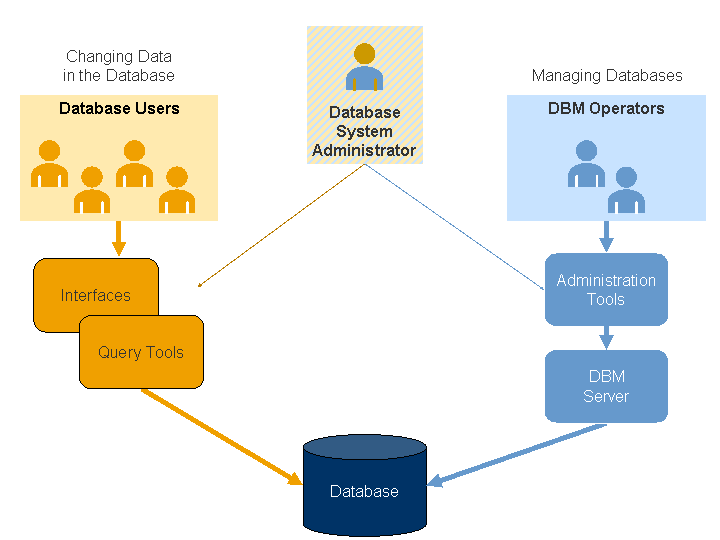
Core Responsibilities
A system administrator's job is incredibly varied, but their responsibilities generally fall into a few key areas.
User Management: This involves creating, modifying, and deleting user accounts. Sysadmins ensure people have access to the resources they need to work, and nothing more. This is crucial for security and organization.
Maintenance and Upgrades: Technology is always changing. Sysadmins are responsible for installing software, applying patches to fix vulnerabilities, and upgrading hardware to keep systems modern and efficient.
Security: Protecting the company's data is a top priority. This includes setting up firewalls, monitoring for suspicious activity, and educating users about security best practices.
Backup and Recovery: What happens if a server crashes or a critical file is deleted? Sysadmins implement and manage backup systems to prevent data loss and have a plan to restore everything quickly if disaster strikes.
Troubleshooting: When an employee can't log in or a key application stops working, the sysadmin is often the first person they call. A huge part of the job is diagnosing and solving technical problems.
Their responsibilities include: Troubleshooting system problems Help desk support Security administration Database backup schedules Manage and communicating maintenance schedules Managing interfaces to and from other systems Performing system upgrades Assist with training needs
A Sysadmin's Toolkit
To manage these responsibilities, system administrators rely on a variety of powerful tools. While the specific software varies, the types of tools are often consistent.
Many sysadmins work from the command-line interface (CLI), a text-based way to interact with a computer. It allows for precise control and the automation of tasks. Scripting languages like Bash, PowerShell, or Python are used to write small programs that can perform routine tasks automatically, like backing up files every night or checking the health of multiple servers at once.
#!/bin/bash
# A simple script to check disk usage and email an alert if it's too high.

SPACE_USAGE=$(df -h / | awk 'NR==2 {print $5}' | sed 's/%//')
THRESHOLD=90

if [ "$SPACE_USAGE" -gt "$THRESHOLD" ]; then
  echo "Warning: Disk space is critically low at $SPACE_USAGE%" | mail -s "Disk Space Alert" admin@example.com
fi
They also use graphical user interfaces (GUIs) for tasks that are more visual, like managing user accounts through a control panel. Finally, monitoring tools are essential. These applications keep an eye on the network and systems 24/7, alerting the sysadmin to potential problems, like a server that’s running too hot or a website that has gone down.
Common Tasks
The day-to-day work of a sysadmin is a mix of planned projects and unexpected challenges. On any given day, they might be onboarding a new employee, investigating a network slowdown, or planning a major system upgrade.
| Task Frequency | Example Activities |
|---|---|
| Daily | Check system logs for errors, respond to user support tickets, monitor system performance. |
| Weekly | Perform system backups, apply security patches, review security logs for suspicious activity. |
| Monthly | Generate reports on system uptime, plan for upcoming software or hardware upgrades, audit user accounts. |
| As Needed | Troubleshoot system outages, install new software, restore files from a backup, add new users. |
Ready to check your understanding?
What is the primary role of a system administrator?
A company's website suddenly goes offline. Which type of tool would be the first to alert a sysadmin to this problem?
This overview covers the fundamentals of what system administration is and what sysadmins do. They are the skilled professionals who build, secure, and maintain the IT infrastructure that powers our modern world.