Strategic Business Administration Mastery
AI Scheduling Optimization
Intelligent Calendar Management
Your calendar is more than a list of appointments. It's a strategic asset that dictates where your most valuable resource—your attention—is spent. Standard calendar management is reactive; you slot in meetings as they're requested, leaving your most important work to fight for the leftover scraps of time. AI scheduling tools flip this model on its head.
Instead of just recording meetings, tools like Reclaim.ai and Clockwise actively manage your time. They function as an intelligent layer on top of your existing calendar, automating the scheduling process based on your priorities, not just your availability. This transforms your schedule from a defensive tool that prevents double-bookings into a proactive one that carves out and protects time for deep work.
By leveraging AI to automate routine scheduling tasks, project managers can unlock significant benefits, including increased efficiency, improved decision-making, and enhanced team leadership.
The core idea is simple: tell the AI what's important, and it will find the best time to do it, even as your schedule shifts. This moves you from manually playing 'calendar Tetris' to defining your ideal workweek and letting the machine handle the logistics.
Automating Priorities and Habits
One of the most powerful features in AI schedulers is the ability to define 'Habits.' These are recurring tasks or routines that you want to accomplish but that have flexible timing. Unlike a rigid recurring meeting, a Habit is a commitment you make to a goal, and the AI finds the optimal time slot for it each week.
For example, you can create Habits for tasks like 'Review project pipeline,' 'Inbox cleanup,' or 'Workout.' You define the duration and how often it needs to happen, and the AI intelligently places it on your calendar. If an urgent meeting comes up and takes over that slot, the AI automatically finds a new home for your Habit, ensuring it still gets done without you having to manually reschedule. This makes your schedule resilient and adaptive.
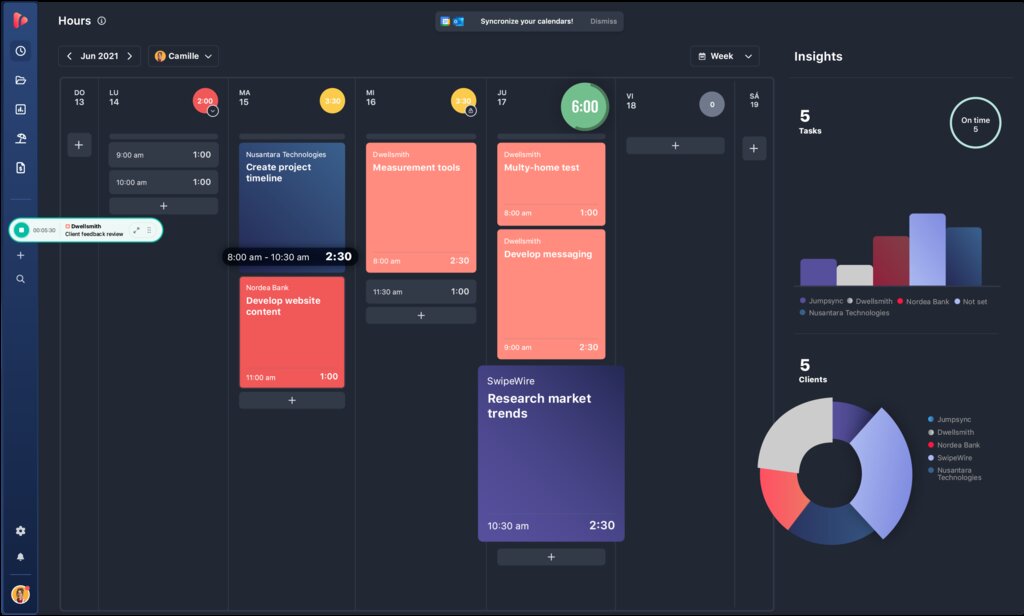
This goes beyond simple tasks. You can set priorities for different types of work. High-priority Habits (e.g., 'Prepare board presentation') will be defended more aggressively by the AI than low-priority ones (e.g., 'Read industry news'). The system understands the difference and shuffles your schedule accordingly, always optimizing for your most critical objectives.
Protecting Focus and Preventing Burnout
A common complaint among busy professionals is meeting fragmentation—a day filled with back-to-back meetings that leaves no time for concentrated work. This is where tools like Clockwise excel. They are designed specifically to combat this problem by creating and protecting blocks of 'Focus Time.'
Focus Time is an automatically scheduled block of two or more hours of uninterrupted time, free from meetings. Clockwise analyzes your team's calendars and rearranges flexible meetings to consolidate them, freeing up long stretches of time for everyone. It's like a smart defragmenter for your organization's schedule.
Buffer Time
noun
Small blocks of time automatically added before or after meetings to allow for preparation, travel, or mental decompression.
To prevent burnout from constant context switching, you can configure smart buffer times. An AI scheduler can automatically add 5 or 15 minutes between meetings. This ensures you have time to grab a coffee, review notes for your next call, or simply take a short break. Similarly, it can calculate and block out travel time automatically if it detects meetings in different physical locations, preventing impossible scheduling scenarios.
Seamless Coordination and Privacy
Coordinating meetings with multiple stakeholders is one of the most time-consuming administrative tasks. AI schedulers solve this by analyzing everyone's availability and preferences to propose the optimal time for all invitees, eliminating endless email chains or poll-based scheduling.
This is especially critical for executives who need to balance their professional and personal lives. AI tools allow for smart calendar syncing. You can sync your personal calendar (e.g., family events, appointments) with your work calendar. The AI will see these personal events as busy blocks and schedule work around them, but it will keep the details private. Your colleagues will only see that you are 'unavailable,' protecting your privacy while ensuring your true availability is accurately reflected.
Advanced settings allow you to configure these rules precisely. For instance, you can tell the AI to never schedule meetings on Fridays after 2 PM or to always leave lunch breaks free, automating the enforcement of your work-life boundaries.
Now's a good time to test your knowledge on what we've covered so far.
What is the primary shift in approach when moving from a standard calendar to an AI scheduling tool?
In an AI scheduling tool, what is a 'Habit'?
Let's review the key terms from this section.
By adopting these tools, you move beyond simple time management. You begin to architect your time, ensuring your calendar reflects and serves your highest priorities, all with minimal manual effort.