Statistical Analysis with R and Python
Introduction to R and Python
Setting Up Your R Environment
R is a programming language built specifically for statistical computing and graphics. It's a favorite among statisticians and data miners for its powerful tools. To get started, you'll need two things: R itself, which is the engine, and RStudio, which is an integrated development environment (IDE). Think of R as the car engine and RStudio as the dashboard, steering wheel, and pedals that make it much easier to drive.
You can download both for free. First, install R from the Comprehensive R Archive Network (CRAN). Then, install the RStudio Desktop (the free version is all you need). Once both are installed, you'll only need to open RStudio to start working.
R Fundamentals
Let's dive into the basic building blocks of R. Like in algebra, you can store values in variables using an assignment operator. In R, this is <-.
# Assign the value 10 to the variable 'x'
x <- 10

# Assign a string of text to 'greeting'
greeting <- "Hello, R!"

# Print the value of x
print(x)
The most basic data structure in R is a vector, which is a sequence of elements of the same type. You can create one using the c() function, which stands for "combine."
# A numeric vector
ages <- c(25, 30, 22, 45)

# A character vector
names <- c("Alice", "Bob", "Charlie", "David")
For statistical analysis, you'll almost always work with data frames. A data frame is a table, with rows and columns, much like a spreadsheet. Each column is a vector, and all columns must have the same length.
# Create a data frame from our vectors
people_df <- data.frame(Name = names, Age = ages)

# Display the data frame
print(people_df)
The real power of R comes from its packages, which are collections of functions and data sets. For data manipulation, dplyr is essential. For creating plots and graphs, ggplot2 is the standard. You can install them with a simple command.
# Install packages (only need to do this once)
install.packages("dplyr")
install.packages("ggplot2")

# Load packages for use in your current session
library(dplyr)
library(ggplot2)
Setting Up Your Python Environment
Next up is Python. Python is a general-purpose language known for its clear, readable syntax. Its versatility and powerful libraries have made it a top choice for data science.
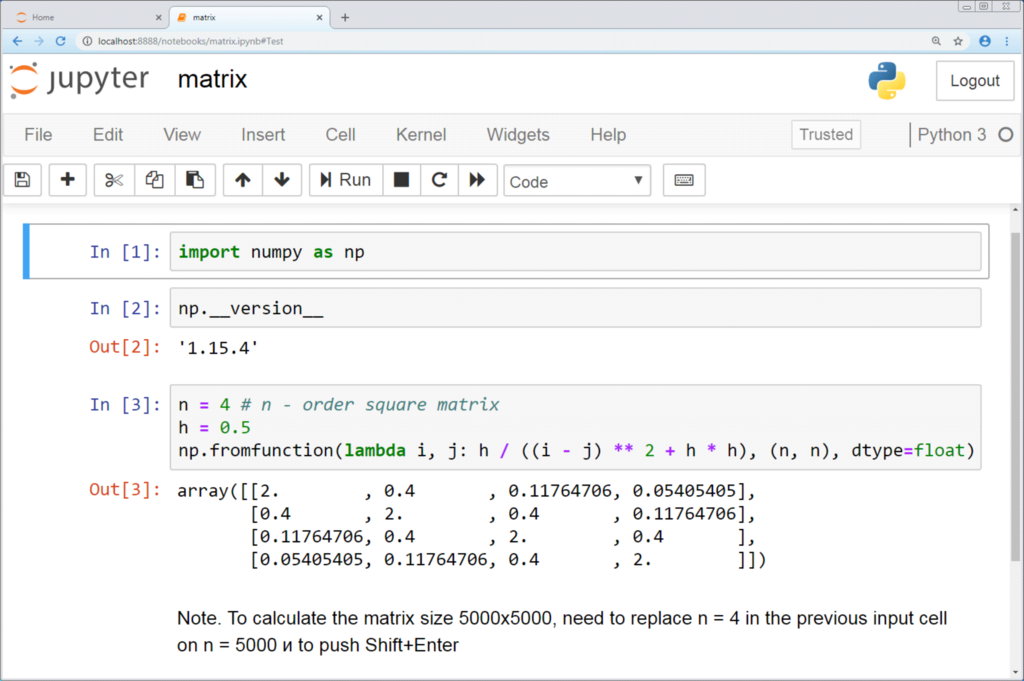
To start with Python for data analysis, the easiest route is to install the Anaconda Distribution. This package includes Python, a package manager, and a host of useful libraries. It also comes with Jupyter Notebook, an interactive, web-based tool that lets you write and run code, add text, and see your visualizations all in one place.
Python Fundamentals
Python's syntax is straightforward. You assign values to variables using the equals sign (=).
# Assign an integer to 'x'
x = 10

# Assign a string to 'greeting'
greeting = "Hello, Python!"

# Print the value of x
print(x)
A fundamental data structure in Python is the list. It's an ordered collection of items, and they can be of different types. Lists are created using square brackets [].
# A list of numbers
ages = [25, 30, 22, 45]

# A list of strings
names = ["Alice", "Bob", "Charlie", "David"]
Like R, Python has powerful libraries that are the workhorses of data analysis. The most important one is pandas, which provides the DataFrame object for handling tabular data. For plotting, matplotlib is the foundational library.
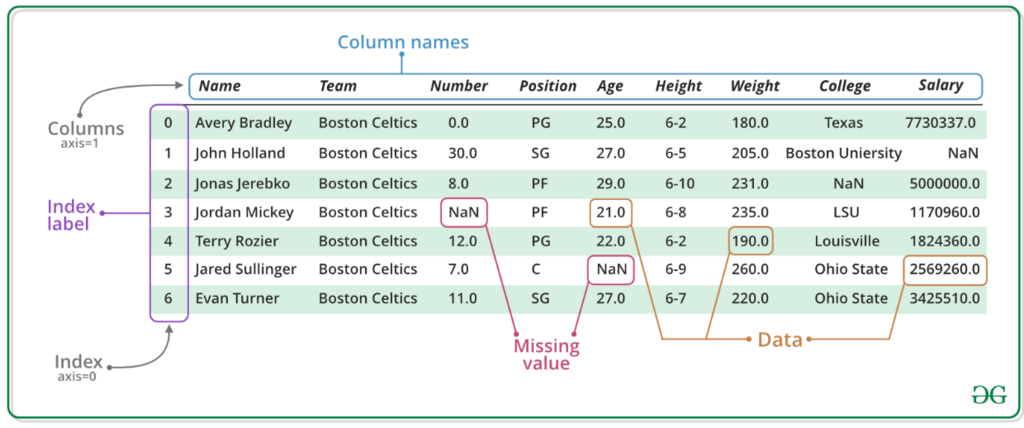
If you installed Anaconda, these libraries are already included. You just need to import them into your script or notebook to use their functions.
# Import libraries
import pandas as pd
import matplotlib.pyplot as plt

# Create a dictionary of our data
data = {'Name': names, 'Age': ages}

# Create a pandas DataFrame
people_df = pd.DataFrame(data)

# Display the DataFrame
print(people_df)
Now you have the basic setup for both R and Python. You've installed the necessary tools, learned the core syntax, and seen how to create the fundamental data structures for analysis in each language.
In the analogy provided, if R is the car engine, what is RStudio?
What is the recommended way to set up Python for data science, which bundles Python itself with key libraries and tools like Jupyter Notebook?