Start Your Coding Adventure
Giving Instructions
Telling Computers What to Do
Computers are amazing. They can help you play games, watch videos, and do homework. But here’s a secret: computers don’t actually know how to do anything on their own. They need instructions from us for every single thing they do.
Think of a computer like a super obedient puppy that can't think for itself. If you want it to fetch a ball, you can't just say "get the ball." You have to be very specific: "Stand up. Turn around. Walk five steps forward. Pick up the ball with your mouth. Walk back to me. Drop the ball."
Giving a computer these kinds of step-by-step instructions is called coding. The instructions themselves are called code.
A Recipe for Code
A set of instructions to complete a task is called an . That might sound like a big, scary word, but you use algorithms all the time. A recipe for baking cookies is an algorithm. The steps for brushing your teeth are an algorithm. It's just a list of things to do in the right order.
Order is super important. What would happen if you tried to make a peanut butter and jelly sandwich by following these steps?
- Put two slices of bread together.
- Spread peanut butter on the bread.
- Get the bread out of the bag. You’d end up with a sticky mess! The computer is the same way. If you give it instructions in the wrong order, your program won't work correctly. This idea of putting instructions in the correct order is called sequencing.
Sequencing means putting your code in the right order, from top to bottom, so the computer does things one step at a time.
Let's Meet Scratch
To start coding, we’re going to use a special tool called . Instead of typing out words, Scratch lets you build programs by snapping colorful blocks together, just like LEGOs. It’s a fun way to give instructions and see what happens right away.
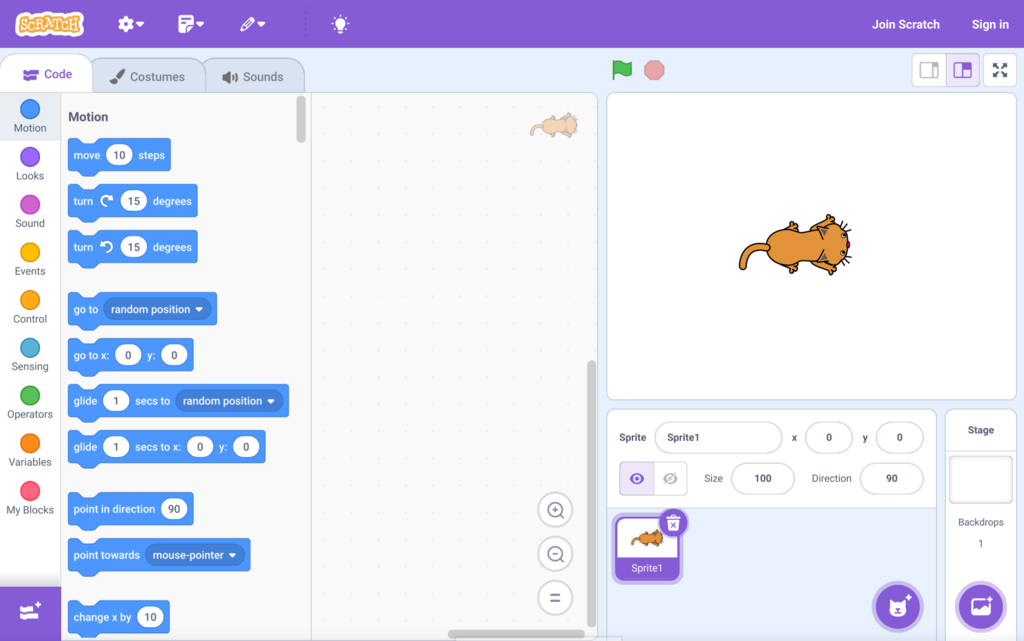
When you open Scratch, you'll see a few main areas:
- The Stage: This is the white box on the right where all the action happens. The cat you see is a character, called a sprite.
- The Block Palette: On the left, you'll find all the code blocks you can use. They are organized by color and what they do.
- The Script Area: This is the big empty space in the middle. You'll drag blocks here to build your code.
Making Things Happen
Every program needs a way to start. In Scratch, the most common way is with the when green flag clicked block. Think of it like a green "Go" button for your code.
Let's give our cat sprite some instructions. We can make it move and talk. Find the blue move 10 steps block in the Motion category. Then, find the purple say Hello! for 2 seconds block in the Looks category.
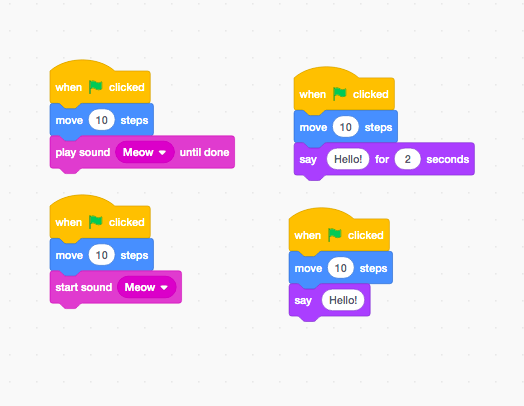
To build your program, you drag the blocks into the script area and snap them together under the green flag block. The computer will read your instructions from top to bottom.
First, it sees the move 10 steps block and moves the cat. After that, it sees the say Hello! block and makes a speech bubble appear. You've just written your first algorithm!
Try it yourself! You can change the numbers in the blocks. What happens if you change move 10 steps to move 100 steps? What if you change what the cat says? Coding is all about experimenting and seeing what you can create, one block at a time.
What is 'coding'?
A recipe for baking cookies is a good example of an...