SQL in a Day for Beginners
Introduction to Databases
What is a Database?
Think of a database as a highly organized digital filing cabinet. Its job is to store and manage information in a structured way, making it easy to find, update, and use that data whenever you need it. Without databases, the digital world would be a chaotic mess.
Almost every app or website you use relies on a database. When you browse products on an online store, the site pulls product names, prices, and images from a database. When you log into social media, your username and password are checked against records in a database. They are the invisible backbone of modern technology, ensuring data is kept safe, organized, and accessible.
Organizing Data with Tables
The most common type of database is a relational database. The name sounds complex, but the idea is simple. It organizes data into tables, which look a lot like spreadsheets. Each table stores information about a specific type of thing, like customers, products, or orders.
These tables are made up of three key components:
Tables: A collection of related data. For example, a
Customerstable would hold information only about customers.Columns: A vertical category of information in a table that describes a specific attribute. In a
Customerstable, you might have columns forCustomerID,FirstName, andRows: A single horizontal record in a table. Each row represents one item, like a single customer's complete information.
Here’s what a simple Customers table might look like:
| CustomerID | FirstName | LastName | |
|---|---|---|---|
| 1 | Maria | Garcia | maria.g@email.com |
| 2 | Chen | Wei | chen.wei@email.com |
| 3 | Fatima | Al-Fassi | f.alfassi@email.com |
In this example, the entire grid is the table. CustomerID, FirstName, LastName, and Email are the columns. Each person's entry is a row.
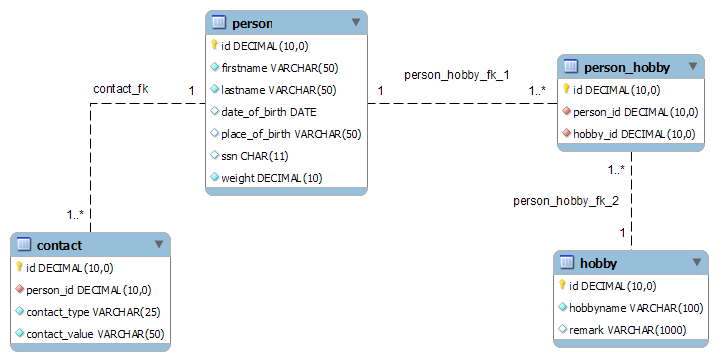
Relational databases get their power from connecting, or relating, these tables to each other. For example, you could have another table for Orders that links back to the Customers table using the CustomerID.
The Language of Databases
So how do we communicate with a database? We can't just ask it in plain English to find a user or add a new product. We need a specific language that the database understands. For relational databases, that language is SQL.
SQL
noun
Stands for Structured Query Language. It is the standard language for managing and manipulating data in relational databases.
SQL lets you perform all the essential tasks you need to manage data. You can think of it as a set of commands to tell the database exactly what to do.
With SQL, you can:
- Retrieve data: Ask the database to show you specific information.
- Insert data: Add new rows to a table.
- Update data: Modify existing rows.
- Delete data: Remove rows from a table.
Learning SQL is the key to unlocking the power of relational databases. It’s a fundamental skill for anyone working with data, from software developers to data analysts.
Time to check your understanding.
What is the primary function of a database?
In a relational database table, what is a 'row'?
Now you know what a database is, how relational databases organize information, and the role SQL plays in managing it all. You're ready to start learning the commands to put it into practice.