SQL Fundamentals
Introduction to SQL
The Language of Data
Imagine a massive library, filled with millions of books organized on countless shelves. If you wanted to find a specific piece of information, you wouldn't just wander around aimlessly. You'd go to the librarian and ask a clear, specific question. The librarian understands your request, finds the right book, and brings it to you.
In the world of data, a database is that library, and SQL is the language you use to speak to the librarian. SQL stands for Structured Query Language. It's the standard way to communicate with databases to store, manage, and retrieve information.
SQL (Structured Query Language) is a standard programming language used for managing and manipulating relational databases.
SQL is specifically designed for relational databases. A relational database organizes data into tables, which are a lot like spreadsheets. Each table consists of rows and columns. For example, a company might have one table for its customers and another for its orders. The power of a relational database is that these tables can be linked, or related, to each other. The Customers table could be linked to the Orders table using a unique customer ID, so you can easily see all the orders placed by a specific person.
A Brief History
The story of SQL begins in the early 1970s at IBM. Researchers Donald Chamberlin and Raymond Boyce developed it after learning about Edgar F. Codd's theoretical model for relational databases. Their goal was to create a simple, English-like language for managing the data in Codd's new system.
It was originally called SEQUEL, for Structured English Query Language, but was later shortened to SQL due to a trademark issue. In the late 1980s, the American National Standards Institute (ANSI) and the International Organization for Standardization (ISO) adopted SQL as a standard. This was a huge step. It meant that different database systems could all use the same core language, making it easier for people to learn and for programs to work with various databases.
Because it's a standard, learning SQL for one database system means you can use it for many others with only minor adjustments.
The Database's Operating System
SQL doesn't work in a vacuum. It's the language you use to interact with a Relational Database Management System, or RDBMS. An RDBMS is the software that actually stores, organizes, and manages the database. Think of it as the operating system for your data, while SQL provides the commands.
You've likely heard of some popular RDBMSs, even if you didn't know the term. MySQL, PostgreSQL, Microsoft SQL Server, and Oracle Database are all examples of powerful RDBMSs that use SQL as their primary language. They handle the complex, behind-the-scenes work of how data is physically stored on a disk, how it's retrieved efficiently, and how to keep it safe and consistent.
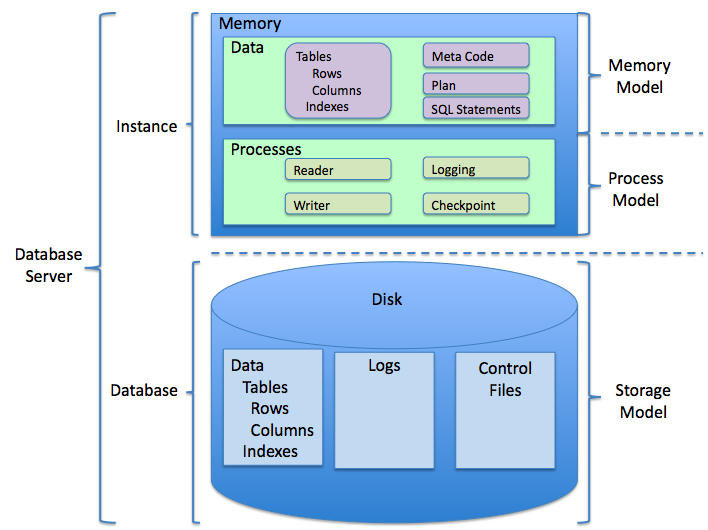
So when you write an SQL query, you're not talking directly to the data files. You're sending an instruction to the RDBMS. The RDBMS then interprets your SQL command and performs the requested action, whether it's fetching a customer's address, adding a new product to your inventory, or updating a user's password.
Now that you know what SQL is and the role it plays, let's review the key terms.
Ready to check your understanding?
What does SQL stand for?
SQL was developed at IBM after researchers learned about Edgar F. Codd's theoretical model for relational databases.
With a solid grasp of what SQL is and why it matters, you're ready to start learning how to use it. In the next section, we'll begin exploring the basic commands that allow you to retrieve data from a database.