SQL Fundamentals
Introduction to Databases
What Is a Database?
Think of a database as a digital filing cabinet. It’s a structured collection of information, organized so that it can be easily accessed, managed, and updated. The main purpose of a database is to handle large amounts of information by storing, retrieving, and managing data efficiently and securely.
Without databases, a business might track sales in a messy spreadsheet, or a hospital might keep patient records in thousands of separate paper files. A database brings all that related information into one place, creating a single source of truth that is reliable and easy to search.
Databases turn raw data into an organized, accessible resource.
The Relational Model
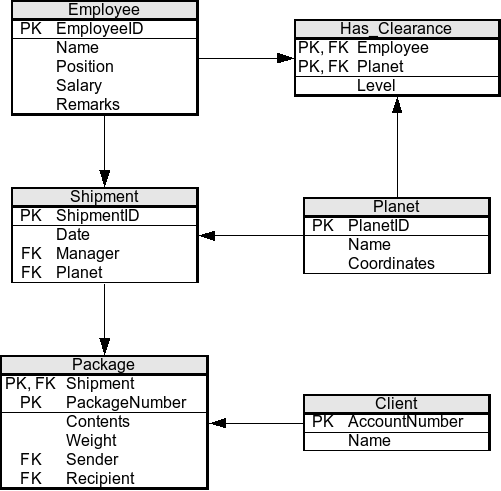
There are several types of databases, but the most common is the relational database. The idea is simple: data is stored in tables, which look a lot like spreadsheets. Each table holds information about a specific type of item, like 'Customers' or 'Products'. What makes this model powerful is that you can create relationships, or links, between these tables.
Imagine you have one table for customer information and another for their orders. Instead of duplicating the customer's name and address for every single order, you can simply link the two tables. This keeps your data clean, efficient, and less prone to errors.
Tables, Rows, and Columns
Let's break down the core components of a relational database.
Table
noun
A collection of related data held in a structured format within a database. It consists of columns and rows.
A table is sometimes called a relation. It's the main container for your data. For example, in a university database, you might have separate tables for Students, Courses, and Instructors.
Column
noun
A vertical set of data values of a particular type, one for each row of a table. It represents an attribute of the record.
Each column has a specific data type, such as text, number, or date. This ensures that all values in a column are of the same kind, which helps maintain data integrity.
Row
noun
A single, implicitly structured data item in a table. It represents a single record or entity.
A row is also known as a record or a tuple. It contains the specific values for each column. For instance, a row might contain '101', 'Alice', 'Smith', and 'Computer Science'.
| StudentID | FirstName | LastName | Major |
|---|---|---|---|
| 101 | Alice | Smith | Computer Science |
| 102 | Bob | Johnson | Biology |
| 103 | Charlie | Brown | History |
Connecting the Dots
Relationships between tables are formed using keys. Keys are special columns that help identify and link data.
A Primary Key is a column (or set of columns) that uniquely identifies each row in a table. The value in this column must be unique for every record and cannot be empty. In our
Studentstable,StudentIDis the perfect primary key because no two students will have the same ID.
Now, let's introduce a new table called Enrollments to track which student is in which course. It needs a way to refer to both students and courses.
A Foreign Key is a column in one table that refers to the primary key of another table. It's the glue that links tables together. In an
Enrollmentstable, we could have aStudentIDcolumn. This column would be a foreign key that points to theStudentIDprimary key in theStudentstable.
This link allows us to easily find all courses a specific student is enrolled in, without having to store the student's name in the Enrollments table. It's efficient and powerful.
The Database Manager
So we have this organized structure, but how do we interact with it? That's where a Database Management System (DBMS) comes in. A DBMS is the software that allows users to create, read, update, and delete data in a database. It acts as an intermediary between the user and the database.
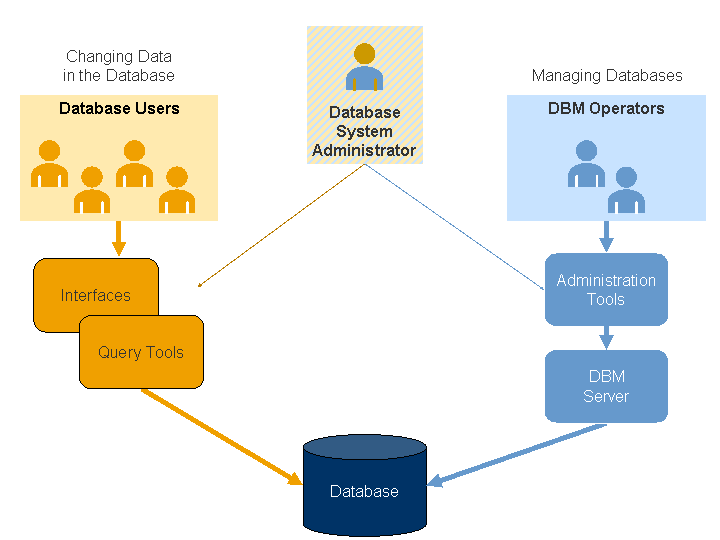
When you want to get information, you send a request to the DBMS. The DBMS then retrieves the data from the physical files and returns it to you. A Relational Database Management System (RDBMS) is a DBMS designed specifically for relational databases. Popular examples include MySQL, PostgreSQL, and Microsoft SQL Server.
Relational Model: The foundation of an RDBMS is based on the relational model, which organizes data into tables (relations) consisting of rows (tuples) and columns (attributes).
Understanding these core concepts—databases, tables, keys, and the role of a DBMS—provides the foundation you need before diving into the language used to communicate with them.
Ready to check your understanding?
What is the primary purpose of a database?
In a relational database, what is another name for a row in a table?
With these fundamentals in place, you're ready to learn how to actually interact with a database.