SQL Fundamentals
Introduction to Databases
What Is a Database?
Think about your phone's contact list. It's a collection of names, phone numbers, and maybe email addresses, all neatly organized. You can quickly search for a person, add a new contact, or update an existing one. In a nutshell, that's a database: an organized collection of data that's easy to access, manage, and update.
A database is a structured set of data held in a computer, especially one that is accessible in various ways.
But databases are much more powerful than a simple contact list. They are the backbone of almost every application you use, from social media and online banking to e-commerce and streaming services. They work behind the scenes to store massive amounts of information efficiently and make sure it’s available whenever it's needed.
Relational Databases
While there are several types of databases, the most common is the relational database. This type has been the industry standard for decades because of its simple, powerful, and intuitive structure. The key idea is that data is stored in tables, which are connected, or related, to one another.
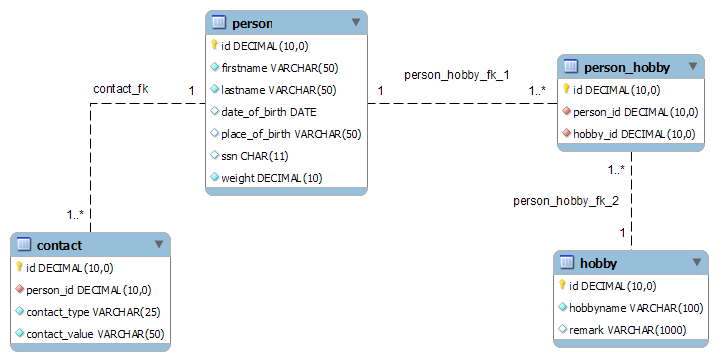
Imagine you run a small online bookstore. You need to keep track of your books, your customers, and the orders they place. In a relational database, you wouldn't cram all this information into one giant list. Instead, you'd create separate tables for each distinct thing.
You might have a
Bookstable, aCustomerstable, and anOrderstable. Each table only holds information relevant to its topic.
Let’s break down the basic components.
The Building Blocks
Every relational database is built from a few simple parts working together.
Table
noun
A collection of related data entries organized in rows and columns. Also known as a relation.
A table is the main component. If you've ever used a spreadsheet, a table will look familiar. Our Customers table, for instance, would have columns for things like CustomerID, FirstName, LastName, and Email.
Row
noun
A single entry or record in a table, representing a specific item. Also known as a tuple.
Each row in the Customers table represents one specific customer. So, one row might contain the information for Jane Doe, while another contains the info for John Smith.
Column
noun
A vertical entity in a table that contains all information of one specific type for all records. Also known as an attribute or field.
Each column represents a specific piece of information. The FirstName column, for example, would contain only the first names of all customers in the table.
| CustomerID | FirstName | LastName | |
|---|---|---|---|
| 1 | Jane | Doe | jane.doe@email.com |
| 2 | John | Smith | john.s@email.com |
| 3 | Emily | Jones | emily.j@another.com |
Managing the Data
So you have these tables full of data. How do you manage them? You use a special piece of software called a Relational Database Management System, or RDBMS.
An RDBMS is the program that lets you create, update, and administer a relational database. It's the engine that makes everything work.
Think of the RDBMS as a highly organized librarian. The books are your data, and the library is your database. The librarian (RDBMS) knows exactly where every book is stored, how to find it quickly, and how to keep the entire collection secure and in good order.
You interact with the RDBMS using a special language. In the upcoming sections, you'll learn about this language, called SQL (Structured Query Language), which is the standard way to communicate with nearly all relational databases.
Familiar examples of RDBMS software include MySQL, PostgreSQL, Microsoft SQL Server, and Oracle Database.
Ready to check your understanding of these core database concepts?
What is the primary function of a database?
In a relational database for a bookstore, all the information about a single, specific customer (e.g., Jane Doe, her ID, and email) would be stored in a single __________.
With these fundamentals in place, you're ready to explore how we actually talk to databases to get the information we need.